


A lot of teams hit the same wall at the same time. The product is working, customers are coming in, and then the application starts resisting every good idea the business wants to launch next. Personalization feels bolted on. Real-time updates lag. AI experiments live in side projects because the core system can't support them cleanly.
That's usually the point when leaders start looking for node.js application development services. Not because Node.js is trendy, but because they need an application layer that can move faster, scale sensibly, and integrate modern capabilities without turning every release into a negotiation between engineering, operations, and compliance.
Is Your Application Ready for the Future of Business?
If your current stack makes every change expensive, the problem usually isn't one feature. It's the foundation.
Legacy platforms often struggle in three places at once. They slow down product delivery, they make integration work messy, and they turn modernization into a chain of exceptions. Teams end up spending more time protecting the system than improving it.
Node.js changes that equation when it's used deliberately. It gives product teams a practical path to build or modernize applications around fast APIs, responsive user experiences, and cleaner service boundaries. It also fits how many businesses already work. Frontend and backend teams can share JavaScript across the stack, which reduces friction in handoffs and speeds up iteration. An IDC study found that Node.js boosts developer productivity by up to 68% and can accelerate development cycles by 30 to 50% compared to traditional stacks, according to Electro IQ's summary of Node.js statistics.
What business leaders should look for
The strongest Node.js engagements usually start with a business question, not a framework debate:
- Can the application support growth without a rewrite?
- Can new capabilities ship without destabilizing core workflows?
- Can AI be integrated in a governed, maintainable way?
- Can the user experience stay fast under pressure?
Those questions matter more than whether a team prefers Express, NestJS, or a particular hosting provider.
For organizations planning a broader platform refresh, a useful companion read is this application modernization roadmap for business leaders. It's a good lens for deciding whether you need a rebuild, a phased migration, or a service-by-service upgrade.
Modernization works best when the application architecture, delivery model, and AI strategy are decided together. If those choices happen in isolation, the costs show up later.
Why AI changes the conversation
Now, the discussion gets more interesting. Businesses no longer just want a faster app. They want an app that can support recommendation engines, copilots, internal search, document workflows, anomaly detection, and other AI-driven features without creating operational chaos.
That requires more than API access to a model. It requires a runtime and architecture that can support prompt workflows, logging, parameter controls, and cost visibility as the application evolves. Node.js is often a strong fit for that future because it handles integration-heavy workloads well and plays nicely with modern cloud patterns.
Why Node.js Delivers Exceptional Speed and Scalability
Node.js is built for work that spends a lot of time waiting on something else. Database calls, API requests, file operations, event streams, and browser sessions all fit that profile.
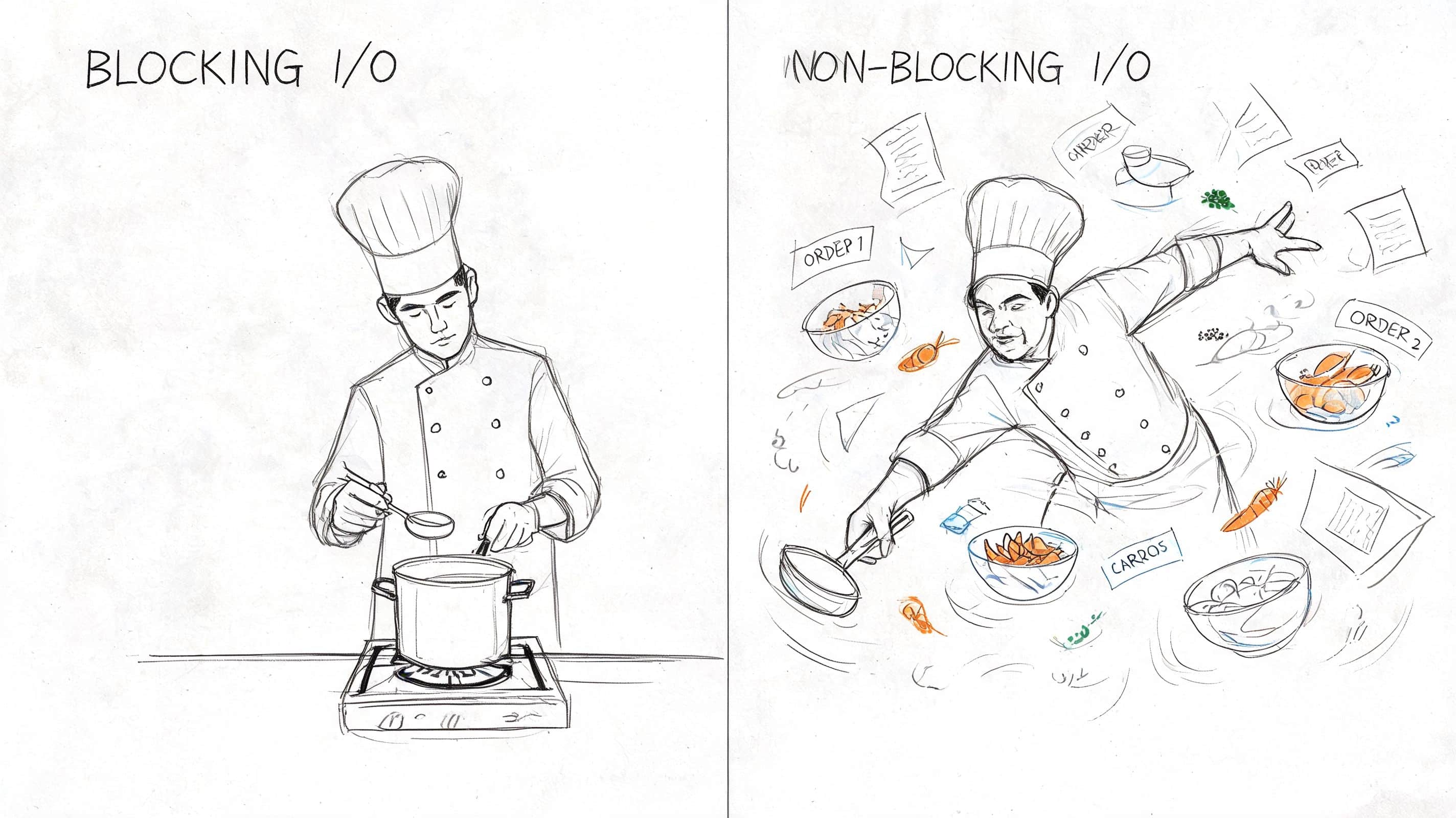
A simple way to explain it is kitchen flow. In a blocking system, the chef starts one dish and waits on each step before touching the next order. In Node.js, the chef starts one task, hands off the waiting part, and keeps the line moving. That's the value of its event-driven, non-blocking I/O model.
What that means in production
This architecture isn't just elegant. It changes how an application behaves under load.
According to Serdao's Node.js development services overview, a single Node.js server instance can handle over 1 million concurrent connections, and this model supports sub-50ms response times under high traffic. That matters when an ecommerce promotion lands, when a fintech workflow spikes, or when users expect real-time updates instead of refresh buttons.
A practical performance layer often includes more than runtime choice alone. Teams still need caching, sensible query design, queueing, and backpressure controls. This guide to Node.js caching strategies and patterns is useful if your current bottleneck is repeated reads rather than raw compute.
Where Node.js shines and where it doesn't
Node.js is particularly strong when your application needs to manage lots of simultaneous network activity:
| Workload type | Node.js fit | Why |
|---|---|---|
| Real-time notifications | Strong | Event-driven flow and persistent connections fit naturally |
| API aggregation | Strong | It handles many async calls efficiently |
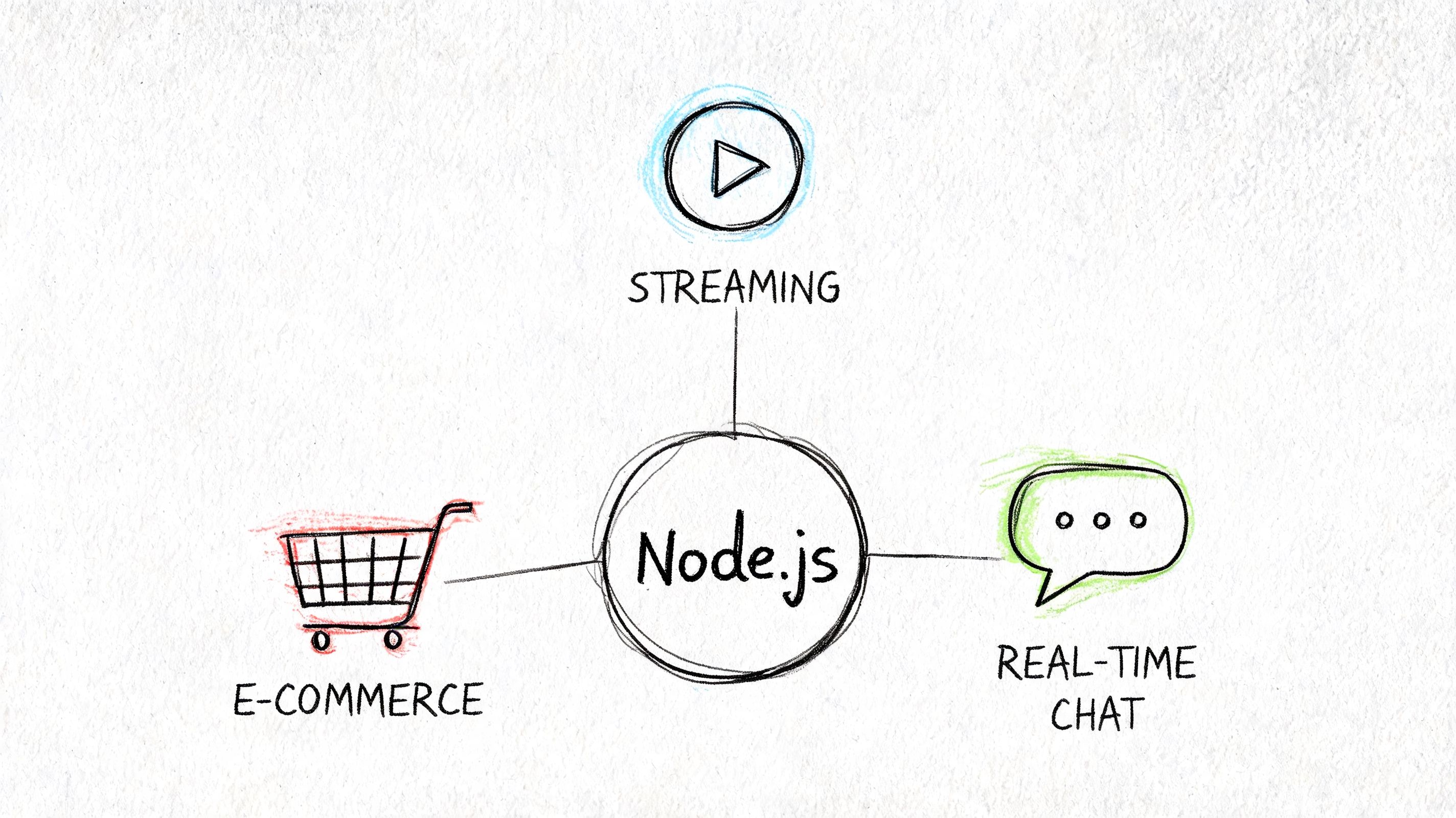
| Streaming and chat | Strong | Low-latency message handling is a natural use case |
| Heavy image or video processing | Mixed | CPU-intensive jobs often need worker threads or separate services |
| Complex analytics crunching | Mixed | Better when compute-heavy tasks are isolated from the main request path |
Practical rule: Use Node.js for coordination, orchestration, and high-concurrency request handling. Isolate CPU-heavy work instead of forcing the runtime to do everything.
That trade-off matters. Some teams hear “fast” and assume Node.js should power every workload in one codebase. That's where projects get sloppy. A well-run Node.js platform is usually part of a broader system, not a universal hammer.
The business outcome
When the architecture matches the workload, leaders usually see the same pattern. Releases get less risky. Traffic spikes become manageable. Product teams stop treating scale as a future emergency and start treating it as a design requirement.
That's the difference between an app that survives growth and one that keeps up with it.
Understanding Core Node.js Development Service Offerings
When a firm sells node.js application development services, the term can mean anything from “we'll build your API” to “we'll own your product delivery from architecture through support.” Business leaders need a clearer menu than that.
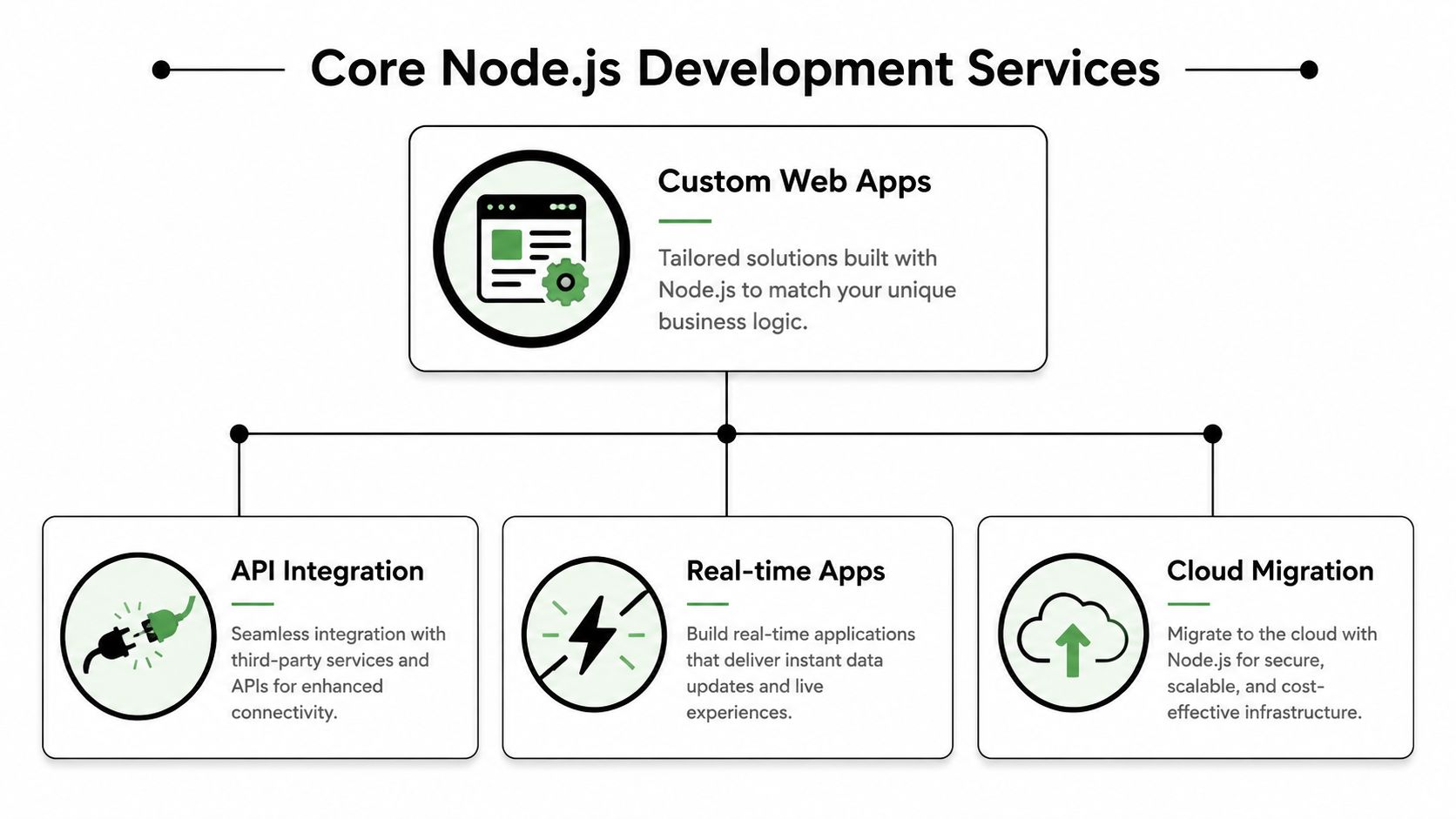
The service mix usually falls into a few core categories. The right combination depends on whether you're launching something new, replacing part of a legacy system, or extending a platform that already works but needs modern capabilities.
The common service lines
Here's what buyers are typically evaluating:
Custom web application development
This covers the business logic, admin tools, customer-facing workflows, account systems, and integrations that make the product yours rather than generic. It's the right fit when off-the-shelf software creates more workarounds than value.API development and integration
Many modernization efforts begin here. A Node.js team may build REST or GraphQL endpoints, connect payment tools, unify customer data, or create service layers between old systems and new interfaces.Real-time application features
Chat, live dashboards, notifications, collaborative editing, presence indicators, and streaming updates often sit comfortably in a Node.js stack because the runtime handles asynchronous communication well.Cloud migration and backend refactoring
This is less glamorous, but it's often where the payoff starts. Moving from a fragile, tightly coupled backend to container-friendly Node.js services can make deployments cleaner and troubleshooting more predictable.
What each engagement should include
The quality difference usually isn't in whether a vendor can write JavaScript. It's in whether they can shape the delivery around maintainability.
A mature engagement should cover:
Architecture decisions
Monolith, modular monolith, microservices, or hybrid. This choice affects every budget and timeline discussion that follows.Framework selection
Express is often fine for lean APIs. NestJS is useful when teams want stronger structure, dependency injection, and TypeScript-first patterns.Observability and support
Logging, alerting, runtime monitoring, and release discipline matter more than polished pitch decks.Security and compliance workflow
Especially in healthcare and fintech, secure secret handling, auditability, and access controls need to be part of the build, not retrofitted later.
Questions worth asking a vendor
A short list can reveal a lot:
- How do you separate real-time features from core transactional flows?
- How do you handle async failures and retries across integrations?
- When would you avoid microservices and keep a modular monolith instead?
- How do you structure Node.js projects so new developers can onboard without guesswork?
Good service partners don't just describe features. They explain where complexity belongs and where it doesn't.
That distinction saves money. Plenty of projects fail because the vendor delivered exactly what was asked for and none of what was needed.
Node.js in Action Industry Use Cases
Node.js becomes easier to evaluate when you stop thinking in abstractions and look at the kinds of business problems it's good at solving.
The strongest use cases usually share one trait. They need responsive systems that connect multiple services, process a lot of events, and keep users moving without visible delay.
Ecommerce and retail
In ecommerce, delay compounds fast. Inventory, pricing, search, recommendations, checkout rules, and fulfillment updates all have to work together in near real time.
A Node.js service layer works well when a retailer needs to unify storefront events with backend systems. That could mean pushing live inventory updates into the customer experience, orchestrating recommendation calls, or keeping cart and promotion logic in sync during traffic surges.
The technical benefit matters because the business consequence is direct. If the app feels responsive and current, customers keep moving. If it feels stale or hesitant, they don't.
Fintech and SaaS
Fintech teams usually care about throughput, traceability, and fault isolation more than novelty. Fast systems matter, but predictable systems matter more.
Node.js fits well in payment orchestration, account event pipelines, transaction notifications, customer dashboards, and internal tools that stitch together multiple services. The runtime is particularly useful when the application spends most of its time coordinating network calls, external services, and real-time state changes.
In fintech, the best Node.js work often happens behind the scenes. Clean service boundaries, dependable retries, and observable failure paths matter more than flashy frontend behavior.
SaaS products benefit in similar ways. Node.js can support account management, product telemetry ingestion, admin consoles, in-app messaging, and AI-connected workflows where many small requests need to move quickly.
Healthcare and wellness
Healthcare systems add a layer of discipline. Teams need strong identity handling, careful audit trails, and restrained data movement. The wrong architecture creates compliance risk long before anyone notices a user-facing bug.
Node.js can support patient portals, scheduling systems, telehealth workflows, and coordination layers between EHR-adjacent tools, mobile interfaces, and third-party services. The key is not to treat “HIPAA-compliant” as a hosting setting. It's an operating model that has to shape how services are split, logged, and governed.
Media, nonprofits, and public-facing platforms
Media products often need content APIs, streaming-related workflows, live updates, and account systems that tolerate heavy bursts of audience activity. Nonprofits and public sector teams often need modern service portals that work on older devices, integrate with multiple data sources, and remain manageable by lean internal teams.
In both cases, Node.js is often valuable because it helps small teams deliver responsive applications without carrying unnecessary platform weight.
Architecting for AI Modernization and Growth
A modern application shouldn't treat AI as a plugin floating off to the side. AI changes the architecture. It adds new request patterns, new governance needs, and new operating costs.
That's why architecture decisions matter early. If the team wants model-powered search, recommendation logic, assistants, document workflows, or anomaly detection, the application has to support orchestration, logging, and controls from the start.

Why microservices often fit AI-heavy products
Node.js works well in microservices environments because the runtime is lightweight and starts quickly. Startup House's Node.js agency overview notes a runtime footprint of about 50MB, a startup time of 2 seconds versus 10 seconds for Java Spring Boot, use at Netflix to handle over 200 million daily requests, and 40 to 60% faster deployments compared to monolithic systems.
Those characteristics matter when you split your system into focused services such as:
- A customer account service
- A recommendation orchestration service
- A document processing service
- An internal admin tool for prompt and model controls
- A compliance-aware audit service
This separation reduces blast radius. If an AI feature misbehaves, it shouldn't take down checkout, patient access, or payment reconciliation.
For leaders thinking through broader platform shifts, this complete cloud modernization guide from CloudCops GmbH is a useful companion. It helps frame the infrastructure and operating model questions that sit underneath application modernization.
Serverless is attractive, but governance decides success
Serverless Node.js is appealing because teams can scale event-driven workloads without owning every piece of server management. That can be a clean fit for AI-triggered actions, lightweight APIs, scheduled processing, and integration endpoints.
But serverless doesn't simplify everything. It can make system behavior harder to understand if prompts, model versions, and request parameters are scattered across functions, services, and teams.
Here's where projects usually break:
| Good pattern | Weak pattern |
|---|---|
| AI prompts are versioned and reviewed | Prompts live inside random code branches |
| Parameters are centrally managed | Secrets and model settings are duplicated across services |
| Logging captures model interactions | Debugging depends on manual screenshots and guesswork |
| Cost visibility is built into operations | Teams discover spend after rollout |
AI modernization fails quietly when teams can't answer three questions: which prompt ran, which model responded, and who approved the change.
The trade-off leaders should understand
Microservices and serverless give flexibility, but they also create coordination overhead. More services mean more deployment surfaces, more observability work, and more rules around data movement. That's manageable if the team has discipline. It's painful if the architecture grows faster than the operating model.
The right Node.js architecture gives businesses room to evolve. The wrong one creates a distributed version of the same old mess.
Finding the Right Partner Engagement Models and KPIs
Plenty of Node.js projects fail for a simple reason. The buyer chose a technology fit and ignored the delivery fit.
A strong partner doesn't just provide developers. They provide the right engagement model, enough architectural judgment, and a measurement plan tied to business outcomes. If those pieces are vague, the project will look busy while drifting off course.
Two common engagement models
Most buyers end up choosing between these:
| Model | Best fit | Watch out for |
|---|---|---|
| Managed project team | New product builds, major modernization, multi-role delivery | You need clear ownership, regular demos, and active scope management |
| Staff augmentation | Internal team already has leadership and delivery rhythm | Added engineers won't fix weak product direction or unclear architecture |
If your internal product and engineering leads are strong, staff augmentation can work well. If you need architecture, delivery management, QA, design, and execution all moving together, a managed team is usually the safer route.
This comparison of staff augmentation versus managed services is useful if you're weighing those trade-offs in practical terms.
KPIs that actually matter
Don't let the KPI discussion stop at “tickets completed” or “sprint velocity.” Those are delivery metrics, not business metrics.
Use a blend of platform and business indicators:
- Reliability measures such as uptime, incident frequency, and recovery discipline
- Release health including deployment consistency and rollback frequency
- User-facing performance such as page responsiveness and API behavior during peak usage
- Business movement including conversion flow health, retention-sensitive features, and internal process efficiency
- AI governance readiness if the app will support model-driven workflows
A good partner will agree to measurable outcomes, but they won't pretend every outcome belongs solely to engineering. Marketing, operations, and product decisions affect the numbers too.
Questions that expose real capability
Ask direct questions in the sales process:
- Who owns architecture decisions during the engagement?
- How are risks surfaced when timeline pressure conflicts with technical quality?
- What does support look like after launch?
- How do you handle regulated data and audit needs?
- How do you keep Node.js projects maintainable as the team changes?
The best answers usually sound specific, a little boring, and very operational. That's a good sign. Delivery maturity often sounds less exciting than sales language, because it's built around habits rather than promises.
Your App's Future A Vendor Checklist and AI Toolkit
By the time you're selecting a Node.js partner, the decision shouldn't come down to who says “scalable” the most times in a proposal. It should come down to whether the team can build a system that stays usable, observable, and governable after launch.
A practical vendor checklist
Use this when evaluating providers of node.js application development services:
Architecture clarity
Can they explain when they'd use a modular monolith, microservices, or serverless Node.js, and why?Operational maturity
Do they include logging, alerting, release management, and post-launch support in the plan?AI readiness
Can they describe how prompts, models, parameters, and usage logs will be managed once AI features are in production?Compliance discipline
For healthcare and fintech, do they understand how access controls, audit trails, and data boundaries affect implementation?Framework judgment
Do they choose tools like Express or NestJS based on team needs and maintainability, not trend-chasing?Plain-language communication
Can they translate technical trade-offs into product and business consequences without hiding behind jargon?
The missing layer in many AI-enabled apps
Here's the problem many teams discover late. Integrating one model is manageable. Integrating several models across multiple workflows creates sprawl fast. Prompts get duplicated. Parameters drift. Logs are inconsistent. Cost visibility disappears until finance asks uncomfortable questions.
That's why AI operations need their own administrative layer. Gartner projects that 75% of fintech apps will use serverless Node.js by 2027, and that projection raises a practical issue: managing AI pipelines with prompt controls, versioning, and compliance becomes part of core application operations, as noted by Wonderment Apps.
A useful outside resource on the content side of this challenge is this guide to optimizing AI prompts for marketers. It focuses on prompt quality, which matters, but application teams also need governance around those prompts once they move from experimentation into production.
What the toolkit should do
One option is Wonderment Apps' prompt management system, an administrative layer designed to plug into existing applications. The practical value is straightforward:
- Prompt vault with versioning so teams can track prompt changes like real product assets
- Parameter manager to control how internal data and settings are passed into AI workflows
- Unified logging across integrated AI services for debugging and audit support
- Cost manager so business and engineering leaders can see cumulative AI spend instead of guessing
That combination matters because AI modernization isn't a one-time feature release. It becomes part of how the application runs.
If a vendor can build your Node.js platform but can't explain how AI behavior will be governed after deployment, keep asking questions. That gap gets expensive.
If you're evaluating a modernization roadmap, planning a new product, or trying to bring AI into an existing application without creating operational chaos, Wonderment Apps can help you assess the architecture, delivery model, and governance tooling you'll need. A demo is the fastest way to see how Node.js delivery and prompt management can work together in one practical system.