


To get the most out of artificial intelligence, you have to go beyond just plugging in an AI model. You need a smart administrative tool to manage it all. For developers and entrepreneurs looking to modernize their apps, the secret isn't just the AI itself—it's having a central system for prompt versioning, secure data access, detailed logging, and cost control. This is the toolkit that turns a cool AI feature into a scalable, reliable, and profitable part of your software. At Wonderment, we’ve developed a prompt management system designed for this exact purpose, and we invite you to see a demo to learn more.
Your Practical Guide to Integrating AI
Bringing AI into your custom software isn’t some far-off idea anymore; it's what you need to do to modernize your applications and keep up. But how to do it right is often misunderstood. It’s less about chasing the latest large language model and more about building a strong foundation for management and control.
Think of it like building a skyscraper—you wouldn't start with the penthouse suite. You'd pour deep, strong foundations first.
For AI in software, that foundation is a prompt management system. It acts as the central nervous system for your AI features, giving you the power to:
- Control Prompts: Create, test, and roll out prompts from a central vault that includes versioning. This makes updating or rolling back changes a breeze.
- Manage Security: Safely connect your AI prompts to internal databases through a parameter manager, all without ever exposing sensitive data.
- Monitor Everything: Keep a detailed log of every single AI interaction. This simplifies debugging and makes it easy to see how different models are performing.
- Track Costs: Get a crystal-clear view of your cumulative spending on AI services, so you can fine-tune for both performance and profitability.
This process is about setting clear goals, putting a management layer in place, and only then moving on to the technical integration.
The visual below breaks down this core three-step approach to a successful AI integration, from defining your goals to getting it implemented.
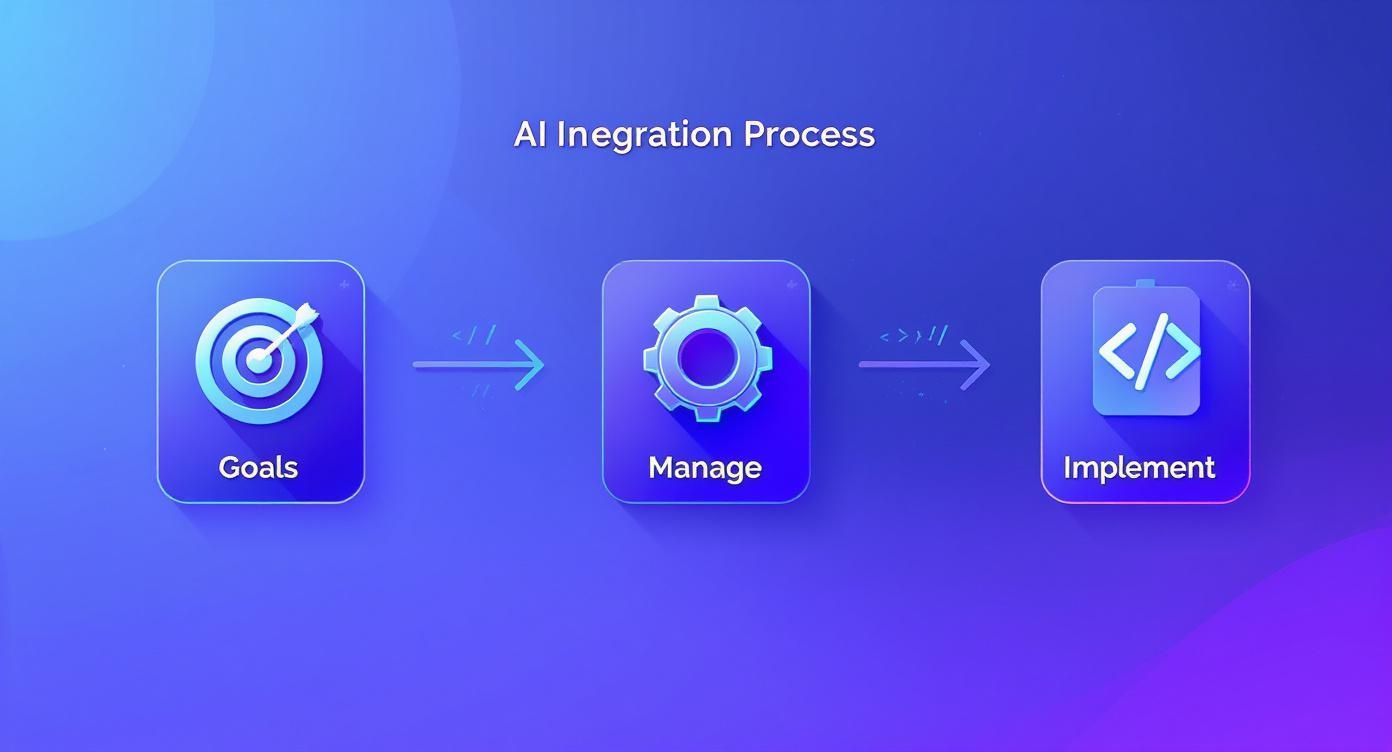
This workflow shows that managing the AI ecosystem isn’t an afterthought—it’s the critical, central step between your strategy and the code.
The Growing Importance of AI Modernization
The need to get this right is more urgent than ever, especially when you look at the market's explosive growth. The global AI market is expected to hit US $254.50 billion in 2025 and is projected to reach about US $1.68 trillion by 2031. That's fueled by a massive 36.89% annual growth rate.
Just look at generative AI alone—it’s set to jump from US $59.01 billion in 2025 to US $400 billion by 2031.
These numbers signal a huge shift in how software is built and maintained. To get AI right, you need a clear roadmap.
This article offers a comprehensive practical guide for implementing AI in business, walking you through a framework to make your software projects successful for years to come. You can also dive deeper into the future of AI in software development in our related post.
Key Pillars of a Successful AI Integration Strategy
To bring all these pieces together, it helps to think in terms of core pillars. Each one supports the next, creating a stable and effective AI system within your application. The table below outlines these essential components.
| Pillar | Core Function | Why It Matters for Your App |
|---|---|---|
| Strategy & Use-Case | Defining clear business goals and pinpointing high-impact AI applications. | Ensures your AI feature solves a real problem and delivers tangible value, not just tech for tech's sake. |
| Data Readiness | Preparing, cleaning, and securing the data needed to train or run your model. | High-quality data leads to accurate, reliable AI performance. Garbage in, garbage out. |
| Model Selection | Choosing between off-the-shelf APIs and building a custom AI model. | Balances cost, speed to market, and the need for a unique competitive advantage. |
| Integration & Prompts | Architecting the technical integration and managing prompt versions centrally. | Creates a scalable, maintainable system that allows for easy updates and performance tracking. |
| Security & Compliance | Implementing robust security protocols and ensuring adherence to privacy laws. | Protects user data, builds trust, and avoids costly legal and reputational damage. |
| Monitoring & ROI | Continuously testing performance, tracking costs, and measuring business impact. | Guarantees the AI feature is not only working correctly but also contributing positively to your bottom line. |
Focusing on these pillars will give you a repeatable framework for success, turning the complex process of AI integration into a manageable and strategic advantage.
Laying the Groundwork: Your AI Strategy and Use Case
Before a single line of code gets written, the first real step in bringing AI into your business is crafting a clear, purposeful strategy. Jumping straight into development without a solid plan is like setting sail without a map—you'll be busy, but you won't get anywhere meaningful. The goal here is to move past vague ideas like "improving support" and pinpoint tangible business problems that AI can solve in a measurable way.
This strategic alignment is non-negotiable. Without it, AI initiatives often become expensive science projects that fail to deliver any real return. The key is to connect every potential AI feature directly to a specific business key performance indicator (KPI).
From Vague Goals to Concrete Use Cases
Let’s get practical. Instead of simply aiming to "improve customer support," a much stronger approach is to map out an AI-powered chatbot that securely taps into your internal knowledge base. The goal? To provide instant, accurate answers to common customer questions. The KPI? Reducing support ticket volume by 30% within six months. Now that is a clear, measurable objective.
Here’s another example for a SaaS platform. A generic goal might be to "increase user engagement." A focused AI use case, on the other hand, would be to design a feature that analyzes user behavior patterns inside the application. This feature could then proactively suggest workflow optimizations, shortcuts, or underutilized tools, tied to a KPI of increasing daily active users by 15%.
These examples share a common thread: they solve a real-world problem and tie the solution directly to a business outcome. This is the foundation of any successful AI strategy.
Identifying High-Impact Opportunities
Finding these high-impact opportunities requires a bit of detective work. It involves looking at your business from a few different angles to make sure you're focusing resources where they'll matter most.
- Talk to Stakeholders: Get in a room with your department heads from sales, marketing, and operations. What are their biggest headaches? Where are the bottlenecks in their daily workflows?
- Analyze User Feedback: Dive into your support tickets, customer reviews, and survey results. What features are users constantly asking for? Where do they seem most frustrated with your software?
- Study Your Competitors: Look at how similar companies in your space are using AI. This isn't about copying them, but about understanding the competitive landscape and spotting opportunities to create your own unique, AI-driven advantage.
By gathering this intel, you can start to map potential AI solutions to real business needs, ensuring that every development effort has a clear purpose.
Your AI strategy shouldn't be about adopting technology for its own sake. It should be a direct response to your most pressing business challenges and growth opportunities, transforming AI from a buzzword into a powerful tool for achieving your goals.
Prioritizing Your AI Initiatives
Once you have a list of potential use cases, it's time to prioritize. You can't build everything at once, so you need a framework for deciding what to tackle first. A simple but effective method is to score each initiative against two key factors: business impact and implementation effort.
The highest-priority projects are those with high business impact and low implementation effort. These are your "quick wins" that can build momentum and demonstrate value early on.
This disciplined approach ensures you're not just chasing trends. The widespread move to adopt AI is undeniable; AI adoption has surged, with 78% of organizations now using it in some form. Generative AI, in particular, has jumped from 55% use in 2023 to 75% in 2024, showing a massive push toward implementation. You can explore more detailed AI statistics to see just how fast this area is growing.
By the end of this process, you should have a prioritized list of AI initiatives, each with a clear business case and a defined success metric. This strategic document becomes your guide as you move into the more technical phases of model selection and integration. To help inform your choices, you can also learn more about the four main types of AI in business.
2. Choosing the Right AI Model and Architecture
Once you’ve nailed down your strategy and know what you want to build, the next big question is how. When it comes to injecting AI into your product, you'll face a fundamental choice that impacts your timeline, budget, and competitive edge: do you tap into a powerful, pre-built model from a provider like OpenAI, or do you invest in building a custom model from the ground up?
This isn't just a technical fork in the road; it's a strategic one. There’s no universal "right" answer. The best path forward depends entirely on your specific use case, your team's skillset, and what you’re trying to achieve in the market.
Pre-Built Models vs. Custom Solutions
For many businesses dipping their toes into AI, the most logical starting point is an off-the-shelf model accessed via an API. Think of these as incredibly smart, general-purpose tools. They can handle a huge variety of tasks—from drafting emails to summarizing dense reports—with impressive skill right out of the box.
On the other end of the spectrum, you have the custom-trained model. This path involves building and training an AI on your own proprietary data. It’s a much heavier lift, no doubt, but the result is a unique, powerful asset that your competitors can't just go out and buy. It becomes your secret sauce.
To help you weigh the options, let's break down how these two approaches stack up against each other.
Comparison of AI Model Approaches
Deciding between an off-the-shelf API and a custom-built model is one of the most critical decisions you'll make. This table gives you a head-to-head comparison to clarify which route might be a better fit for your immediate and long-term goals.
| Factor | Off-the-Shelf Models (e.g., GPT-4 API) | Custom-Trained Models |
|---|---|---|
| Speed to Market | Very Fast. You can integrate a feature in days or weeks, not months or years. | Slow. Requires significant time for data collection, training, and validation. |
| Initial Cost | Low. Pay-as-you-go pricing means you avoid massive upfront investment. | High. Requires specialized talent, significant computing resources, and data infrastructure. |
| Control & Uniqueness | Limited. You are bound by the provider's capabilities and terms of service. | Total Control. The model is your proprietary IP, tailored exactly to your specific needs. |
| Data Privacy | A Consideration. You are sending data to a third party, requiring careful security measures. | Maximum Security. Data stays within your own environment, offering better privacy control. |
| Best For | General tasks like text generation, summarization, and customer service chatbots. | Niche, industry-specific tasks where deep domain knowledge provides a competitive edge. |
As you can see, the choice isn't always clear-cut. The best approach often depends on balancing short-term wins with long-term strategic advantages.
In many real-world scenarios, a hybrid strategy makes the most sense. You could use a pre-built model to quickly launch a broad feature, like a text summarizer in your app. At the same time, your team could be in the background developing a highly specialized custom model to analyze niche legal documents—a task a general model would likely fumble. This gets you to market fast while you build a competitive moat for the long haul.
Designing a Scalable Integration Architecture
Picking a model is just one piece of the puzzle. How you weave it into your existing software is just as important. Whether you're building for a desktop or mobile app, the end goal is a system that’s responsive, scalable, and doesn't create a clunky user experience.
A poorly designed integration can bring your app to a grinding halt, leaving the user staring at a frozen screen while it waits for the AI to respond. To sidestep this, it's crucial to handle AI requests asynchronously. This just means your app stays nimble and functional while the AI crunches away in the background, updating the interface only when the results are ready.
This is where a microservices approach really shines. By breaking out your AI functions into separate, independent services, you build a more resilient and scalable system. If one AI feature gets bogged down, it won't drag the rest of your application down with it. Each service can be updated and scaled on its own. If you're new to this concept, exploring some proven https://www.wondermentapps.com/blog/microservices-architecture-best-practices/ is a great place to start.
The real test of a good AI integration isn't just the intelligence of the model, but the elegance of its architecture. A seamless user experience depends on an architecture that can handle requests efficiently and scale gracefully as demand grows.
Ultimately, the right model and architecture should be a direct reflection of your business goals, striking a balance between today's need for speed and cost-efficiency with tomorrow's ambition for a unique, defensible position in the market.
Getting Prompts and Parameters Right
After you’ve picked a model and have a rough idea of the architecture, you get to the most hands-on part of the whole process: the interaction layer. This is where the real magic happens. The quality of what your AI produces is directly, almost brutally, tied to the quality of the instructions you feed it. Get this right, and you’ll unlock incredible capabilities; get it wrong, and chaos can take over fast.
Effective prompt engineering is definitely part art, part science. It’s all about crafting precise, context-rich instructions that guide the AI to give you consistent, accurate, and genuinely helpful results, every single time. A vague prompt gets you a generic, useless answer. A well-designed one, on the other hand, can feel like you’ve found a secret superpower.
But crafting that perfect prompt is only half the battle. What happens when you hardcode that prompt into ten different places across your mobile and desktop apps? A simple tweak to the wording becomes a developer’s nightmare, demanding a full code deployment just to change a sentence. That’s not just inefficient; it’s a recipe for disaster as you try to scale.
You Absolutely Need a Prompt Vault
To sidestep this mess, you need a centralized system for managing your prompts. Think of it as a prompt vault. This isn't just some fancy spreadsheet; it’s a dedicated admin tool that completely separates your prompts from your application's code.
A prompt vault with version control is the single most important tool for building a scalable and maintainable AI feature. It lets your team test, deploy, and, if needed, roll back changes to prompts instantly without ever touching the application's source code.
This approach turns prompt management from a risky development task into a safe, controlled operational process. You can experiment with new prompt variations, see how they perform in a staging environment, and push the best ones live with the click of a button.
Keep an Eye on Tokens and Costs
Beyond just managing the words, we have to talk about efficiency. Every single time your application sends a prompt to an AI model, you're paying for the tokens you send and the tokens you get back. A long, wordy prompt doesn’t just drive up your bill; it increases latency, making your app feel slow and clunky to the user.
Token management is the ongoing process of making your prompts as lean as possible while still giving the AI all the context it needs. This might look like:
- Using shorthand or codes that the AI understands.
- Structuring the prompt with clear headings or XML tags.
- Refining your instructions to cut out ambiguous or unnecessary words.
Every token you save is money back in your pocket and a millisecond saved for your user. This isn't a one-and-done task; it requires constant monitoring, which is another huge reason why a centralized management system is so critical.
Securely Hooking Prompts into Your Data
Many of the most powerful AI use cases involve connecting the model to your own internal data—think customer databases or private knowledge bases. You might want a customer service bot to look up a user's order history or a summarization tool to process a confidential internal report. This is where a secure parameter manager is non-negotiable.
This tool acts as a secure bridge. It lets your prompts use dynamic placeholders (parameters) that are safely filled with internal data at runtime. The parameter manager makes sure this connection is locked down and that no sensitive information is ever exposed directly in the prompt itself or logged where it shouldn't be.
For example, a prompt might look something like this: "Summarize the latest support ticket for {{user_id}} and identify the core issue." At the last possible moment, the parameter manager securely fetches the ticket data for that specific user and injects it before sending the complete package to the AI. This lets you build incredibly personalized and context-aware AI interactions without ever compromising on security—a true cornerstone of building AI responsibly.
Managing AI Security, Compliance, and Costs
When you bring AI into your business, you're doing more than just adding a cool new feature. You're plugging in a powerful component that touches your data, your users, and your budget. This immediately cracks open a whole new set of challenges around security, privacy, and cost management that you simply can't afford to ignore.
Without a solid plan, expenses can spiral out of control, and you could easily find yourself exposed to serious compliance risks.

The good news? All of these challenges are completely manageable, but only if you have the right strategy and tools from the get-go. It all comes down to treating security and cost control as top priorities in your AI integration process, not as afterthoughts.
Navigating Data Privacy and Security
Your users trust you with their data. That trust is everything. When you send any piece of information to a third-party AI model, you have to be absolutely certain it’s handled with the highest level of care. This is non-negotiable, especially with regulations like GDPR and CCPA, where a single misstep can lead to crippling fines.
A critical first step here is data anonymization. Before any user data ever leaves your system for an external AI service, it needs to be scrubbed clean of all personally identifiable information (PII). This means replacing names, email addresses, and any other sensitive details with generic placeholders.
Beyond privacy, you're also facing new types of security threats. Prompt injection, for instance, is a vulnerability where a malicious user can trick your AI into ignoring its original programming and executing their commands instead. A strong defense means sanitizing all user inputs and setting up strict guardrails around what the AI is and is not allowed to do.
When you integrate AI, you're not just a software provider anymore—you're a data steward. Your approach to security and compliance will directly impact your brand's reputation and your users' trust.
A core piece of this puzzle is establishing a robust framework for Artificial Intelligence Governance, which guides the ethical and secure rollout of these technologies.
Keeping AI Costs from Spiraling
AI is incredibly powerful, but it’s definitely not free. Every API call has a price tag, and without tight oversight, those costs can accumulate with shocking speed. A single complex query can be thousands of times more expensive than a simple one. If you aren't tracking your spend in real-time, you could be in for a rude awakening at the end of the month.
This is where a dedicated cost management system becomes essential. Simply glancing at your monthly invoice from your AI provider isn't enough. You need a granular, real-time view of your expenses across every model you're using.
Here are a few practical ways to keep your budget in check:
- Set API Rate Limits: Put hard caps on the number of requests your application can make in a given timeframe. This is your first line of defense against unexpected usage spikes.
- Choose Cost-Effective Models: Don't default to the most powerful (and expensive) model for every task. Use a cheaper, faster model for simple jobs and save the heavy hitters for truly complex reasoning.
- Monitor Token Usage: Keep a close watch on the number of tokens going into your prompts and coming out in the AI's responses. Small optimizations here can lead to massive savings over time.
The Power of an Integrated Logging Tool
This is exactly where a centralized logging and cost management tool becomes an entrepreneur’s best friend. Imagine having a single dashboard showing you precisely how much you're spending on each AI model, which features are driving the most cost, and how your expenses are trending day by day.
This unified view is a total game-changer. It empowers you to:
- Track Spending in Real-Time: See your cumulative spend across all AI providers as it happens, not a month after the fact.
- Identify Costly Queries: Pinpoint the specific prompts or features that are eating up a disproportionate amount of your budget.
- Make Informed Decisions: Use concrete data to decide when it's time to switch to a more cost-effective model or redesign a feature to be more efficient.
Without this level of visibility, you're flying blind. An integrated management system provides the financial guardrails you need to innovate responsibly and make sure every AI feature you build is a net positive for your bottom line.
The Power of a Centralized AI Management Tool
So, you're ready to integrate AI. It's easy to think it's just a simple API call, but that's where the real work begins. To actually succeed with AI, you need a robust administrative layer to manage every moving part—from prompts and parameters to security and costs.
Without this central control panel, you’re essentially flying blind.
This is where the Wonderment Apps prompt management system comes in. It's the toolkit every developer and entrepreneur needs. It gives you a plug-and-play solution to modernize any desktop or mobile application by consolidating all the critical functions needed to build scalable, reliable, and profitable AI features.
The Core Components of an AI Toolkit
Instead of trying to cobble together multiple, disconnected systems, our unified tool brings the whole AI integration lifecycle under one roof. It pulls together the absolute must-have components that solve the biggest headaches in AI development.
-
A Prompt Vault with Versioning: This is a lifesaver. It completely eliminates the nightmare of updating hardcoded prompts. You can test, deploy, and instantly roll back changes, making sure you never accidentally push a bad prompt to production.
-
A Secure Parameter Manager: Think of this as a secure bridge connecting your AI models to your internal databases. It lets you personalize interactions with real-time data without ever exposing sensitive information. A total game-changer for creating dynamic, context-aware experiences.
-
A Unified Logging System: Observability is everything. Our central log gives you a complete, bird's-eye view of every interaction across all your integrated AI models. This makes debugging and performance analysis incredibly straightforward.
-
A Real-Time Cost Manager: Never be surprised by an AI bill again. This tool gives entrepreneurs a clear, cumulative view of their spend across all services, helping them make smart decisions that balance performance and profitability.
A centralized management system transforms AI integration from a complex technical hurdle into a controlled, operational process. It provides the financial and technical oversight needed to turn a great idea into a sustainable business advantage.
Having this kind of administrative tool gives you the control you need to innovate with confidence. If you're looking to get your AI initiatives on the right track, seeing a system like this in action is the best next step.
We invite you to schedule a demo of our prompt management system to see how it can modernize your application.
Got Questions? We’ve Got Answers.
As business leaders start digging into what it takes to integrate AI into their software, a lot of the same questions tend to pop up. Here’s what we hear most often.
How Do I Choose the Right Developer for My AI Project?
You’re not just looking for a coder; you’re looking for a partner with deep experience in both software engineering and practical AI integration. They need to be fluent in API architecture, data security, and the subtle art of prompt engineering.
The real tell is whether they immediately start talking about AI management and scalability. A seasoned team won't just build a feature; they'll ask how you plan to manage it. Do they have tools for prompt versioning, cost tracking, and performance monitoring? That’s the sign of a mature, professional team that builds AI to last.
Can I Add AI to My Existing App Without a Full Rewrite?
Absolutely. In fact, this is how most companies get started and modernize their applications. The trick is to take a modular approach, connecting AI features through clean, well-defined APIs.
You can start small. Add an AI-powered search or a content summarizer without tearing apart your app's core logic. This gets even easier when you use an administrative tool that plugs into your existing software, giving you a central command center to manage every AI interaction.
The biggest mistake we see is companies treating AI as a purely technical problem instead of a strategic one. They get excited and jump right into implementation without a solid business case, a management plan, or any cost controls.
This is a recipe for inconsistent results, runaway operational costs, and an inability to scale. Getting the strategy and management tools right from the beginning is what separates successful projects from failed experiments.
How Do I Measure the ROI of an AI Feature?
Measuring your return on investment circles right back to the goals you set in your initial strategy. You have to connect every AI feature to a concrete business metric.
- For an AI support bot, are you seeing a reduction in support tickets? Are customer wait times dropping?
- For a recommendation engine, are you tracking the lift in user engagement, average order value, or total sales?
This is where a good AI management system with built-in cost tracking becomes indispensable. It lets you put the cost of running the AI feature side-by-side with the business value it’s creating. That’s how you get a crystal-clear picture of your ROI.
Ready to modernize your software with a scalable AI management framework? The team at Wonderment Apps can help you build and integrate a powerful administrative toolkit for prompt versioning, cost control, and more. Schedule a demo today to see how it works.