

Legacy system modernization isn't just a technical upgrade; it’s about swapping out old, inefficient software for modern, secure, and scalable solutions that can actually keep up with your business. The approaches can be as simple as moving to the cloud or as involved as a complete from-scratch rebuild, but the goal is always the same: better performance and the ability to grow. This is where modern tools, like an AI integration platform, can turn a daunting task into a serious competitive edge.
At Wonderment Apps, we've developed a prompt management system—an administrative tool that developers and entrepreneurs can plug into their existing apps to modernize them for AI integration. Throughout this guide, we'll show you how strategies like these can not only fix old problems but also unlock new opportunities for innovation.
Why Your Old Software Is a Hidden Business Anchor
Let’s be honest. That legacy system you keep patching up isn't just showing its age—it's a hidden anchor dragging your entire business down. It quietly eats up your budget, leaves you wide open to security threats, and completely blocks the kind of innovation your customers now expect. The old "if it ain't broke, don't fix it" mindset? In a market that rewards speed and agility, that’s a recipe for getting left behind.
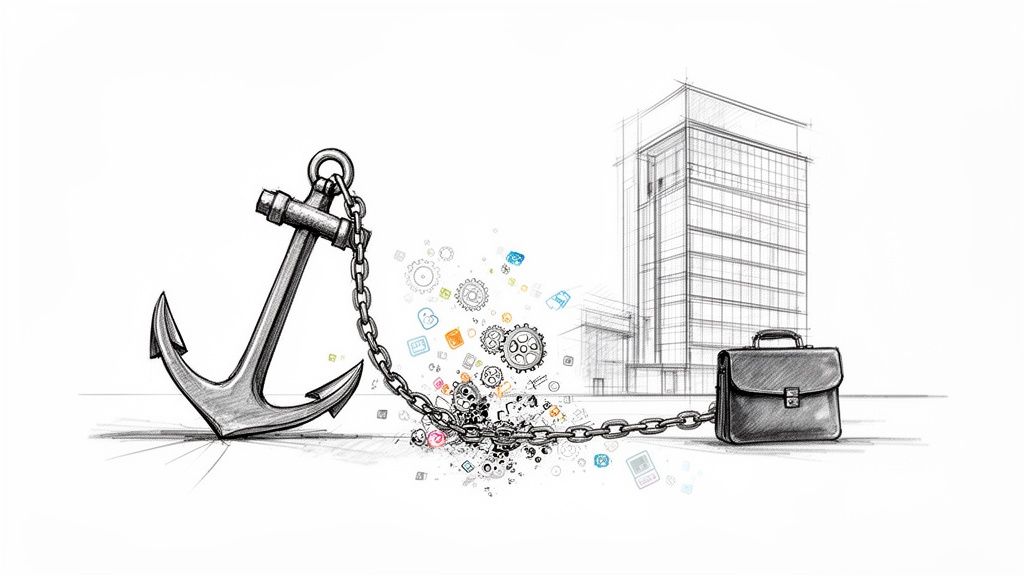
Many businesses get stuck looking only at the obvious maintenance fees and fail to see the real cost of keeping outdated tech around. The real damage is in the missed opportunities, the frustrated developers, and the sheer inability to adapt when the market shifts.
The Real Costs of Inaction
When you cling to legacy systems, you're creating a pile of problems that quietly suffocate progress. These issues usually start as minor operational friction before they snowball into full-blown crises.
- Skyrocketing Maintenance: A huge chunk of the IT budget gets poured into just keeping the lights on for old systems. That’s money that could be funding projects that actually grow the business.
- Security Vulnerabilities: Old software often lacks modern security features, making it a playground for cyberattacks. A single breach can lead to devastating financial and reputational damage.
- Talent Drain: Good developers want to work with modern tools, not wrestle with archaic code. Forcing them onto legacy systems is a great way to tank morale and lose your best people.
- Integration Headaches: Trying to connect old software to new tools and APIs is almost always a custom-coded nightmare. This prevents you from adopting new capabilities and makes every new integration a painful, expensive project. If your organization is stuck with brittle and slow data systems, it's worth exploring practical steps for modernizing legacy ETL pipelines.
The core problem with legacy systems isn't just that they're old; it's that they were built for a world that no longer exists. They cannot support the agility, intelligence, and customer-centricity required to compete today.
The Modernization Imperative
Despite the clear and present danger, a surprising number of companies are slow to act. A 2025 survey from Saritasa.com revealed that 62% of organizations still rely on legacy systems for their core operations. Of those, 43% pointed to security vulnerabilities as a top concern, while 48% said performance improvements were their main driver.
This shows a huge disconnect: businesses know there's a problem, but they get paralyzed by the perceived complexity of fixing it. Modernization, however, isn't just another IT project. It’s a strategic business decision to future-proof your entire operation.
This is where modern tools, like an AI integration platform, can turn a daunting task into a serious competitive edge. By introducing a central hub to manage your AI integrations, you can start unlocking capabilities that were completely out of reach before. This isn't just about replacing old code; it's about building a more intelligent, responsive, and resilient foundation for your business—one that sets you up for success for years to come.
Choosing Your Path With The 7 Core Modernization Strategies
Deciding to modernize a legacy system feels a lot like planning a major home renovation. You wouldn't use the same approach for a fresh coat of paint as you would for knocking down walls to create an open-concept living space. In the same way, legacy modernization isn’t a single action—it’s a whole spectrum of choices, each with its own price tag, risks, and potential payoff.
This is where the “7 Rs of modernization” framework comes into play. It’s a handy way to break down the different paths you can take, from simple migrations to complete, ground-up overhauls. Getting a handle on these core strategies is the first step toward building a realistic plan that lines up with your budget, timeline, and, most importantly, your business goals.
The Low-Effort Lifts: Rehost and Replatform
For many companies, the first big win is simply escaping the chains of on-premise hardware without having to rewrite the entire application. This is where the first two strategies shine, offering a faster, less disruptive route to the cloud.
-
Rehost (Lift and Shift): This is the most straightforward of all legacy system modernization strategies. Imagine picking up your application and moving it, completely as-is, from your server room into a cloud provider’s data center (like AWS or Azure). The code doesn't change one bit. This approach is quick and relatively cheap, making it a great fit for companies that need to get out of a data center fast or slash hardware maintenance bills. The catch? It doesn't fix any of the application's underlying architectural issues. You're just running the same old software in a new place.
-
Replatform (Lift and Reshape): This is a step up from a simple rehost. It involves making small tweaks to your application so it can take better advantage of its new cloud environment. For example, you might switch from a self-managed database to a managed cloud database service. This move cuts down on administrative headaches and can boost performance without needing a major code rewrite. Think of it like moving your furniture to a new house but also swapping out your old, inefficient fridge for a modern, energy-saving one.
The Middle Ground: Refactor and Rearchitect
Sometimes, just moving isn't enough. To really unlock new capabilities and become more agile, you've got to roll up your sleeves and get into the code. These mid-tier strategies involve more work but deliver far greater value in the long run.
Refactor is all about restructuring and optimizing the existing code without changing what it does on the outside. It's like decluttering and organizing a messy room. The main goal here is to clean up "technical debt," making the software easier to maintain, more efficient, and less buggy. It’s a critical step for improving performance and getting an application ready for future updates.
Rearchitect, on the other hand, is a much bigger change. This strategy means fundamentally altering the application's architecture to truly tap into cloud-native features.
A common goal here is shifting from a monolithic structure—where everything is tangled together in one big codebase—to a more flexible setup. For a deeper dive into this approach, our guide on microservices architecture best practices explains how breaking an application into smaller, independent services can dramatically improve scalability and development speed.
This approach is a significant investment, but it sets the stage for real innovation and makes it much easier to plug in advanced technologies like AI down the line.
The Major Overhauls: Rebuild and Replace
In some cases, the old system is just too outdated, too tangled, or too out of sync with what the business needs today. When the foundation is cracked beyond repair, it's time to think about a full-scale teardown.
-
Rebuild: This means rewriting the application from the ground up while keeping its original scope and specifications. You're essentially building a brand-new, modern version of the old system. This is often the only option when the original technology is obsolete, but the business function it performs is still absolutely critical.
-
Replace: This strategy involves tossing the old application entirely and switching to a different solution, usually a commercial off-the-shelf (SaaS) product. If a third-party tool can meet 80% or more of your business needs without the cost and hassle of custom development, replacing your legacy system can be the smartest and most efficient path forward.
The Final R: Retain
And finally, there's always the option to do nothing at all. Retain means making a conscious decision to keep a legacy application exactly as it is. This might sound counterintuitive in an article about modernization, but it can be the right call. If a system is stable, serves a specific niche need, and the cost of changing it would far outweigh any potential benefit, leaving it alone makes perfect sense. This article outlining top legacy system modernization strategies offers more detail on these various approaches. The key is to make this an active, informed choice, not just a passive result of putting off a decision.
Comparing The 7 Legacy Modernization Strategies
To help you visualize where each strategy fits, here's a high-level comparison. Think of this as a quick reference guide to match the right approach to your specific situation.
| Strategy | Description | Effort & Cost | Risk Level | Best For |
|---|---|---|---|---|
| Rehost | Move the application to the cloud with no code changes (Lift & Shift). | Low | Low | Quick data center exits; immediate cost savings on hardware. |
| Replatform | Make minor cloud-specific optimizations without changing the core architecture. | Low-to-Medium | Low | Gaining cloud benefits (e.g., managed services) with minimal code changes. |
| Refactor | Restructure existing code to improve maintainability and performance. | Medium | Medium | Reducing technical debt; preparing a stable app for future development. |
| Rearchitect | Fundamentally alter the application's architecture (e.g., monolith to microservices). | High | High | Unlocking scalability and agility; preparing for major innovation. |
| Rebuild | Rewrite the application from scratch with modern technology, keeping the original scope. | Very High | High | When the core function is critical but the technology is completely obsolete. |
| Replace | Discard the old application and switch to a third-party solution (e.g., SaaS). | Varies | Medium | When an off-the-shelf product can meet most business requirements. |
| Retain | Intentionally keep the legacy system as-is. | None | Low (in the short term) | Stable systems where the cost of change outweighs the benefits. |
Each of these "Rs" represents a valid strategic choice. The best one for you depends entirely on your business drivers, technical realities, and long-term vision.
How AI-Driven Modernization Creates New Value
True modernization today is about more than just moving your application to a new server or cleaning up old code. It’s about making your systems intelligent. This is where you can build a genuine, lasting competitive edge, turning what used to be a defensive IT cost into an offensive business strategy that drives real growth.
AI and machine learning need to be a cornerstone of your efforts, not a distant afterthought. By weaving intelligence directly into your modernized architecture, you unlock new streams of value that were flat-out impossible with your legacy setup. This shift in thinking is critical; it’s the difference between simply keeping the lights on and building a system that actively finds new ways to serve your customers and streamline your operations.
From Cost Center To Revenue Driver
Legacy systems are notorious cost sinks, but an AI-first approach completely flips that script. A modernized, intelligent system doesn't just cut maintenance costs; it actively generates revenue by creating smarter, more engaging user experiences.
Imagine using AI to power real-time product recommendations in an e-commerce app or to provide instant, personalized support through a generative AI chatbot. These aren't futuristic ideas—they are tangible applications that have a direct impact on your bottom line.
- Smarter Customer Support: Weave in generative AI to handle common customer queries instantly. This frees up your human agents to tackle the complex issues, cutting operational costs while boosting customer satisfaction with 24/7 availability.
- Predictive Operations: Use machine learning models to analyze operational data, predicting when equipment might fail or when inventory needs a top-up. This proactive approach minimizes downtime and prevents costly stockouts.
- Hyper-Personalization: Move beyond basic user profiles. AI can analyze behavior in real-time to deliver unique content, offers, and experiences to every single user, which is a massive boost for conversion and retention rates.
This decision tree helps visualize the key decision points—goals, scope, and risk—that guide a successful modernization journey from start to finish.
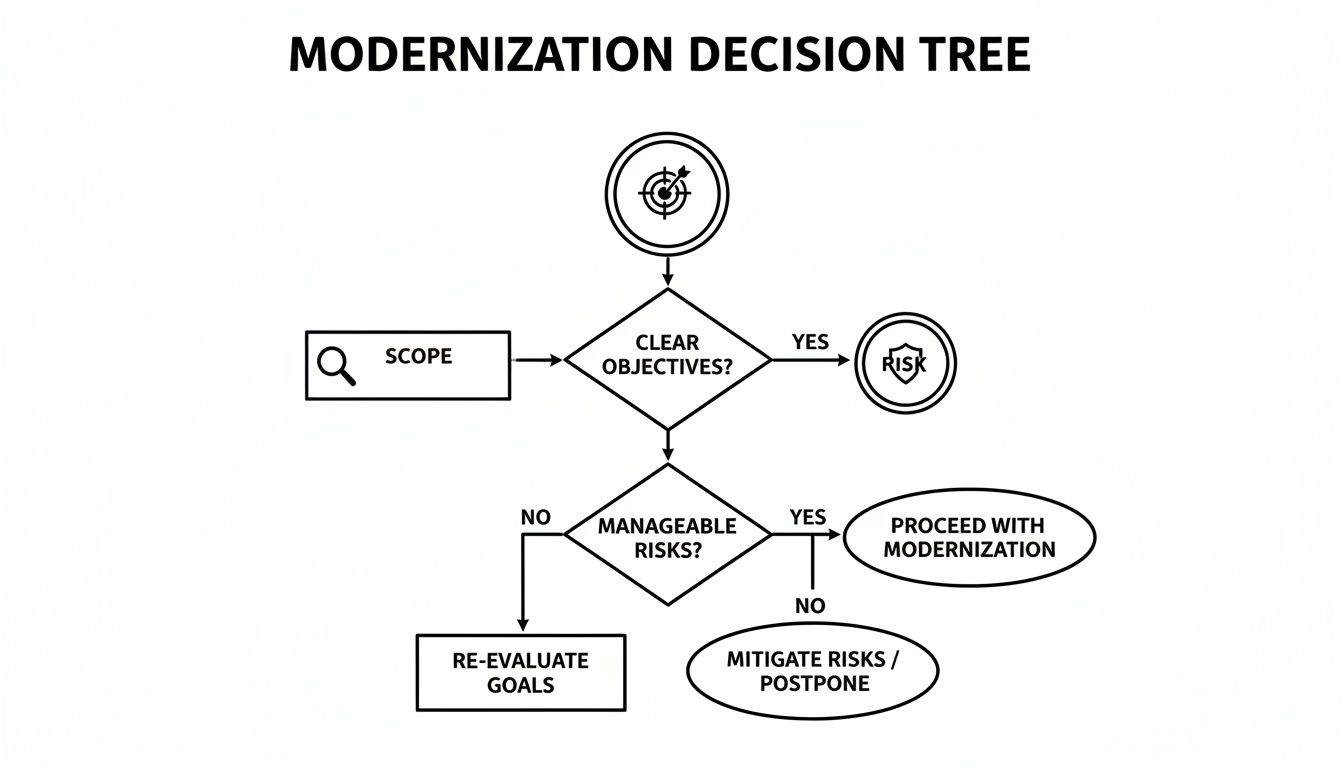
As the flowchart shows, getting a crystal-clear understanding of your business objectives is the essential first step, long before any technical work begins.
The Architectural Launchpad for AI
You can't just bolt advanced AI onto a rickety, monolithic legacy structure and expect good results. It doesn't work that way. A modernized architecture, particularly one based on microservices, creates the perfect launchpad for these advanced capabilities. By breaking down a huge application into smaller, independent services, you gain the flexibility to experiment with and deploy AI models where they’ll have the most impact.
This architectural shift is a game-changer. It lets you introduce an AI-powered feature to one part of your application without having to redeploy the entire system. You can learn more about how to leverage artificial intelligence in our detailed guide on the topic.
Modernization isn’t about chasing trends; it's about building a foundation that can adapt to whatever comes next. An AI-ready architecture ensures you're not just catching up to today's technology but are prepared for tomorrow's innovations.
Recent data backs up this strategic shift. In a 2025 survey of 1,000 business leaders, data management and predictive analytics were top motivators for modernization. Among the most data-forward companies, 54% cited future technology adoption—like AI and advanced analytics—as a primary driver for their investments.
On top of that, generative AI has been shown to deliver up to 40% productivity gains in software development, dramatically compressing modernization timelines from years to months. When you can move that fast, the business case for placing AI at the heart of your modernization strategy becomes impossible to ignore.
Building Your Modernization Roadmap Step By Step
A brilliant modernization strategy is just a nice idea without a clear, actionable plan to back it up. A roadmap is what turns your vision into a concrete project everyone can follow. It’s the blueprint that guides your team, manages expectations, and keeps everyone focused on the finish line. Without one, even the most promising projects can quickly lose direction and stall out.
Think of this step-by-step guide as your project’s GPS. It’s here to make sure you take the most efficient route to your destination, minimizing disruption and maximizing your chances of a huge win.
Phase 1: Assess Your Current Systems
Before you can plan your journey, you have to know exactly where you’re starting from. The first phase is a deep dive into your existing legacy systems. This isn’t just a technical audit; it’s about connecting the tech’s limitations to the real-world business problems they’re causing.
The goal here is to get past surface-level complaints like "the system is slow" and uncover the root causes and their true business impact.
- Identify Pain Points: Go talk to the people who use the system every single day—customer service reps, finance teams, operations managers. What frustrates them? Where are the bottlenecks that grind their work to a halt?
- Map Business Drivers: What is the business trying to accomplish that the current system is actively preventing? This could be anything from launching a new product line and entering a new market to simply improving customer response times.
- Conduct a Technical Audit: Now it’s time to get under the hood. Evaluate the system's architecture, codebase, security vulnerabilities, and integration capabilities. How much technical debt has piled up? Is the original programming language basically a museum piece?
This initial assessment gives you the hard data you need to build a compelling business case and define what a successful modernization project actually looks like.
Phase 2: Define Clear Objectives and KPIs
With a solid picture of your starting point, the next step is to define your destination. Vague goals like "improve efficiency" just won’t cut it. You need specific, measurable, achievable, relevant, and time-bound (SMART) objectives that tie directly back to the business drivers you uncovered in phase one.
For example, a generic goal is "make the system faster." A much stronger SMART objective is to "reduce customer data retrieval time from 15 seconds to under 2 seconds by Q3." See the difference?
Key Performance Indicators (KPIs) are the metrics you'll use to track progress toward these objectives. They transform abstract goals into hard numbers, making it easy to demonstrate ROI and keep stakeholders aligned.
Here are a few examples of strong KPIs for a modernization project:
- Decrease in server maintenance costs by 30% within six months.
- Reduction in critical security incidents by 90% post-migration.
- Increase in developer productivity, measured by a 50% faster feature deployment cycle.
Phase 3: Select the Right Strategy and Team
Armed with your assessment and crystal-clear objectives, you can finally choose the right modernization strategy from the "7 Rs" framework. If your main goal is to get out of an on-premise data center fast, a Rehost (lift-and-shift) strategy might be your best bet. But if you need to unlock new AI-driven features, a more involved Rearchitect or Rebuild approach will be necessary.
This is also the moment to assemble your A-team. You'll need a cross-functional group with technical experts, project managers, and key business stakeholders. You’ll have to decide whether to use an in-house team, bring in an experienced partner, or go with a hybrid model based on your internal skills, budget, and timeline.
An external partner can bring specialized expertise in complex areas like cloud migration and AI integration, which can seriously reduce project risk. For any organization making this move, understanding the nuances of developing in the cloud is a critical piece of the puzzle.
Phase 4: Plan a Phased Migration
Trying to modernize everything at once—what’s often called a "big bang" approach—is incredibly risky. It almost always leads to massive business disruption and headaches for everyone involved.
A much safer and more effective method is to plan the migration in manageable, incremental phases. This approach allows you to deliver value faster, get real feedback along the way, and adjust your plan as you learn. It’s about building momentum.
For instance, you could start by migrating a single, low-risk piece of the application. That initial success builds confidence and provides valuable lessons you can apply to the more complex parts of the system. This iterative process de-risks the entire project and ensures business keeps running smoothly throughout the transition.
Strong governance is key here. Set up regular check-ins and clear communication channels to keep the phased rollout on track and make sure everyone stays aligned on progress and goals.
The Toolkit for Seamless AI Integration
Weaving artificial intelligence into your newly modernized application shouldn't feel like a separate, painful project tacked on at the end. When you have the right tools, the whole process becomes manageable, scalable, and frankly, incredibly powerful. This is where a dedicated prompt management system comes in—think of it as the central command center for your app's newfound intelligence, turning complex AI operations into a simple workflow.
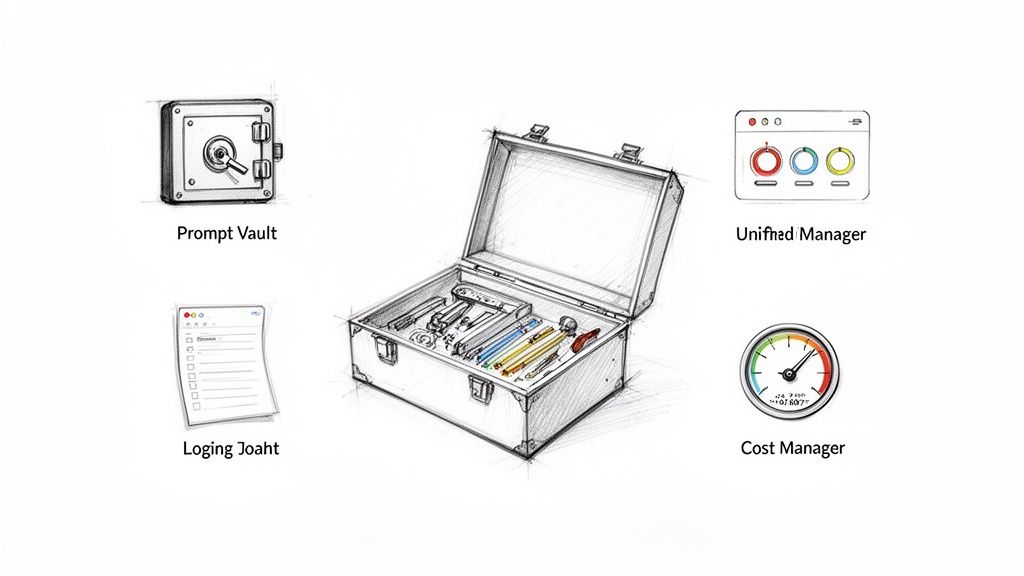
The Wonderment Apps administrative tool is built to simplify every part of AI integration. It gives developers and business leaders the essential controls they need to roll out AI features with confidence, making sure your move into an AI-powered future is both fast and secure. Our system includes a prompt vault with versioning, a parameter manager, a unified logging system, and a cost manager to keep your spend in check.
Centralize and Control with a Prompt Vault
Every generative AI feature lives and dies by its prompt—the specific instruction you give the AI model. If your prompts are inconsistent or poorly managed, you'll get unpredictable and often low-quality AI responses. That's a quick way to frustrate users.
A Prompt Vault completely solves this problem by giving you a single, secure place for all of your application's prompts. It's like a library where every prompt is carefully cataloged, tested, and version-controlled.
This centralized approach has some huge advantages:
- Versioning and Rollbacks: Your team can experiment with new prompt ideas, track how they change over time, and instantly roll back to an old version if a new one isn't working out.
- Consistency Across the App: It guarantees that the same user action gets the same quality of AI response every single time, creating a reliable and predictable experience.
- Enhanced Security: By keeping prompts locked down, you prevent unauthorized changes and protect the core logic of your AI features.
Connect AI to Your Data with a Parameter Manager
For an AI to be really useful, it needs access to your internal business data. But just opening up your database to an external AI model is a massive security and privacy risk. This is where a Parameter Manager is absolutely essential.
This tool works as a secure gateway, giving you pinpoint control over what data the AI can see and how it can use it. You can define specific parameters—like customerID or productSKU—that the AI can request. The manager then safely pulls only the needed information from your database, preventing the AI from ever getting direct, unrestricted access.
A Parameter Manager is the bridge connecting the raw power of large language models to the specific context of your business data—all without blowing a hole in your security. It’s what makes hyper-personalized responses based on a user’s purchase history or support tickets possible.
Monitor Everything with Unified Logging
When you're juggling multiple AI models or services, trying to track performance and fix problems can feel like detective work in the dark. A unified logging system brings all that scattered information into one clear, easy-to-read dashboard.
This tool captures every single interaction with every AI you've integrated. You get critical insights into performance, latency, and any errors that pop up. Your team can monitor the health of your AI features in real time, spot bottlenecks, and diagnose issues long before they affect your users. This kind of oversight is a must-have for keeping an AI-powered application running smoothly.
Eliminate Surprises with a Cost Manager
AI models are pay-per-use, usually charging you for every "token" they process. Without keeping a close eye on it, these costs can balloon and leave you with a shocking bill at the end of the month.
A Cost Manager gives you a real-time, transparent look at your cumulative AI spending. It tracks token usage across all your models and features so you can see exactly where your money is going. This visibility lets you set spending limits, optimize expensive prompts, and make smart decisions about your AI investments. No more financial surprises. For any business serious about implementing legacy system modernization strategies that involve AI, this level of control isn't optional.
Your Legacy Modernization Questions Answered
Starting a legacy modernization project opens up a can of worms. You'll have questions about everything, from simply identifying if you even have a legacy system to justifying the massive cost to your board. Getting through it requires clear, practical answers.
We've pulled together the most common questions we hear from business leaders to give you some straightforward advice for your strategy. This section is all about tackling the real-world concerns that pop up when you’re planning one of the most important initiatives a business can take on.
How Do I Know if My System Is a Legacy System?
A system isn’t “legacy” just because it's old. It’s legacy because it’s holding your business back. While age is certainly a factor, the real test is whether your technology can support growth and adapt to what the market—and your customers—demand today. If your software is the reason you can't launch new features or pivot when you need to, you've got a prime candidate for modernization.
Keep an eye out for these warning signs:
- Sky-High Maintenance Costs: Is a huge chunk of your IT budget just going toward keeping the lights on? That’s a major red flag.
- A Shrinking Talent Pool: If you’re struggling to find developers who know the system's ancient programming language, you're sitting on a massive operational risk.
- Integration Nightmares: When connecting to modern APIs and third-party tools feels like a painful, custom-built science project every time, you know you have a problem.
- Lagging Performance: Slow load times, constant glitches, and frequent crashes don't just frustrate your internal teams; they actively harm the user experience and can send customers running to your competitors.
The bottom line is simple: if your technology is a barrier to innovation instead of an engine for it, you're dealing with a legacy system.
What Is the Biggest Mistake Companies Make in Modernization?
The single biggest mistake we see, time and time again, is treating modernization as a purely technical exercise without tying it to concrete business goals. A project that’s only defined by IT metrics—like migrating servers or updating a code library—is almost guaranteed to fall short of expectations. Sure, lifting-and-shifting an old application to the cloud (Rehosting) might shave off some infrastructure costs, but it won’t magically make your business more agile or unlock new revenue streams.
The most successful legacy system modernization strategies are always driven by clear business outcomes. You should be able to state your goal in plain English, like "boost customer conversion by 15%" or "cut our time-to-market for new features in half."
Always, always start by defining why you're modernizing before you get lost in the technical weeds of how. This business-first mindset ensures the project delivers real, tangible value and gets the enthusiastic support it needs from every corner of the organization.
Should We Build an In-House Team or Hire a Partner?
This decision really boils down to balancing your internal expertise, the project's complexity, and your timeline. Each path has its pros and cons. An in-house team knows your business inside and out and gives you long-term control. But building that team can be painfully slow and expensive, especially when you need niche skills like cloud architecture or AI engineering.
Partnering with a specialist firm, on the other hand, can put the project on the fast track. An experienced partner brings proven methods, a deep bench of cross-functional experts, and a team that’s ready to hit the ground running, which dramatically lowers your risk. The right partner does more than just write code; they act as a strategic guide, helping you sidestep the common traps. A hybrid model, where a partner augments your existing team with specific skills, can also be a fantastic middle ground.
How Can I Justify the Cost of Modernization to Stakeholders?
To get buy-in, you have to frame the conversation around two things: the return on investment (ROI) and the crippling cost of doing nothing. A purely technical pitch just won’t land with your CFO or CEO. Instead, you need to build a clear financial model that hits on three core areas:
- Cost Reduction: Calculate the hard savings you’ll see from lower maintenance fees, reduced infrastructure spending, and getting rid of old hardware.
- Revenue Generation: Model the potential upside from launching new features, improving the user experience, and getting into new markets faster than your competition.
- Risk Mitigation: Put a number on the potential financial and brand damage from a major security breach, a catastrophic system failure, or fines for falling out of compliance.
When you present a clear, side-by-side comparison of the one-time investment against these ongoing gains and avoided disasters, you create a powerful, undeniable case for moving forward.
At Wonderment Apps, we specialize in turning aging legacy systems into intelligent, scalable, and secure applications. Our managed teams and AI integration toolkit can accelerate your modernization journey, transforming a hidden business anchor into a powerful engine for growth.
See how our prompt management system can modernize your app for AI. Schedule a demo with us today!