

Ten critical federal legacy systems collectively cost about $337 million annually to operate and maintain, according to the U.S. Government Accountability Office's review of systems identified in 2019. That's the right starting point for legacy app modernization: not which framework to adopt, but what it costs to keep essential software dependable.
Treat modernization as a financial-control problem with engineering consequences. Fund changes that reduce operational burden or improve business outcomes, and establish review points where leaders can stop work that isn't delivering value. A newer architecture isn't automatically a better investment.
What Legacy App Modernization Means and Why It Stalls
62% of surveyed U.S. organizations still used legacy systems in 2025, while 43% identified security vulnerabilities as a major concern, according to Saritasa's survey of 500 IT professionals. The problem isn't old code alone. It's software that becomes expensive or risky to change while the business still depends on it.
Legacy app modernization means changing an aging application so it remains secure, maintainable, and able to connect to new services. It doesn't necessarily mean rewriting it.
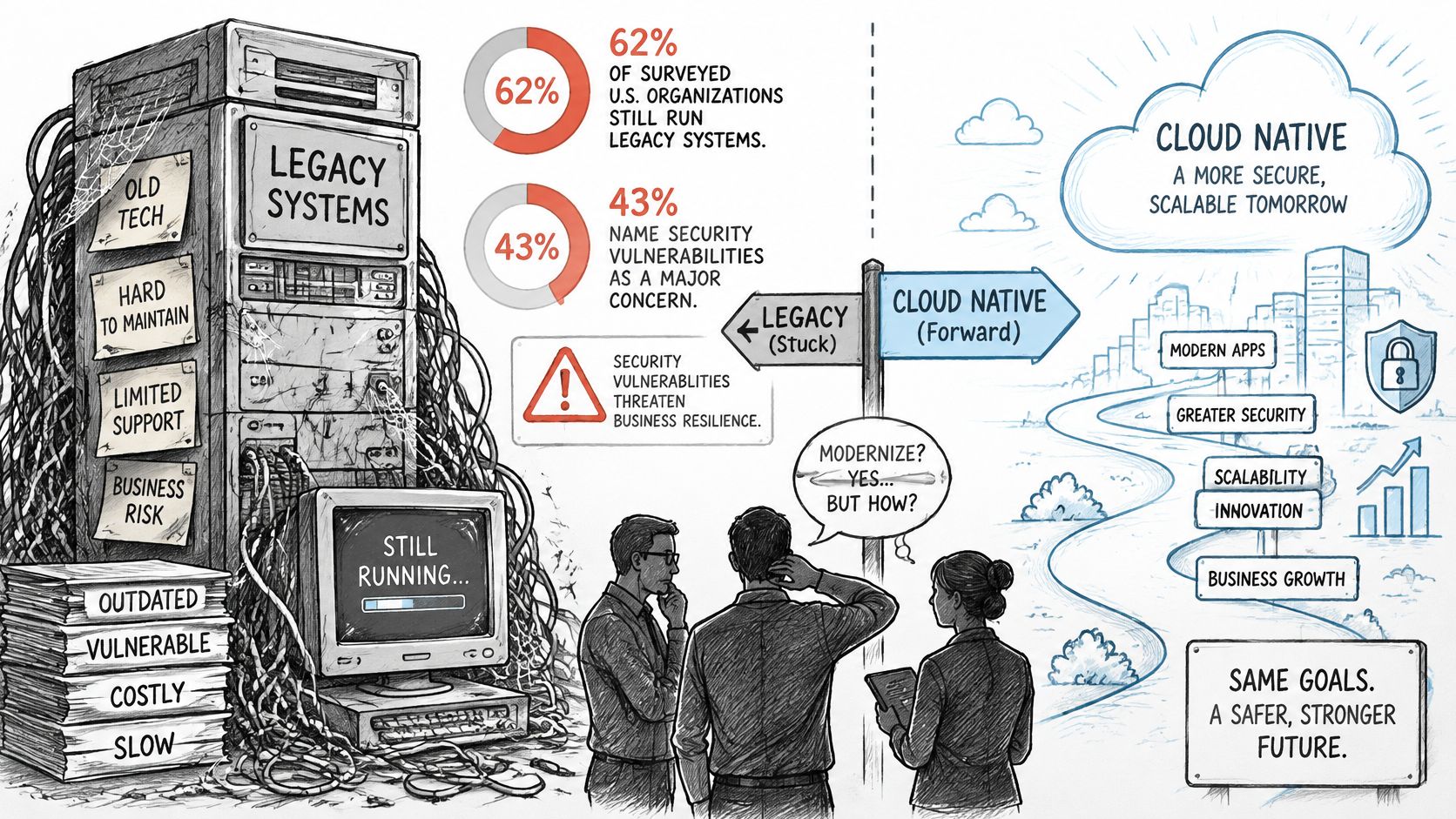
Think of a house with sound foundations and outdated wiring. You wouldn't demolish the kitchen because the upstairs sockets need replacing. You'd inspect the circuits, identify hazards, and decide which rooms can stay occupied during the work.
Say a retailer's checkout works reliably, but its merchandising team needs personalized recommendations. Rebuilding payments just to add recommendations would expose a dependable transaction flow to unnecessary risk.
Why teams get stuck
Maintenance consumes the available budget. Disconnected systems make releases harder to coordinate, while undocumented pricing, eligibility, or fulfillment rules turn seemingly small changes into detective work. Adding AI creates another difficulty: the application may have no safe way to expose data, evaluate generated outputs, or administer model changes.
Practical rule: Preserve working business behavior until you can demonstrate that its replacement is safer, cheaper to operate, or meaningfully better for users.
Wonderment Apps has developed a prompt management system, an administrative tool developers and entrepreneurs can plug into existing software to support AI integration. A focused demo near the end offers a way to examine those controls without committing to a wholesale rebuild.
The decisions that matter are concrete: which strategy fits each application, how to fund the work, which KPIs justify continued investment, how to move data safely, and whether the application is ready for AI.
Five Modernization Strategies Compared Side by Side
Modernization strategies at a glance
| Strategy | What Changes | Typical Effort | Best When | Main Risk |
|---|---|---|---|---|
| Rehost | Moves the application to new infrastructure with little or no code change | Low | A deadline is close and the application is stable | Carries existing technical debt into the new environment |
| Replatform | Keeps the code and moves it to managed databases, containers, or newer runtimes | Low to medium | Operating costs and maintenance overhead are the main pain | Hidden coupling breaks on the new platform |
| Refactor | Restructures internal code while preserving external behavior | Medium | Core business logic is valuable but the architecture blocks change | Long programs that stall without stage gates |
| Rewrite | Rebuilds the application from scratch on a current stack | High | Legacy logic is poorly documented and the platform is end-of-life | Feature-parity gaps and scope creep |
| Replace | Retires the application and adopts a commercial or SaaS product | Medium to high | An off-the-shelf product covers most required features | Loss of customization and vendor dependence |
Choose the intervention, not the fashion
Rehost when infrastructure is the immediate problem. Moving a stable application to cloud virtual machines before a hosting contract expires can buy breathing room. It won't untangle code or remove manual support work.
Replatform when managed services can remove operational chores. Moving an application's database to a managed offering may simplify backups and patching, but test extensions, authentication, connection handling, and query behavior before making the switch.
Refactor when valuable rules are trapped in tangled code. Extracting tax calculation from checkout can make both easier to test without changing customer-visible behavior. Don't equate refactoring with creating dozens of services; use our microservices architecture best practices to evaluate whether service boundaries justify their operational overhead.
Rewrite when the existing platform can't support the required future. Poor documentation and an end-of-life platform can justify rebuilding, but they also make it dangerous. Recover business rules through code analysis, production behavior, and stakeholder validation before promising feature parity.
Replace when the software isn't a meaningful differentiator. A standard scheduling or administrative workflow may fit a commercial product better than custom code. DOM Studio's approach to weight and score vendor features helps make that assessment explicit, especially when permissions, exportability, and integrations matter more than a polished sales demo.
Match the strategy to the business logic you must preserve and the urgency of the platform risk, not the stack your team wants on its résumé.
Portfolios commonly need a combination of strategies. For planning, treat rehosting and replatforming as potentially months-long work, and substantial refactoring or rewriting as potentially multiyear commitments, not delivery promises. Replacement schedules hinge on procurement, configuration, and data migration.
Estimate cost per workflow from the operational baseline, not just a vendor quote. Include the period when old and new environments run together; otherwise, the budget starts with a blind spot.
How to Plan a Modernization Roadmap Step by Step
In 2025, 93% of surveyed Global 2000 organizations had retired 25% or less of their technology debt, according to Cognizant. Plan for staged retirement, with each stage earning the next tranche of funding. A ceremonial launch date after which every legacy dependency supposedly disappears is a press release, not a plan.
Build an executable investment plan
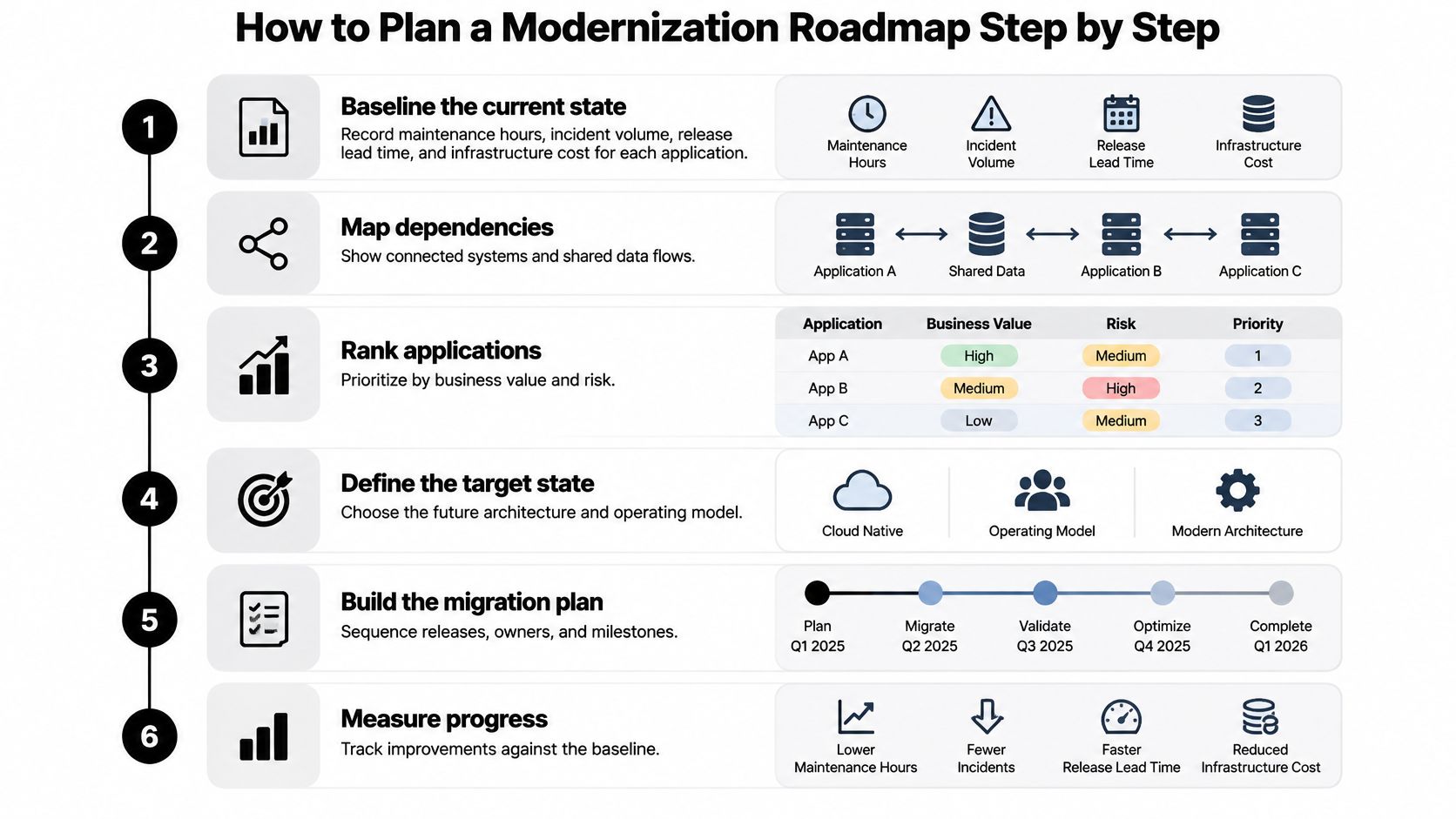
Baseline the current state. Record maintenance hours, incident volume, release lead time, and infrastructure cost for each application. Separate recurring work from exceptional incidents so an unusually quiet month doesn't become your business case.
Map dependencies before drawing the target architecture. List integrations, shared databases, scheduled jobs, identity services, and downstream consumers. Trace actual runtime traffic alongside source-code references, because a forgotten batch export can matter as much as a customer-facing API.
Rank applications by business value and technical risk. Include revenue exposure, operational criticality, security concerns, and platform supportability. Choose a bounded workflow with measurable value and a manageable dependency surface rather than starting with the largest application.
Build a risk register. Cover data loss, downtime, security, compliance, and loss of staff knowledge. Give each risk an owner, a mitigation, and a condition that prevents release.
Choose a strategy for each workflow. Define the target behavior and operating model, including who will support it after launch. Keep architecture decisions tied to a business constraint rather than a general preference for cloud services or microservices.
Stage delivery around verifiable increments. Require validated data parity, a rehearsed rollback procedure, and a named owner for each increment. Agree on acceptance criteria before developers start implementing.
Fund the complete transition. Count parallel operations, data remediation, testing, training, and post-launch ownership alongside license or infrastructure savings. Release funding against demonstrated outcomes, and define in advance what result would narrow the scope or keep the legacy system running.
The order matters. Skipping the baseline or the dependency map doesn't save time; it moves the cost of discovery into production, where it is far more expensive.
For the Casting Networks project, Wonderment Apps combined every regional website under one domain, set up the new site architecture, and created all page templates from the client's initial design and copy input. That is steps 5 and 6 in practice: a shared structure agreed before individual releases. For a comparable consolidation, sequence rollout around verified regional content and navigation rather than a single cutover date.
Make the baseline useful
Track the share of spending and engineering hours devoted to keeping existing services running versus delivering new product capabilities. That ratio is the number executives will judge the program by. A successful program lowers the maintenance share without worsening outages, response times, or customer experience.
Keep both hours and money visible. Moving work from an internal team to a managed service may reduce engineering effort while increasing direct operating expense, and executives need to see that trade-off before they approve the next release of funds.
A complete baseline should contain:
- Service inventory: Applications, owners, environments, and support obligations.
- Operating measures: Maintenance effort, incidents, release lead time, and infrastructure charges.
- Dependency evidence: Integrations, shared data, scheduled processes, and identity paths.
- Business outcomes: Workflow completion, conversion where relevant, and support demand.
- Delivery safeguards: Acceptance criteria, risk owners, rollback requirements, and retirement conditions.
A baseline that cannot answer what a workflow costs today cannot justify what it will cost to change it.
KPIs and Stage Gates That Keep Costs in Check
Modernization KPIs and stage-gate questions
| KPI | How to Measure | Healthy Direction | Stage-Gate Question |
|---|---|---|---|
| Run-cost share | Maintenance spend as a percentage of IT budget | Falling | Is maintenance spend still rising after two releases? |
| Lead time for change | Days from approved request to production release | Falling | Are changes reaching users faster? |
| Change failure rate | Percentage of releases causing an incident or rollback | Stable or falling | Has the new platform increased rollbacks? |
| Incident rate | Production incidents per month for the migrated workflow | Falling | Are incidents concentrated at integration points? |
| Migration throughput | Workflows migrated per quarter against plan | Steady | Has throughput stalled for two quarters? |
| Customer conversion on migrated flows | Conversion before and after cutover | Stable or rising | Did conversion drop after the change? |
| Payback period | Months to recover total investment, including transition costs | Within plan | Is revised payback still acceptable? |
49% of respondents said actual legacy-maintenance costs exceeded plans in the prior year, and 86% said legacy-system budget pressure constrained innovation, according to Ensono's 2025 modernization findings. Track failure costs, duplicated operations, and post-launch ownership, not just cloud or license savings.
Use these recommended decision thresholds, agreed before delivery:
- Continue: Run costs fall across two releases while incident rates hold steady.
- Narrow scope: Migration throughput stalls for two consecutive quarters.
- Pause the workflow: Conversion drops after cutover. Investigate before expanding exposure.
- Preserve the legacy component: The revised payback exceeds the approved investment horizon and its operational risks remain manageable.
Under budget isn't the same as value delivered. A completed migration can leave maintenance costs, customer friction, and operational risk unchanged.
Require the chosen KPIs to improve across two consecutive reviews before awarding more funding. Compare equivalent traffic and workload conditions so apparent savings don't come from reduced usage.
Data Migration and Integration Patterns That Reduce Risk
Integration and migration patterns compared
| Pattern | How It Works | Data Risk | Rollback |
|---|---|---|---|
| Strangler fig | Routes traffic piece by piece from the old system to the new one | Low when each slice is validated before moving | Route traffic back to the legacy component |
| API façade | Wraps legacy functions behind stable endpoints | Low to medium, according to write paths | Switch the façade back to the legacy call |
| Event-based synchronization | Publishes changes so both systems stay aligned | Medium because of ordering and duplicate events | Stop consumers and replay from the event log |
| Batch extract-and-load | Copies data on a schedule | Medium because data can become stale between runs | Re-run the load from the last verified snapshot |
| Big-bang cutover | Switches all users to the new system in one event | High because every dataset moves at once | Restore a full pre-cutover backup, often with downtime |
These risk labels assume disciplined implementation. Routing traffic back doesn't undo writes already accepted by the new system, and replaying an event log won't repair a destructive consumer without corrected processing logic.
Validate meaning, not just movement
Start with Contesimal's guidance on discovery and classification before migration: identify what you're moving, its sensitivity, and its dependencies before selecting transfer mechanics. Our database migration best practices provide a complementary planning reference.
- Profile data quality: Inspect missing values, duplicates, invalid relationships, encoding, and historical exceptions. Resolve ownership of questionable records before moving them.
- Reconcile datasets: Compare record counts and checksums on normalized representations, then test business totals and relationships. Matching row counts won't reveal an incorrectly mapped currency field.
- Run in parallel deliberately: Set a validation period and exit criteria before launch. Shadow reads or compare outputs without allowing competing systems to independently execute the same financial action.
- Control schema changes: Freeze schema changes during cutover windows or route exceptions through explicit approval. Otherwise, a valid migration script can become obsolete during deployment.
- Move authorization with the data: Verify that users can access the same permitted records, and cannot access previously restricted ones. Test service accounts and administrative roles separately.
- Protect rollback writes: Identify the authoritative writer throughout cutover and capture changes needed for reconciliation. A backup alone doesn't preserve transactions accepted afterward.
Say an ecommerce team first exposes order-history lookup through an API façade. It compares returned orders, totals, and permissions across old and new paths before changing where customer requests are served.
Once data parity remains reliable through a representative operating period, the team moves order writes behind strangler routing. It tests retries and duplicate submissions before expanding traffic.
Prefer incremental migration unless the application is small enough to switch within a rehearsed maintenance window, with an acceptable recovery path.
What Your Legacy Application Needs Before AI Features
An API call isn't an AI-readiness strategy. In a 2025 global survey of more than 500 IT decision-makers, 68% said legacy systems prevented their organizations from fully embracing modern technologies, with maintenance time, disconnected silos, and maintenance cost among the contributors, according to Pega.
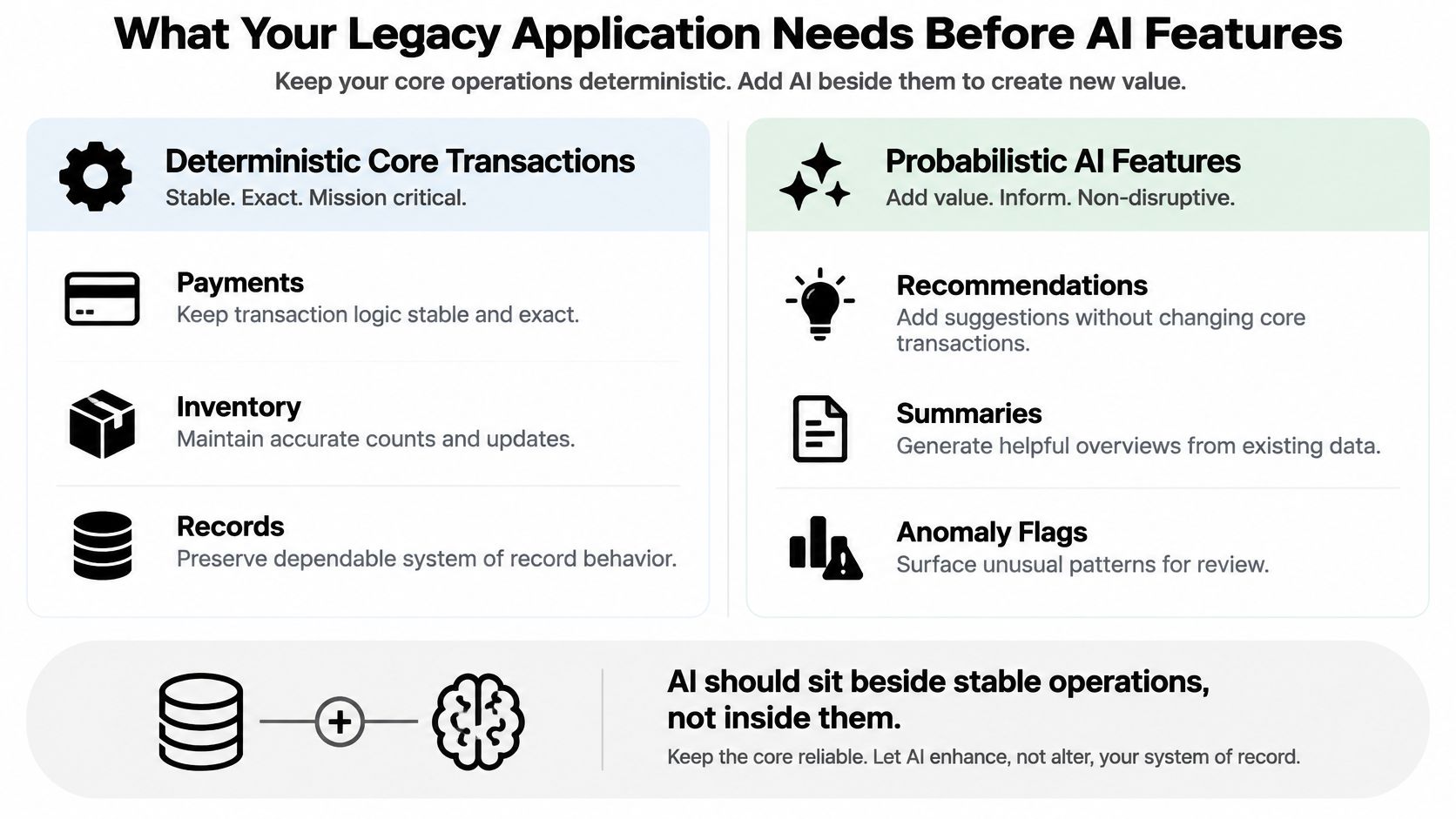
Keep deterministic transactions separate from probabilistic AI features. Payments, inventory updates, and system-of-record changes require exact business rules; recommendations, summaries, and anomaly flags can sit alongside them. AI-generated actions must pass authorization, validation, and appropriate approval before changing core records.
Run readiness tests in dependency order
- Data completeness: Confirm the required fields exist and that missing or conflicting values produce a safe fallback, not an invented answer.
- Lineage: Trace source records through transformations and retrieval. A reviewer should be able to establish where an answer's supporting information originated.
- Authorization propagation: Test that AI sees only information the requesting user may access. Enforce permissions in retrieval services, not in prompt instructions.
- Response-time budgets: Allocate time across data retrieval, model inference, validation, and rendering. Define timeout behavior for both desktop and mobile experiences.
- Evaluation quality: Use a labeled test set with expected answers, unacceptable disclosures, and refusal cases. Include unusual but consequential requests.
- Rollback capability: Demonstrate that operators can disable the feature or restore an approved configuration without disrupting core transactions.
- Transaction cost: Measure token or inference spending alongside retries, retrieval, and validation. Assess cost per completed task, not merely per model call.
Assign operational accountability
The NIST AI Risk Management Framework organizes this work into GOVERN, MAP, MEASURE, and MANAGE. GOVERN assigns accountability across the lifecycle; MAP documents intended users, context, and impacts; MEASURE evaluates outputs and risks; MANAGE prioritizes mitigations and responses.
For a fintech support assistant, scope account retrieval to the customer's permissions and test against appropriately protected historical tickets. Set a short, explicit response-time budget and provide a non-AI support route when retrieval or generation fails.
Replacing a monolith with services won't clean historical records or resolve disputed data ownership. AI readiness is a data and dependency problem before it's a model-selection problem.
Use a strict go/no-go decision: proceed only when data ownership, access controls, evaluation criteria, acceptable cost, and fallback behavior have accountable owners and passing evidence. If any are missing, modernize that dependency before launching the feature.
Running AI Features Reliably at Scale
The AWS Well-Architected Framework identifies six pillars: operational excellence, security, reliability, performance efficiency, cost optimization, and sustainability. Apply them through latency and error-rate objectives, endpoint instrumentation, recovery tests, and capacity changes based on measured demand.
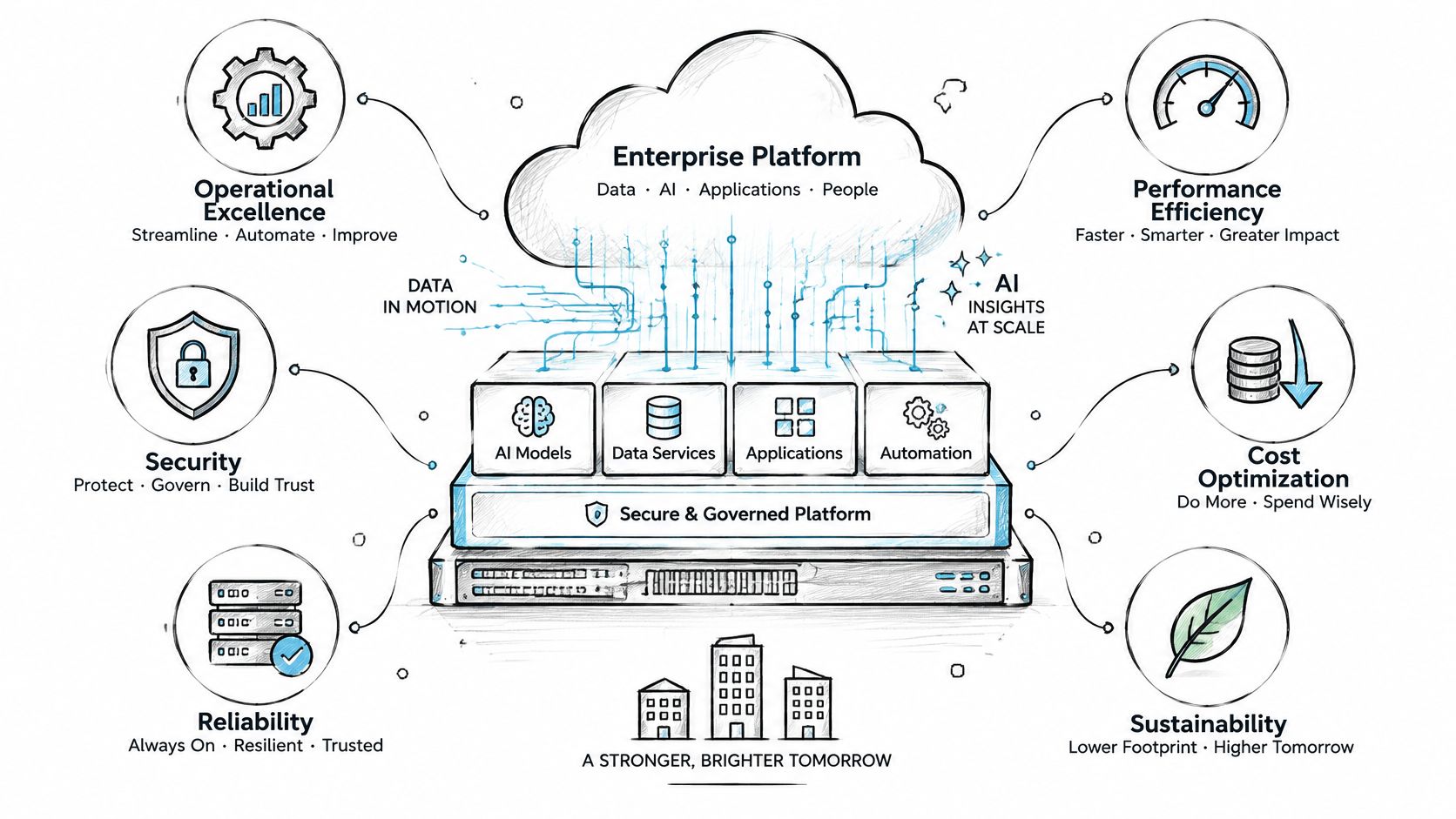
Our Managed Projects practice builds highly performant, intuitively designed technology that can support up to millions of users per day. For AI-enabled workloads, use production integration advice from SupportGPT alongside our AI software development guidance to scrutinize integration behavior, not just interface design.
Make changes reconstructable
NIST's AI risk-management guidance supports ongoing monitoring, defined responsibilities, and periodic review. Implement those principles with:
- Controlled changes: Record versions, test results, approval status, and rollback paths for prompt and model updates.
- Protected traces: Log model identifiers, prompt versions, parameters, data-access paths, and outputs with redaction, retention limits, and restricted access.
Suppose answer quality drops after a provider update. An unchanged prompt narrows the investigation, but doesn't prove model fault; compare retrieved data, configurations, and model identifiers before restoring the previous route and rerunning evaluations.
The 2024 DORA findings associated greater AI adoption with an estimated 1.5% decrease in delivery throughput and 7.2% reduction in delivery stability. Judge developers by deployment outcomes, change failure rate, and recovery time, not generated-code volume.
Book a Demo to Test Your Modernization Plan
Choose a bounded workflow to modernize this quarter, rather than attempting to redesign the entire estate before delivering anything. Authorize discovery first, then let evidence determine whether implementation should proceed.
Take the next actions in order:
- Choose the application and workflow. Identify the customer or operational outcome you want to improve.
- Complete the baseline. Establish the current cost, reliability, dependencies, and accountable owner.
- Score AI readiness. Bring the failing tests and unresolved access questions to a focused tool evaluation.
Book a demo of the Wonderment Apps prompt management system using a sample application. Examine the prompt vault with versioning, parameter manager for internal database access, logging across all integrated AIs, and cost manager showing cumulative spend.
Ask questions that expose operational fit
- Approval and recovery: How are prompt versions approved and rolled back?
- Database boundaries: How is access scoped by user role?
- Feature economics: How is spending reported per feature, rather than only as an aggregate bill?
We listen, advise, then design and develop. Clients receive ongoing access to project management deliverables, plus direct access to industry experts for support, mentorship, and consultation through the Wonderment Hive.
That combination matters when selecting developers: you need people who can explain the operating consequences of their decisions, not just implement a model connection.
Before booking, confirm that the baseline is complete, a workflow is chosen, and a named owner is accountable for the decision. Bring those materials so the conversation tests your modernization plan rather than drifting into a generic product tour.
Wonderment Apps offers legacy modernization, custom web and mobile engineering, and an administrative toolkit for integrating and managing AI in existing software. Visit Wonderment Apps to discuss your chosen workflow and book a prompt management demo focused on access controls, operational visibility, and cumulative AI spending.