

Your team probably already has the ingredients for AI. A web app that creaks a little under peak load. A mobile app with decent engagement but too many support tickets. A back office full of spreadsheets, rules, approvals, and “we'll fix that later” workflows. Someone already tested a chatbot. Someone else pasted customer data into an AI tool they definitely shouldn't have used. Leadership now wants modernization, but nobody agrees on what that means.
That's the starting point for AI driven digital transformation. Not a moonshot. Not a keynote slide. A slightly messy product and operating environment that needs to get smarter without becoming riskier.
Introduction to AI Driven Digital Transformation That Scales
A COO approves an AI pilot to reduce support costs. Three months later, the demo looks sharp, but the business is harder to run. One team is paying for model usage no one can explain. Another is copying prompts between tools with no version control. Legal wants audit trails. Product wants the feature in the app by next quarter. Finance wants proof that any of this improves margin.
That is the starting point.
AI driven digital transformation scales when leaders treat it as operating-model rewiring, not software shopping. The question is not just which model to buy. The harder questions are where AI should make decisions, which workflows need human review, how prompts are governed, and how usage is controlled before costs spread across teams.
Analysts at McKinsey found that AI adoption is widespread, while full scaling remains rare. That gap matters. It usually means companies have access to models but have not yet built the controls, application patterns, and team habits that turn experiments into repeatable business value.
What leaders are dealing with
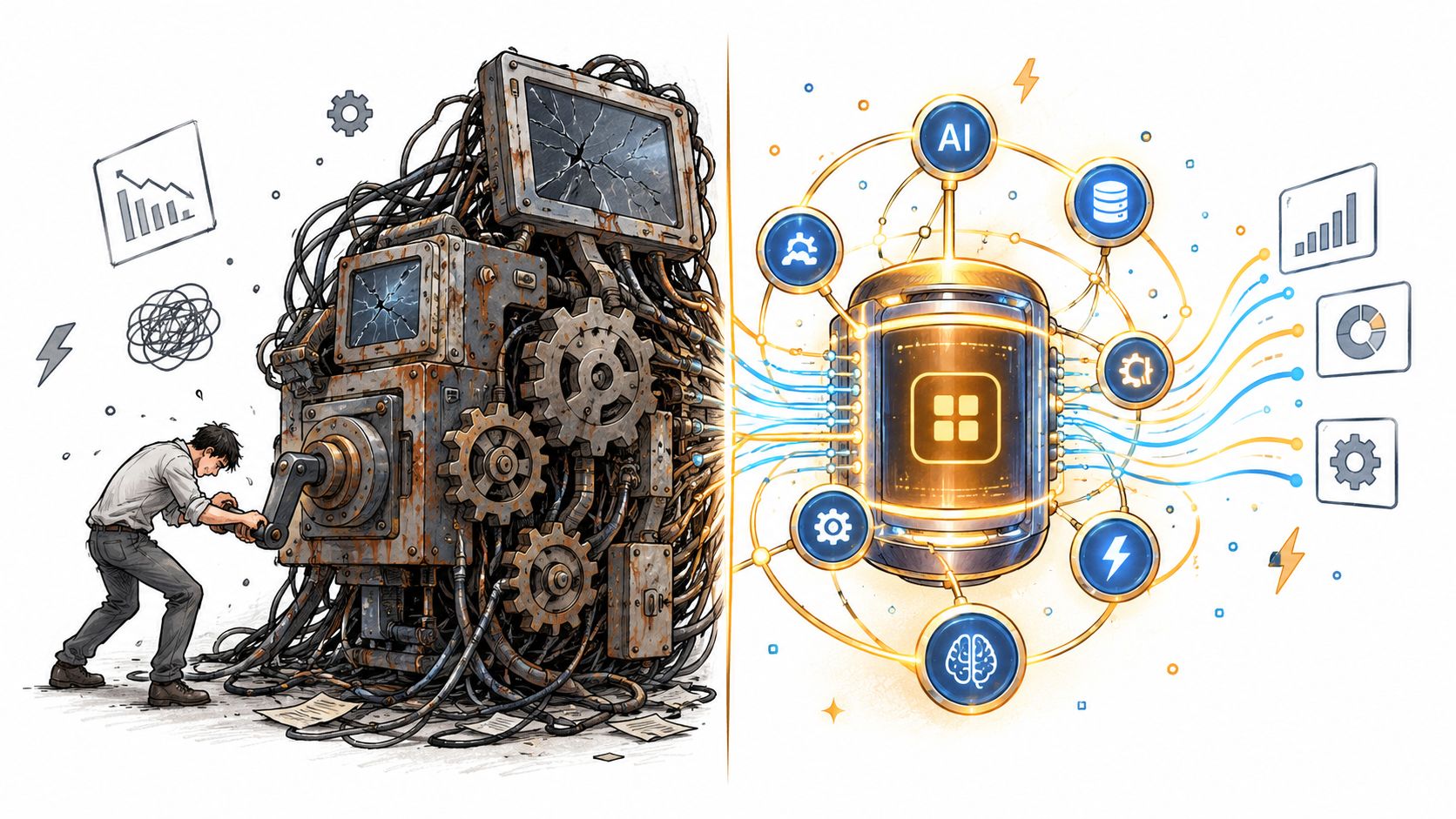
A useful comparison is plumbing versus fixtures. The chatbot, summary button, or recommendation panel is the fixture customers see. The transformation work sits behind the wall. Data routing, prompt templates, fallback logic, permissions, observability, and cost limits determine whether that visible feature helps the business or creates a new support queue.
Leaders usually run into three pressures at once:
- Fragmented decision logic: Rules, approvals, and customer context sit across systems, so AI has incomplete inputs and produces uneven results.
- Higher product expectations: Customers and employees now expect search, summaries, recommendations, and faster resolution inside the tools they already use.
- Weak governance at the point of use: Teams can access models before the business has clear standards for prompts, logs, review flows, and approved data sources.
In regulated or process-heavy environments, those pressures become stricter. Procurement, compliance, and audit work need software that organizes operational complexity, not just a polished front end. Software for Government contracting is one example of a system built around that kind of structured workflow.
The modernization layer teams often miss
Model access is only one layer. The missing layer is administration for AI behavior inside real products.
Prompts need owners. Versions need change history. Outputs need evaluation rules. Expensive workflows need budget controls. Scalable apps also need routing logic, so a simple task does not always call the largest model available. Without that layer, teams get a familiar result: a clever prototype that is too risky, too costly, or too brittle to spread across products and departments.
That is why modernization work often starts with architecture choices rather than a flashy interface. Teams add prompt management, usage monitoring, policy checks, and app-level orchestration to the software they already run. For a broader look at how that fits into product strategy, this guide to digital transformation with AI gives useful context.
AI modernization pays off when the workflow, the application architecture, and the guardrails are designed as one system.
What AI Driven Digital Transformation Really Means
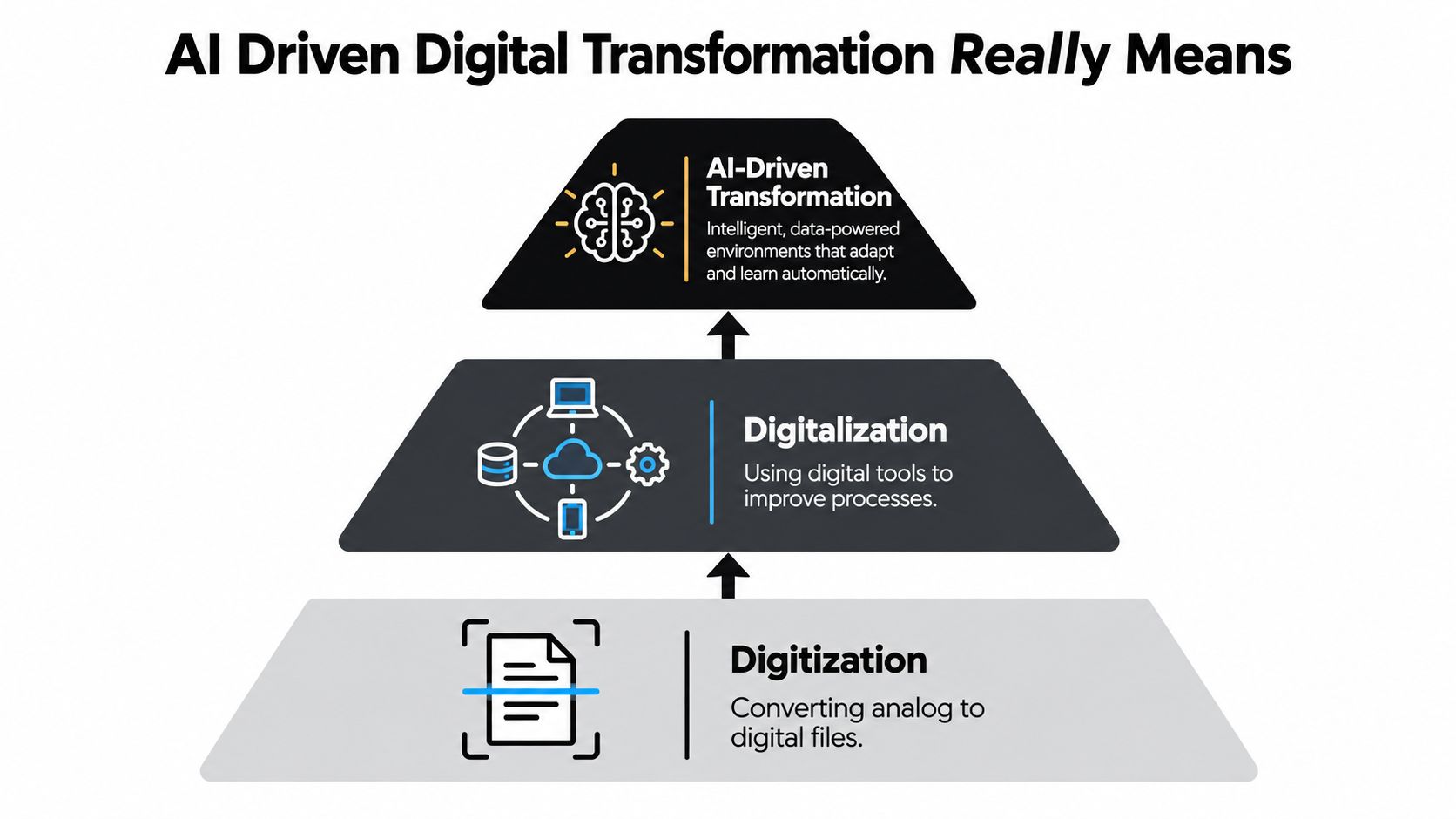
People often mix up digitization, digitalization, and AI transformation as if they're the same staircase step with different paint. They're not.
Start with the building analogy
Think of your software like a building.
Digitization is scanning the paper blueprint so it exists as a file.
Digitalization is adding elevators, badge access, and connected lighting so the building runs better.
AI-driven transformation is turning that building into one that senses traffic, redirects people, predicts maintenance, and adjusts itself while staying safe and usable.
That last step changes the operating model, not just the interface.
Definition: AI driven digital transformation is the redesign of products, workflows, and decision systems so software can sense, reason, and act with data, within rules the business controls.
The difference between bolting on AI and embedding it
A bolt-on feature usually looks like this: “Let's add a chatbot to the customer portal.”
An embedded capability looks more like this:
| Approach | What it does | What changes |
|---|---|---|
| Bolt-on AI | Adds a surface feature | The workflow stays mostly the same |
| Embedded AI | Connects data, prompts, rules, and actions | The workflow itself gets redesigned |
In practice, embedding AI means the app can do things such as summarize support history before an agent replies, recommend next-best actions inside a CRM, classify uploaded documents, or tailor a mobile onboarding flow based on behavior and account context.
Why workflow redesign matters more than model choice
Leaders often ask which model they should use first. That matters, but usually less than they think. The bigger question is: where does the output go, who trusts it, and what happens next?
A good model dropped into a bad workflow is like a race engine attached to a shopping cart. It makes noise. It doesn't improve transportation.
Recent enterprise research highlights this gap. One 2026 analysis found 48% introduced AI without redesigning workflows, while only 12% had redesigned at scale. The same body of research notes that only one in five companies has a mature governance model for autonomous AI agents, and that many organizations expect efficiency gains before they see growth benefits (ISG enterprise AI adoption report).
For business leaders, that changes the playbook. Buying access to a model isn't transformation. Deciding where humans stay in control, where software can take action, and how prompts, approvals, and data access are governed. That's transformation.
If you want a second perspective on that operating-model view, AI transformation insights from MR2 frame the challenge in similarly practical terms.
Business Value and KPIs That Prove Transformation Works
A team launches an AI assistant for support, and the early feedback sounds promising. Agents say it feels useful. Managers hear good anecdotes. Six weeks later, finance asks a harder question: did resolution speed improve, did quality hold, and what did each answer cost?
That is the moment where AI transformation stops being a tool purchase and starts looking like operating-model rewiring. If you want ROI you can defend, you need measures tied to the workflow, the controls around prompts and approvals, and the cost of running the system at production scale.
Start with the workflow, then measure the AI layer inside it
A useful KPI design begins with a specific job. Support teams resolve cases. Underwriters review submissions. Retail apps convert visits into purchases. Care teams triage requests.
Then measure the system the way an engineer would measure a production line. AI is one station in that line, not the whole factory.
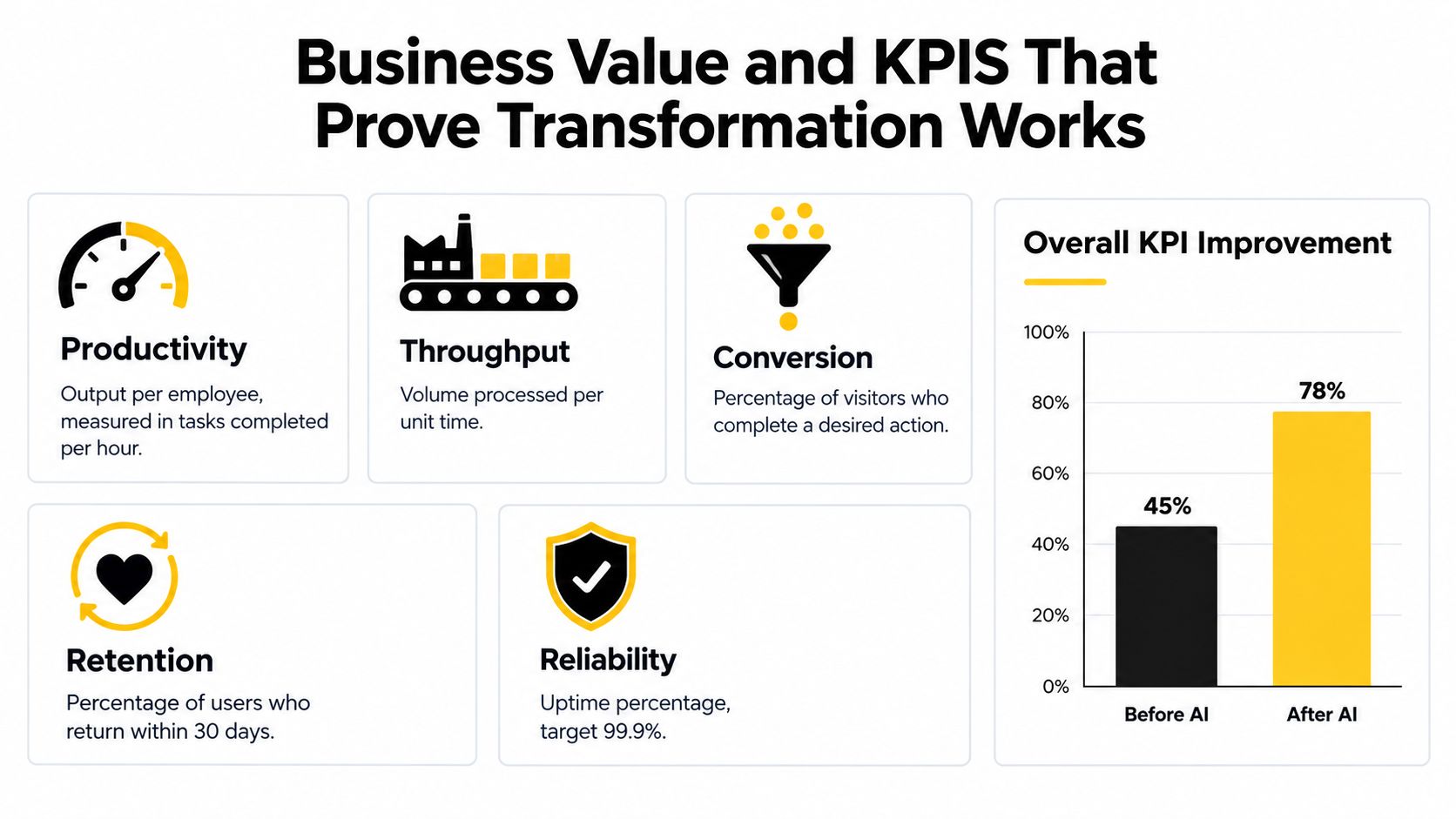
A practical scorecard usually tracks:
- Productivity: Output per person or team in a fixed period
- Throughput: How much work clears the workflow end to end
- Quality: Error rates, escalations, rework, satisfaction, or sentiment
- Reliability: Whether service levels stay stable as volume rises
- Cost visibility: Model spend, orchestration cost, and human review cost
That last one gets missed often. A feature that saves ten minutes but burns expensive tokens, triggers manual cleanup, or requires prompt tuning every week may help in a demo and disappoint in a budget review.
A measured example leaders can learn from
In a randomized field experiment covering 5,179 customer support agents, access to a generative AI conversational assistant increased issues resolved per hour by 14% on average. The effect was strongest for novice and lower-skilled workers, and the study also reported better customer sentiment, fewer manager escalations, and improved retention (NBER working paper).
That pattern matters because it shows where value often appears first. AI can transfer know-how into the workflow so newer staff perform closer to experienced staff. In business terms, that can shorten ramp time, reduce supervision load, and raise service consistency before it creates any headline-grabbing revenue gain.
Why ROI is hard to prove in practice
The problem is rarely a lack of dashboards. The problem is that many companies do not instrument AI as a governed operating layer.
If prompts are edited ad hoc, model usage is spread across teams, and no one logs acceptance rates or downstream outcomes, KPI reporting turns into educated guesswork. It becomes hard to answer basic questions. Which prompts drive rework? Which model calls create the highest cost per completed task? Where do humans override outputs, and why?
That is why prompt governance belongs in the KPI discussion. Prompts are not just interface text. In many systems, they function like business rules written in natural language. If those rules change, quality, compliance, and cost can change with them.
A practical KPI setup for leaders
Here is a simple structure that holds up well in real programs:
- Choose one workflow. Pick something narrow, such as support resolution, claims intake, renewal review, or onboarding verification.
- Capture the baseline. Measure cycle time, rework, escalation rate, completion rate, and service quality before AI enters the flow.
- Log every AI touchpoint. Track prompts, model calls, output type, user acceptance, edits, handoffs, and final business outcome.
- Separate efficiency KPIs from growth KPIs. Efficiency usually shows up first. Growth often depends on product changes, channel strategy, or new user experiences beyond the model itself.
- Track unit economics weekly. Monitor token usage, fallback rates, human review time, and cost per successful outcome.
- Review prompt changes like code changes. Version them, test them, and connect changes to quality and cost shifts.
A good mental model is a warehouse conveyor with sensors at each checkpoint. If a package gets delayed, damaged, or rerouted, you can see where it happened. AI programs need the same observability. Without it, leaders see output volume but not whether the system is improving the business.
For teams setting up the measurement and implementation pieces together, this guide on how to implement AI in business is useful because it treats instrumentation, governance, and rollout as one design problem.
Industry Use Cases That Show AI in Real App Experiences
A customer opens a retail app, searches for a product, asks a support question, and checks out. A patient fills out intake forms before a visit. A fraud analyst reviews a flagged transaction. In each case, the visible AI feature is only the front counter. The business result comes from what happens behind it: how the app gathers context, how prompts are controlled, how costs are contained, and how the workflow hands work to a person when confidence drops.
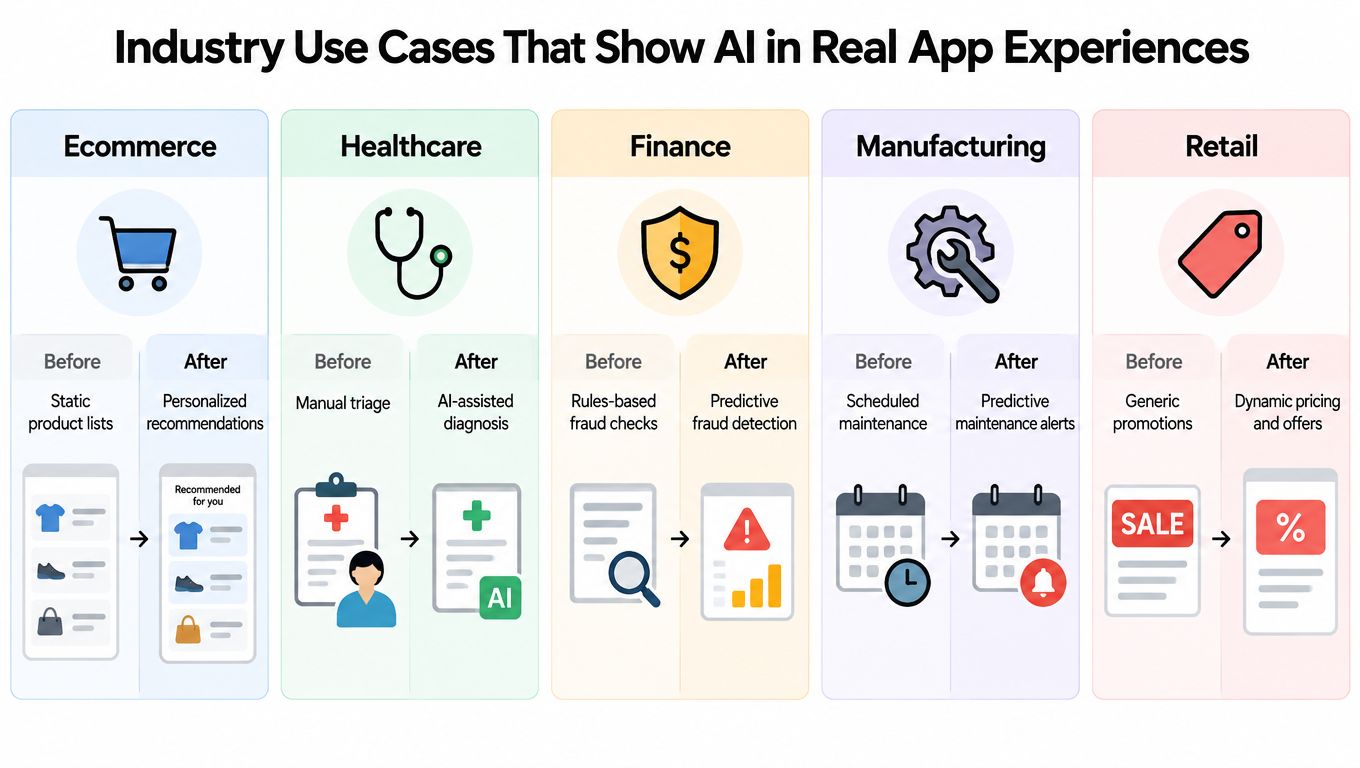
The pattern repeats across industries. Companies do not get ROI from buying a model the way they buy office furniture. They get ROI by rewiring the operating model inside the app experience, then making that wiring reliable enough to scale.
Ecommerce and retail
In retail, AI works best when it improves a buying path that already exists. Search gets better because the app understands product attributes, inventory, and shopper intent. Recommendations improve because the system weighs behavior and stock levels together, instead of pushing the same popular items to everyone. Review summaries help users decide faster, but only if the summary reflects current products and recent feedback.
That last part matters. A recommendation widget is cheap to demo and expensive to run badly. If prompts pull too much catalog data, token costs rise. If they pull too little, relevance falls. Good teams treat prompt design like shelf layout in a physical store. Put the right products within reach, label them clearly, and do not make shoppers wander through a warehouse to find one item.
A 2026 industry roundup reported that 38% of mobile and web apps now actively use generative AI, up from 14% in early 2024 (app development roundup). The useful lesson is not that every app needs a chat box. It is that users increasingly expect software to understand context and reduce effort.
Fintech and SaaS
Financial and SaaS products have a tougher balancing act. They need intelligent behavior, but they also need repeatability, traceability, and cost discipline. A model can classify risk signals, summarize account activity, explain unusual billing changes, or guide a user through a complex setup flow. None of that counts for much if the app cannot show why a result appeared or who reviewed it.
A fraud alert is a good example. The visible output is a flag on a transaction. The actual product experience includes the evidence sent to the reviewer, the confidence threshold that triggered the alert, the prompt version used, the customer-safe explanation, and the audit log stored afterward. That is operating-model rewiring. The model is one component in a controlled decision path.
In secure products, the core feature isn't only detection. It's traceable decision support.
This is also where cost control becomes product design. If every low-confidence case goes to an expensive model and then to a human reviewer, margins disappear. Strong teams route simple cases through cheaper models, reserve larger models for harder judgments, and design the app so users can correct errors quickly.
Healthcare and wellness
Healthcare apps succeed when they reduce administrative drag without making clinical work harder to trust. AI can organize patient-reported information, draft visit summaries, guide care navigation, and surface likely next steps. The point is not novelty. The point is reducing the time spent hunting through forms, messages, and records.
The safest design usually looks less flashy than executives expect. A calm intake assistant that structures symptoms and insurance details can create more value than an ambitious medical chatbot with weak guardrails. Prompt governance matters here because the app must pass only the right context, follow access rules, and keep human judgment in charge for sensitive decisions.
A useful analogy is airline check-in. Good systems collect the needed information early, verify it, and route exceptions to an agent before the gate becomes chaotic. Healthcare AI should do the same. Gather context, standardize it, and escalate edge cases before they disrupt care.
Media and content-rich platforms
Media products need AI and app performance to work together. Summaries, tagging, discovery, and personalization can increase engagement, but each feature adds retrieval, ranking, and generation work behind the screen. If architecture does not scale, the app feels slower exactly where it should feel smarter.
That trade-off is easy to miss in planning meetings. A personalized feed is not one feature. It is a chain of services that fetch content, rank candidates, apply business rules, generate or select summaries, and render results fast enough that the user keeps scrolling. If one link in that chain stalls, the user experiences the whole thing as a bad product, not as an isolated infrastructure problem.
For media teams, AI transformation often means building a better assembly line, not a shinier robot.
Public sector and service digitization
Public sector and nonprofit teams often manage long forms, document reviews, status updates, procurement logic, and layered approvals. AI can help explain requirements in plain language, summarize case materials, and route requests to the right queue. The app experience improves when people spend less time decoding bureaucracy and more time completing the task.
The hidden work is familiar by now. Prompts need approved templates. Sensitive data needs access controls. Outputs need a record of how they were produced. And the app has to support inconsistent, real-world inputs from citizens, staff, and external partners.
Cross-country OECD firm-level evidence found AI adoption was positively linked to productivity, with statistically significant coefficients ranging from about 0.06 in France to 0.34 in Belgium, interpreted as average percentage differences in productivity between AI users and non-users (OECD report). The variation is the important part. Results depend on the surrounding process design, data quality, and workforce setup, not on model access alone.
Across all five industries, the visible feature may be a summary, recommendation, alert, or assistant. The durable advantage comes from the app architecture and operating rules around it. That is why scalable AI transformation looks less like shopping for tools and more like rewiring how decisions move through the business.
Your Practical Roadmap From Assessment to Scaling
Teams usually want to jump to model selection. Resist that impulse for a week. First inspect the terrain.
Step one is an honest systems assessment
Start by mapping where the current product gets its data, where decisions happen, and where users hit friction. In a desktop workflow, that might mean swivel-chair work between systems. In a mobile flow, it might mean users abandoning tasks because the app asks for too much input too early.
Look for three things:
- Repeatable decisions: Places where people make similar judgments over and over.
- Context gaps: Moments where users or employees need information the system already has somewhere else.
- Latency pain: Delays caused by manual review, brittle integrations, or overloaded teams.
A good modernization plan doesn't ask, “Where can we use AI?” It asks, “Where does better context change the outcome?”
Step two is preparing the data path
AI features are only as useful as the application plumbing around them. The model may be impressive, but if the app can't fetch the right records, enforce access rules, or pass clean context into prompts, the output becomes expensive decoration.
A quick decision table helps:
| Question | If yes | If no |
|---|---|---|
| Is the needed data accessible through stable systems? | Move toward integration design | Fix data access first |
| Are business rules documented well enough to guide output? | Add AI into the workflow | Clarify rules before automation |
| Can the team monitor results and costs? | Proceed with pilot instrumentation | Build observability first |
Step three is choosing the architecture that won't trap you later
Apps expected to grow should be designed for scale from day one. A high-traffic scaling guide recommends stateless services, read replicas, caching, asynchronous processing, and modular architecture, and notes that multi-tier caching can absorb 80% to 95% of read traffic before it reaches the database (software scaling guide).
That advice matters even more when AI enters the stack. AI features increase reads, write events, logging volume, and background processing. If your architecture assumes every request must hit the same core database and same synchronous application layer, it won't age gracefully.
Build the app so intelligence can be added without forcing the whole product to hold its breath.
Step four is governance in the flow of work
Governance shouldn't live in a policy PDF nobody opens. It needs to show up in how prompts are stored, how parameters are passed, how outputs are logged, and who can change behavior.
That's where a dedicated administrative layer can help. Wonderment Apps offers one example with a prompt vault for versioning, a parameter manager for internal database access, unified logging across integrated AI tools, and a cost manager that tracks cumulative spend. In practical terms, that means developers don't have to scatter prompt logic and spend visibility across ad hoc scripts and dashboards.
For leaders shaping the sequence of work, this application modernization roadmap is useful because it treats architecture, governance, and delivery as one continuous system.
Common Challenges and How to Mitigate Them
The most expensive AI mistake isn't choosing the wrong model. It's preserving the old bottleneck and making it faster.
Challenge one is workflow cosplay
A team adds AI summaries, AI search, or AI copilots, but approvals, ownership, and exception handling remain unchanged. Employees get new output, yet they still wait on the same people, use the same forms, and escalate through the same chain.
The fix is less glamorous than a new model release:
- Redesign decision rights: Specify what the system can suggest, what it can do automatically, and what still requires a human.
- Clarify exception paths: Decide where uncertain outputs go so nobody improvises risk handling.
- Tie prompts to process owners: If the prompt changes business behavior, a named owner should approve changes.
Challenge two is AI sprawl
AI usage rarely stays inside official lanes. Product teams test one tool, support teams try another, marketing experiments with three more, and suddenly nobody knows which prompts touch internal data or how much the stack costs.
A practical quarterly check looks like this:
- Inventory every AI touchpoint in customer-facing apps, internal tools, and experimental environments.
- Identify shadow usage outside approved procurement or architecture review.
- Review data exposure for prompts that reference internal records, documents, or user data.
- Track cumulative spend across tools, not just within one vendor account.
- Log output quality issues so governance includes performance, not just compliance.
Challenge three is confusing efficiency with transformation
Leaders often see early time savings and assume the hard part is done. It isn't. Efficiency is the opening move. Durable advantage usually comes later, after teams redesign service models, product experiences, and internal coordination around the new capability.
Teams get more value when they treat AI as an operating model change with software attached, not software with a press release attached.
The companies that handle this well usually keep one habit: they revisit the workflow after launch. They don't freeze the design at “good enough.” They watch where humans still compensate for system weakness, then keep rewiring.
Tech Stack Team Model and Real World Outcomes That Last
Long-lived AI modernization depends on two things at once. A stack that can evolve, and a team model that doesn't collapse under its own handoffs.
The stack should be boring in the right places
For most organizations, the durable choice is a modular stack with dependable interfaces between product, data, and AI layers. That often includes web frameworks such as React, backend platforms such as .NET or Java, native mobile on iOS and Android when needed, and CMS-driven surfaces like WordPress where that makes sense. The important part isn't naming every tool. It's keeping the architecture adaptable so one model, one vendor, or one feature experiment doesn't hard-code your future.
The team should match the risk
A modern app initiative usually needs engineers, designers, QA, and project leadership working as one delivery unit rather than a relay race. For some products, a managed project team makes sense. For others, curated staffing across React, .NET, Java, iOS, Android, WordPress, QA, product management, and UX is the practical way to fill capability gaps without stalling momentum.
When evaluating development partners, ask direct questions about OWASP Top 10 practices, data encryption, ISO 27001 certification, and prior work with GDPR or HIPAA compliance, because those are concrete indicators of enterprise security and scalability readiness (developer hiring checklist).
The administrative layer is what makes AI sustainable
Prompt versioning, parameter controls, logging, and cost visibility sound operational because they are operational. That's exactly why they matter. AI features become maintainable when teams can update prompts safely, connect internal data deliberately, observe outputs across integrated systems, and keep spend visible as usage grows.
The fun part of AI is often the demo. The lasting part is the discipline behind it. Build both, and your software won't just look modern. It'll stay modern.
Wonderment Apps helps organizations modernize web, mobile, and legacy software with AI integrations, scalable engineering, and an administrative layer for prompt governance, logging, and cost control. If you're trying to turn scattered experiments into durable product capability, visit Wonderment Apps to see how that approach works in practice.