


Your customer app worked well with a few thousand users. Then a promotion, a new region, or a sudden operational demand exposed everything at once. Login slowed down, field employees lost work when connectivity dropped, support teams couldn't explain crashes, and every request for a new workflow joined a growing backlog.
That situation captures the challenge of enterprise mobile development. An enterprise app isn't merely a mobile interface. It's a long-lived product connected to identity systems, APIs, databases, analytics, compliance controls, and the people who depend on it during busy or unreliable working conditions.
AI adds another opportunity, and another management problem. Teams can modernize existing desktop and mobile software with assistants, recommendations, automation, and natural-language workflows, but long-term value depends on controlling prompts, access, logging, model changes, and usage costs. Tools such as Wonderment Apps' prompt management system point toward that future by giving teams a way to manage AI behavior inside an existing product rather than scattering prompts through application code.
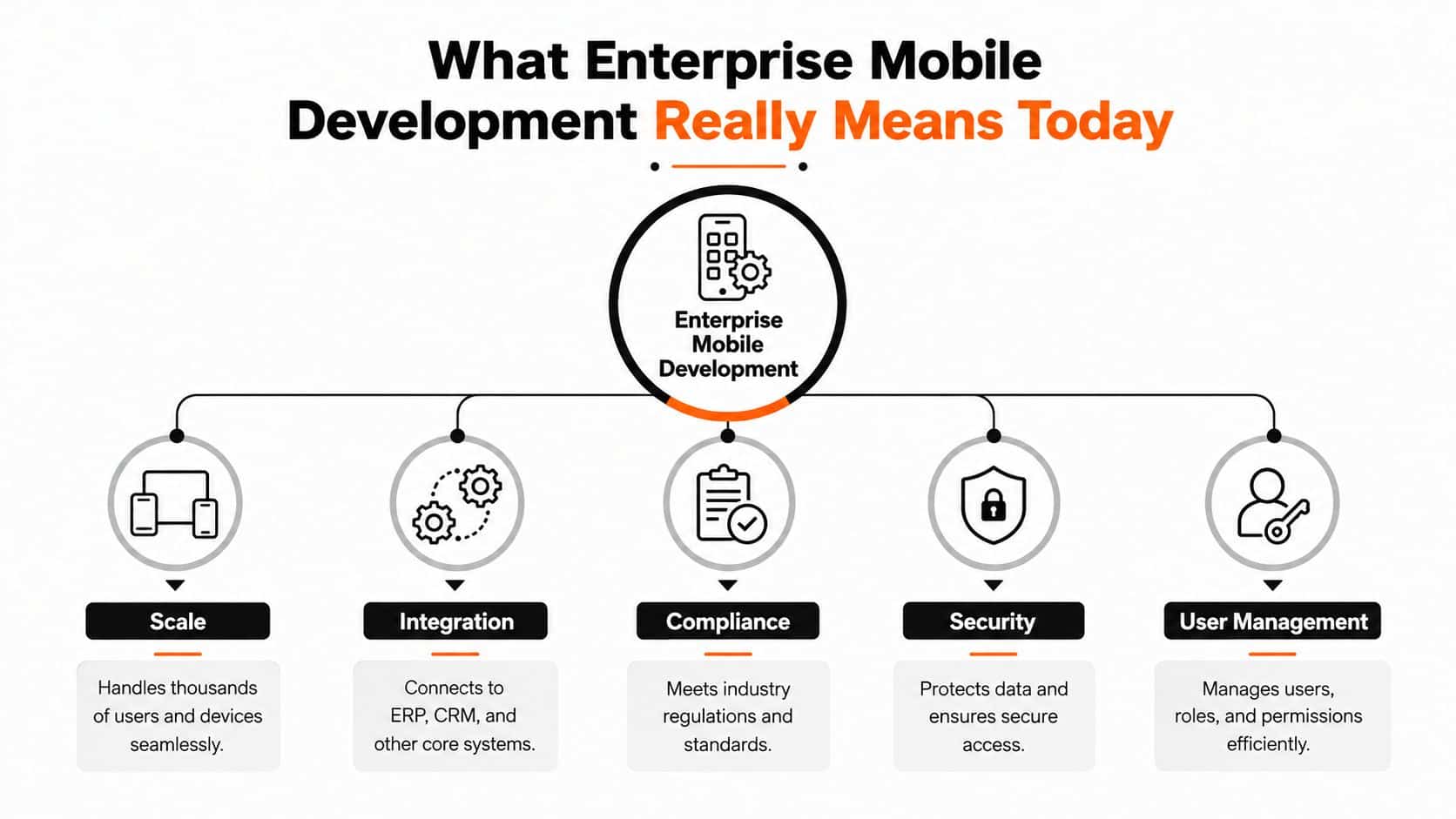
What Enterprise Mobile Development Really Means Today
A consumer app can focus on a narrow journey. An enterprise app often serves a dispatcher, a field technician, a regional manager, a customer, an auditor, and an administrator, all using different devices and permissions. The app must connect those experiences to systems such as an ERP, CRM, payment platform, scheduling engine, or clinical database.
That makes enterprise mobile development closer to building a city transit system than producing a single car. A car can be judged mainly by its own performance. A transit system must coordinate routes, passengers, safety rules, maintenance, changing demand, and connections to other networks. A mobile app may look simple on screen while carrying a complicated operational responsibility underneath.
The five responsibilities of an enterprise app
A useful mental model has five connected parts:
- Scale: The product must keep serving users as adoption expands across teams, regions, or customer groups.
- Integration: Mobile workflows need dependable connections to business systems and internal services.
- Compliance: Regulated organizations must preserve evidence of access, actions, approvals, and data handling.
- Security: Identity, encryption, device posture, app integrity, and response procedures all matter.
- User management: Each person needs the right access, workflow, and level of control.
The distinction also appears over time. Enterprise software may need support long after the original development team changes, the operating system evolves, or the business replaces a backend platform. Good teams therefore design clear boundaries, document decisions, automate tests, and make integrations replaceable where practical.
Practical rule: Treat every mobile feature as part of a product portfolio, not as an isolated screen.
AI modernization fits this model when it follows the same discipline. A support assistant, recommendation engine, or internal search experience should have defined permissions, observable behavior, and a controlled release process. That approach lets an organization improve an existing app without turning every future model update into a risky rewrite.
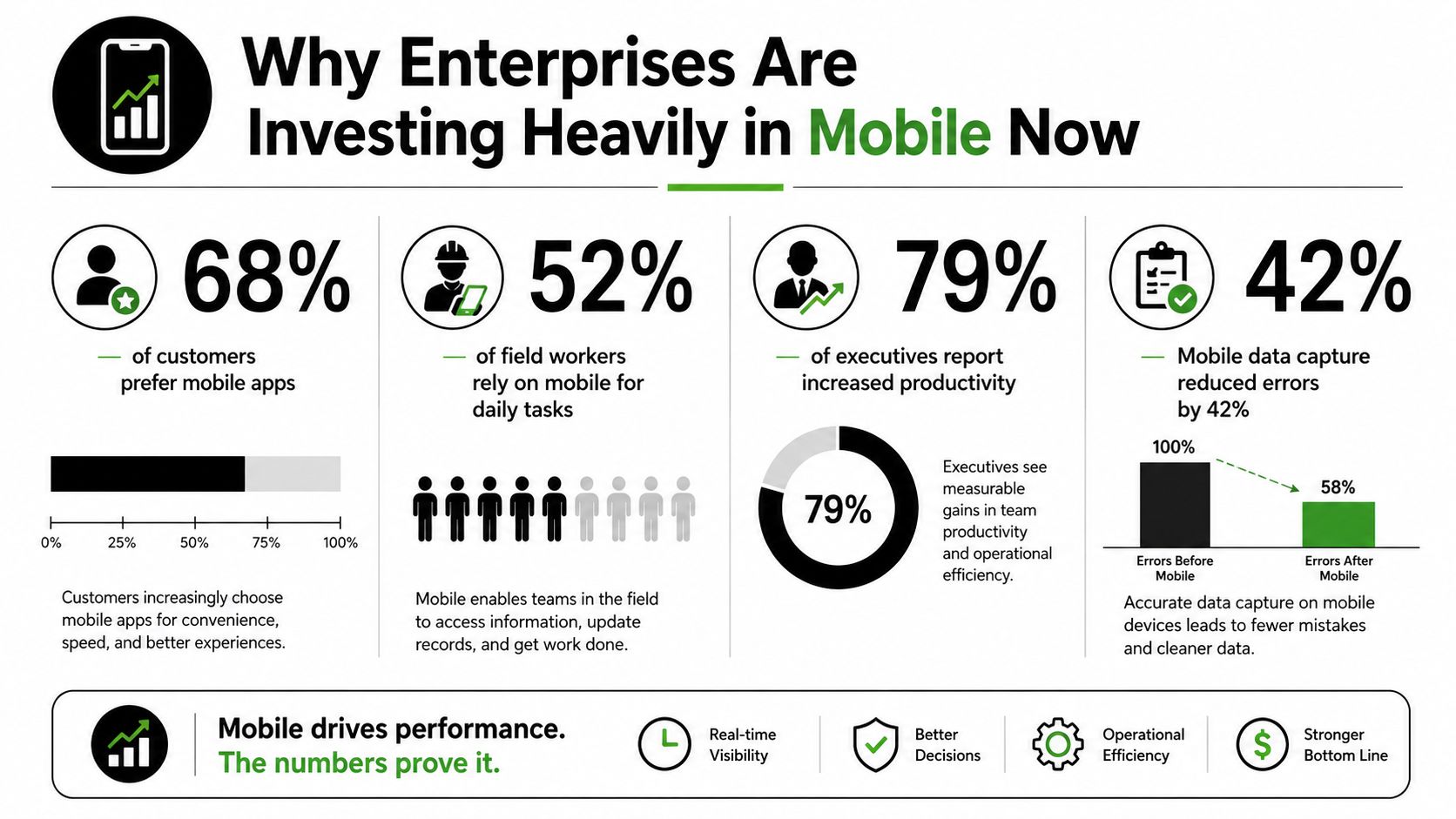
Why Enterprises Are Investing Heavily in Mobile Now
A field technician checks a work order, a customer completes a service request, and a manager reviews the latest status, all from places where a desktop may not be available. Mobile has become a working interface for both customers and employees. Its value comes from shortening the distance between an action and the business record behind it, not from putting every existing screen on a smaller device.
The market reflects this shift. One estimate places the enterprise mobile application development market at USD 189.22 billion in 2026, up from USD 168.45 billion in 2025, with a projection of USD 338.42 billion by 2031 and a 12.33% CAGR from 2026 to 2031. It also reports that cloud solutions accounted for 67.92% of revenue in 2025, large enterprises represented 63.65% of market size, and North America held 37.95% of the market. The figures point to a category shaped by cloud-first operations and large, established organizations, rather than isolated small apps. The enterprise mobile application development market analysis provides that market framing.
Investment needs a portfolio argument
The right investment question is not whether an app looks modern. It is which business constraint the product changes. A retail workflow might help staff locate inventory faster. A fintech experience might reduce customer friction while preserving identity and audit controls. A healthcare tool might let authorized staff record information where care occurs. A public-sector service might make a complex process easier to complete.
Each example belongs in a portfolio decision. Leaders can compare expected business value, integration effort, operating cost, user reach, and the consequences of leaving the workflow unchanged. That approach prevents a popular request from consuming capacity while higher-impact mobile work remains blocked.
Enterprise mobility has expanded from device access and BYOD into a broader discipline covering security, governance, and application management. Market estimates differ because they measure different scopes. One report values enterprise mobility at USD 54.40 billion in 2024, projecting USD 688.86 billion by 2034 at a 28.90% CAGR. Another estimates USD 68.85 billion in 2025 and USD 377.42 billion by 2034 at a 20.81% CAGR. A separate enterprise mobility management estimate places the market at USD 19.05 billion in 2024 and USD 69.12 billion by 2030. These variations reinforce a practical lesson: define the business problem and portfolio boundaries before comparing forecasts. This enterprise mobility market outlook provides broader context.
Mobile work should not wait behind so-called core software. For many organizations, the mobile app is the front door to that software. Teams assessing delivery capacity can consult this offshore mobile app development guide when evaluating distributed development models, partner responsibilities, and long-term ownership.
Choosing Your Architecture and Platform Path
A field technician needs barcode scanning and offline updates. A customer may need a fast, familiar checkout. Those workflows can share identity, data contracts, and release controls while using different mobile implementations. Architecture is therefore a portfolio decision, not a contest between technology labels.
Native development uses platform-specific technologies and provides direct access to iOS or Android capabilities. Cross-platform development shares much of the application code across platforms, reducing duplication and coordinating releases. Hybrid approaches place web-rendered experiences inside native shells. They suit selected workflows, provided the team tests performance and device integration carefully.
Native work can fit specialized device capabilities, demanding graphics, or platform-specific interaction. Shared code can fit a portfolio with several business apps, overlapping workflows, and a small engineering group. This guide to building cross-platform mobile apps offers a useful starting point for assessing that option.
| Criteria | Native | Cross-Platform |
|---|---|---|
| Platform-specific capabilities | Strong direct access | Usually available through libraries or native modules |
| Code sharing | Limited across platforms | High potential for shared business logic and UI |
| Specialist skills | Requires platform-focused expertise | Requires framework knowledge plus platform awareness |
| User experience | Fine-grained platform control | Consistent experience with careful platform adaptation |
| Maintenance | Separate platform paths | Shared changes can simplify portfolio maintenance |
| Best fit | Specialized experiences and deep device integration | Multiple platforms, common workflows, and coordinated delivery |
The more important question is how the organization will govern the portfolio. Reusable authentication, navigation, analytics, error handling, design components, and API conventions prevent every app from becoming a separate operating model. A modular structure lets one product change without forcing all applications to release together.
An API-driven architecture keeps mobile clients focused on presentation and interaction while centralizing business rules that can be secured and reused. An offline-first architecture treats local persistence and synchronization as core behavior. That design supports delivery, inspection, healthcare, and retail workflows where connectivity may be unreliable.
Ask stakeholders:
- Which device capabilities are required, rather than merely convenient?
- How many platforms and applications must the team support?
- Can the organization hire and retain the needed specialists?
- Which workflows must function offline?
- Which governance rules should apply across the portfolio?
- Which product areas need independent release cycles?
The right choice is the one the organization can operate for years. This native versus cross-platform mobile development comparison explains the trade-offs, but governance, staffing, and backlog priorities should determine the final path. A shared platform can reduce repeated work, while selective native investment preserves control where a workflow depends on the device.
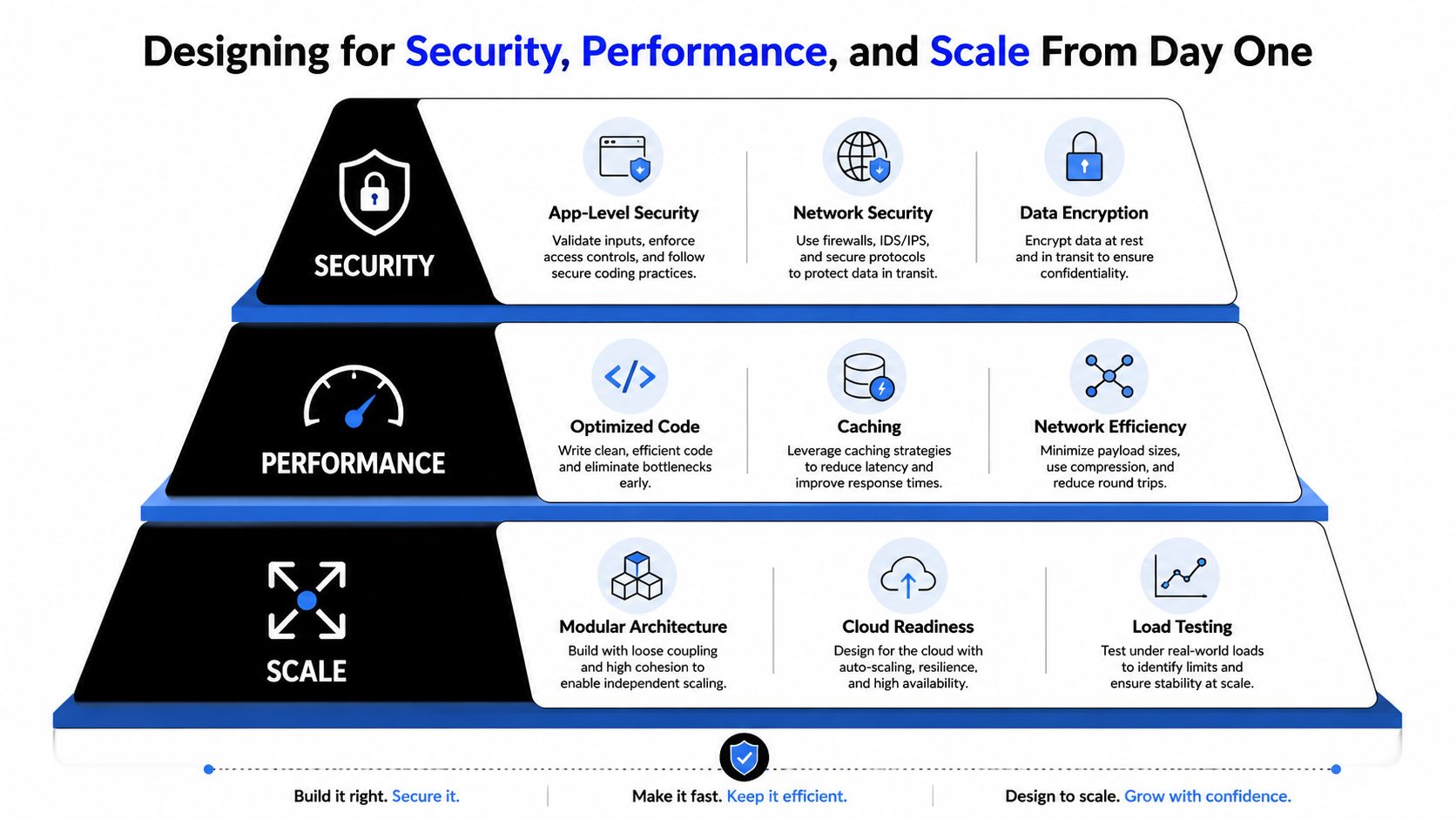
Designing for Security Performance and Scale From Day One
Security, performance, and scalability should shape the first architecture diagram. Retrofitting them after launch is expensive because the team must change data flows, permissions, deployment processes, and sometimes the user experience itself.
Build security as a fleet-wide system
App-level controls matter, but enterprise security can't stop at the app package. NIST SP 800-124 Rev. 2 recommends enterprise mobility management, mobile threat defense, and mobile application vetting as components of a layered mobile security program.
That means the architecture should account for heterogeneous and partly unmanaged devices. Establish strong identity, least-privilege authorization, encryption in transit and at rest, secure secrets handling, device and session policies, application vetting, and response workflows. The organization also needs audit trails that explain who accessed data, what action occurred, and how the team handled suspicious activity.
Code protection deserves attention before runtime defenses. One cited analysis reported that about 86% of 135 popular apps had known security flaws, while only 14% had minimal risk. Zimperium also reported that over 60% of iOS apps and up to 34% of Android apps lacked basic code protection. These figures come from the security research summarized by Guardsquare's mobile application security release. The lesson isn't to chase a perfect score. It's to make application integrity, secrets protection, dependency review, and release verification normal engineering work.
Design continuity for unreliable networks
Offline-first apps need a deliberate data model. Local persistence stores work safely on the device, while synchronization reconciles local changes with the server after reconnection. Writes should be idempotent, meaning a retry doesn't create duplicate orders, visits, or clinical records. Conflict rules should be explicit, and background work should respect battery, memory, and CPU limits.
An enterprise-grade Xamarin and Azure case study reported a 98% offline sync success rate, synchronization latency below 1.2 seconds after reconnection, memory usage under 120 MB, and CPU utilization below 10% during background sync. Those results are tied to the implementation described in the offline synchronization case study, not a universal promise for every app.
Design test: Disconnect the device, complete the most important workflow, terminate the app, and reconnect later. If the team can't explain what happens to each write, the offline design isn't finished.
For scale, use stateless APIs that can scale horizontally, asynchronous job queues for expensive AI generation, CDN delivery for generated content, and server-side subscription validation where paid access applies. These patterns separate immediate user interaction from resource-intensive work, so a burst of demand doesn't force every mobile request to wait on the same process. Load testing, caching, pagination, and bounded payloads complete the picture.
For implementation guidance on protecting mobile products, consult these mobile app security best practices. Security and speed don't compete when the team designs both as system properties.
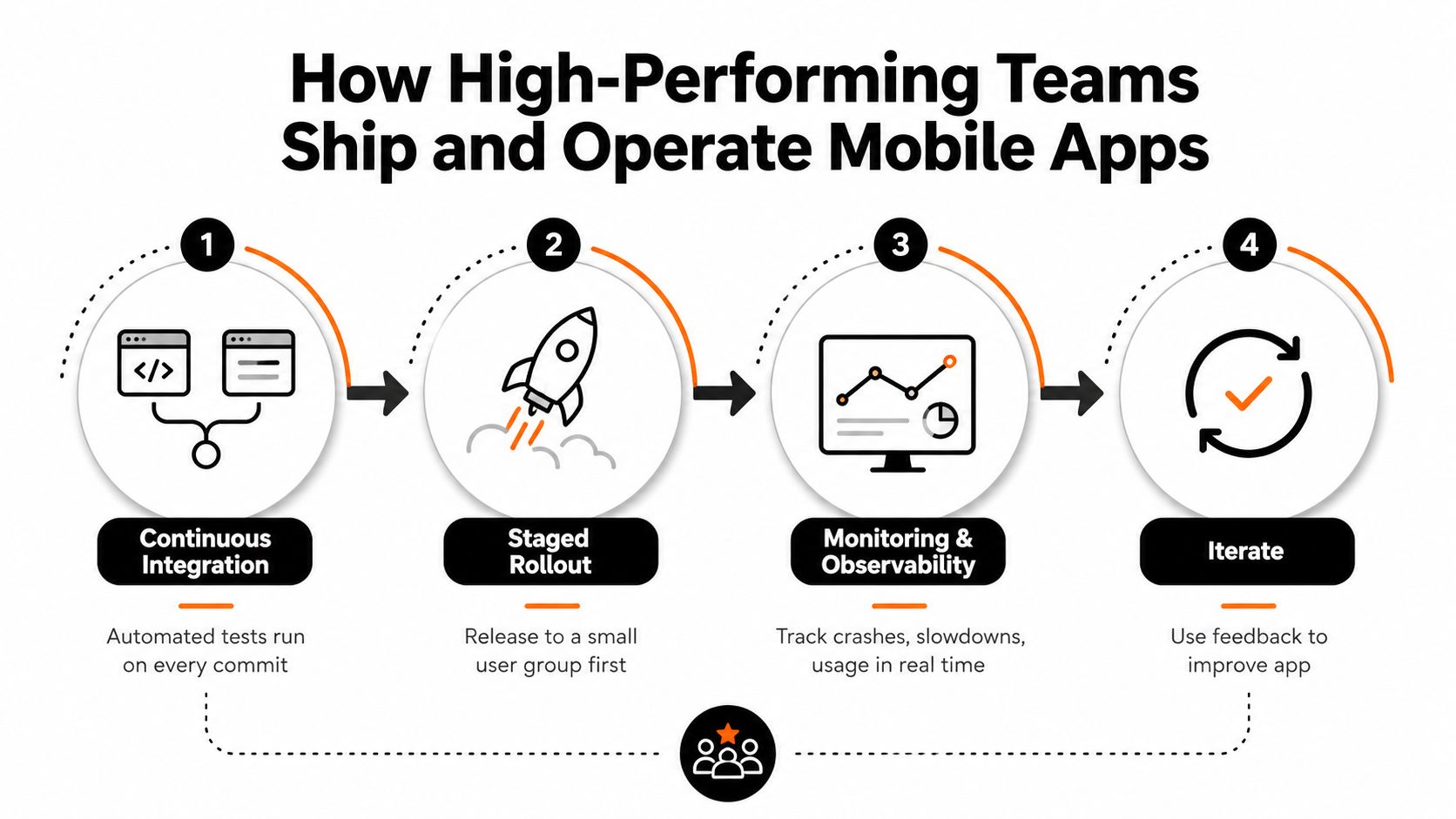
How High Performing Teams Ship and Operate Mobile Apps
A reliable release process is an operating system for the product. It tells engineers how code moves, tells product managers what evidence supports a release, and tells support teams where to look when something breaks.
Create a repeatable delivery loop
A strong mobile team connects four practices:
- Continuous integration: Every change runs automated unit, integration, and UI checks before it becomes a release candidate.
- Staged rollout: The team releases to a controlled audience first, checks results, and expands only when the evidence is acceptable.
- Monitoring and observability: Crash reporting, latency tracking, logs, and usage signals reveal what users experience in production.
- Iteration: Product and engineering teams use those signals to fix defects, improve workflows, and retire features that create unnecessary complexity.
Feature flags let teams separate code deployment from user exposure. That separation supports safer experiments and gives operators a way to disable a malfunctioning capability without waiting for a full store release. Regulated teams should also preserve release notes, approvals, test evidence, and access records so an auditor can follow the decision path.
Staff for ownership, not just launch
The right team depends on the product surface and existing skills. A durable group usually combines product management, UX design, mobile engineering, backend engineering, quality assurance, and operational ownership. QA shouldn't arrive only at the end. Automated tests protect repeatable behavior, while manual testing covers device differences, accessibility, network conditions, and workflows that scripted checks can't fully represent.
Wonderment Apps' Managed Projects practice is one example of a delivery model that assembles engineers, designers, QA professionals, and project managers around project needs. Its broader staffing capabilities include React, .NET, Java, iOS, Android, WordPress, automated and manual QA, product management, and UX design. Leaders should compare any partner on communication, technical ownership, testing discipline, and post-launch support, not just on the number of developers offered.
Operating principle: The team that launches the app should leave behind a system another team can understand, monitor, and safely change.
Set a regular operating rhythm. Review crashes and slow transactions, inspect support themes, examine release health, and prioritize technical debt alongside customer features. That rhythm keeps reliability visible before a crisis turns it into the only priority.
Modernizing With AI and Building Apps That Last
A claims team may spend weeks answering the same policy questions while a customer app waits in the backlog for a smaller improvement. AI modernization can address both problems when leaders treat it as a portfolio and governance decision. Start with one workflow that has a measurable business outcome, then expand only after the team understands accuracy, permissions, response time, and cost.
The application does not need a full replacement. An assistant can first support employees, summarize documents, or route requests. Later, the same capability may support customer service, recommendations, or workflow automation. This staged approach protects the existing product while testing whether AI deserves a larger place in the roadmap.
Keep orchestration on the server, rather than distributing model logic throughout the mobile client. The client can stream generated tokens through SSE or WebSocket. The server should handle authentication, tool access, retries, model selection, and policy enforcement. Keep tools and functions to fewer than 10 per namespace, since overlapping or unclear tools make model behavior harder to control. The architecture is outlined in this practical guide to AI agents in mobile apps.
Treat prompts as governed product assets
A prompt affects behavior, tool access, operating cost, and the review required when a model changes. Storing prompts in scattered source files makes those decisions difficult to trace. A prompt management layer gives the product team a shared record of what changed and why.
Wonderment Apps offers a prompt management system with:
- Prompt vault and versioning: Store prompts centrally, compare revisions, and roll back behavior when needed.
- Parameter manager: Organize parameters for internal database access and application connections.
- Logging across integrated AI systems: Record activity across the models and services connected to the product.
- Cost manager: Show cumulative AI spend as usage grows.
This layer lets the mobile or desktop interface remain stable while teams adjust prompts, orchestration, and model routing behind it. It also turns modernization into a portfolio choice. Leaders can fund small experiments, retire weak ones, and expand capabilities that produce reliable value instead of committing the whole roadmap to one model.
Task-specific agents are moving into product experiences. One forecast projects adoption in 40% of enterprise applications by the end of 2026, compared with less than 5% in 2025. The figures are projections from this enterprise mobility strategy analysis, not a universal adoption rate.
Internal skills matter as much as platform decisions. AI for industries courses can connect AI concepts to sector workflows, while this guide to AI in mobile apps offers mobile-specific architecture ideas.
Costs Checklists and Industry Playbooks for Your Next Move
Enterprise mobile cost comes from more than screens. Team composition, backend integration, identity, compliance, device testing, offline synchronization, observability, support, and AI usage all influence the total effort. A cheaper first release can become expensive if it creates duplicated platform work or leaves governance for later.
Use this checklist before selecting a partner:
- Portfolio fit: Can the team prioritize the backlog rather than accept every request?
- Architecture ownership: Can it explain why native, cross-platform, offline-first, or API-driven design fits the workflow?
- Security evidence: Will it document identity, encryption, app vetting, device policy, and incident response?
- AI governance: Can it manage prompts, tools, logs, model changes, permissions, and cumulative cost?
- Operating support: Will it monitor, test, release, and improve the product after launch?
- Industry understanding: Can it adapt the experience for ecommerce, fintech, healthcare, media, SaaS, nonprofit, or public-sector needs?
For ecommerce, prioritize reliable catalog, personalization, checkout, and operational workflows. Fintech needs identity, auditability, and strong data protection. Healthcare needs user-centered experiences that respect sensitive information and unreliable working environments. Media needs efficient content delivery and discovery. Public-sector teams need accessible, maintainable services with clear accountability.
The right partner helps you turn a backlog into a governed portfolio, modernizes existing software without discarding useful systems, and explains trade-offs in business language. Start by ranking workflows according to user value, risk, integration complexity, and long-term ownership.
Wonderment Apps helps organizations design, build, and modernize web and mobile products with UX, backend architecture, QA, AI integration, and ongoing engineering support. Visit Wonderment Apps to discuss your enterprise mobile development roadmap and request a focused conversation about scaling your app, controlling AI operations, and building for the years ahead.