


Server side rendering is when the server generates HTML on each request and ships it to the browser, so people see real content before JavaScript finishes loading. In a 2025 comparison of content-heavy web apps, client-side rendering averaged over 27 seconds for Largest Contentful Paint, while server-side rendering averaged around 8 seconds under 3G throttling, which is why this topic matters for real users, not just architecture diagrams. The benchmark study makes the trade-off easy to understand, slow networks punish client-first rendering, while server-first rendering gives the browser something useful much earlier.
That's the practical promise behind SSR, and it's also why teams building ecommerce, media, and app-like customer portals keep coming back to it. It's not a magic switch, though, it's a rendering model with clear strengths, clear costs, and a few implementation details that matter a lot once the app moves past the prototype stage.
What Server Side Rendering Actually Means
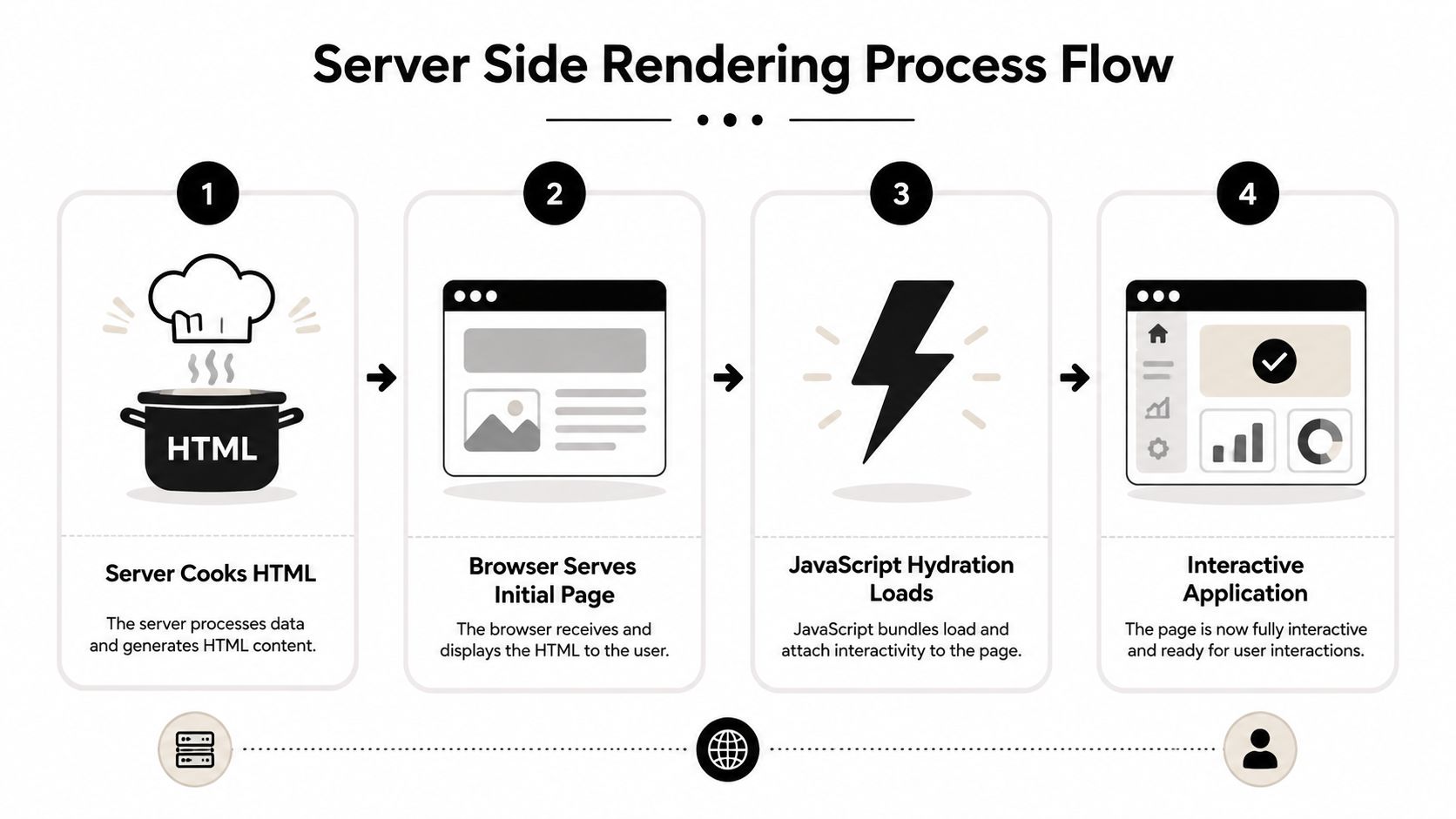
Server side rendering starts with the server, not the browser. The server builds the HTML first, sends back a page that already contains content, and JavaScript arrives later to make that page interactive. The useful part is visible immediately, even if the interactive layer is still loading.
A simple analogy helps here. CSR ships an empty room and asks the browser to furnish it. SSR ships the room with the furniture already in place, then adds the wiring and switches so everything works.
The five-step request flow
A standard SSR request has five concrete steps. First, the browser sends an HTTP request. Second, the server fetches the data it needs. Third, the server pre-renders HTML. Fourth, the server returns that HTML. Fifth, the browser downloads JavaScript for hydration, which attaches event handlers and reconnects the page to the component tree. DebugBear's SSR walkthrough lays out that flow clearly, and it is the part people often miss when they assume SSR is just a faster way to send markup.
Practical rule: if a page can show useful content before hydration finishes, SSR is doing real work for you.
That distinction matters because hydration is not the same thing as rendering. In React-based setups, the browser can display the HTML immediately, then hydration makes buttons, forms, and dynamic UI work. That four-step infographic illustrating the server-side rendering process from HTML generation to a fully interactive web application. shows the sequence in a compact way, and the same lifecycle is described in the React rendering API documentation used by modern frameworks.
Why request-driven rendering changes the mental model
SSR is request-driven rather than build-time. A page using SSR is regenerated on each request, so the server can use fresh data, route-specific content, or user state at the moment someone asks for the page. That is different from static generation, where the HTML is prepared ahead of time and reused until something changes.
The trade-off is easy to picture once the flow is clear. SSR gives the browser something useful sooner, especially on slower connections, but it also means the server has more work to do on every visit. The browser gets the first paint earlier, while the application still pays the cost of hydration and the extra server work behind the scenes.
For teams choosing an architecture, that difference changes the decision itself. If the page needs current inventory, personalized account details, or search results that should not wait for a rebuild, SSR fits the problem better than a static page. If the content rarely changes, a prebuilt approach is simpler and cheaper to run.
That gap is why SSR keeps showing up in modern stacks. The benchmark comparison makes the pattern visible in a way architectural diagrams do not.
SSR vs CSR vs SSG at a Glance
These three rendering models solve different problems, so the useful question is not “which one is best,” it is “which one fits this route.” SSR generates HTML on the server for each request, CSR sends a shell and lets the browser build the page, and SSG prebuilds HTML ahead of time.
| Criterion | SSR | CSR | SSG |
|---|---|---|---|
| Where HTML is created | On the server for each request | In the browser after JavaScript loads | At build time |
| Freshness of data | High, because content is request-driven | High after client fetches finish | Lower unless you rebuild or revalidate |
| First-load behavior | Strong for visible content and crawlable markup | Often slower to first meaningful paint | Very fast for content that rarely changes |
| Best fit | Dynamic pages, ecommerce, media, authenticated surfaces | Highly interactive app shells, dashboards | Marketing pages, docs, evergreen articles |
| Main weakness | More server work and more operational complexity | Slower visible content on weak networks | Stale content if updates happen often |
The practical difference shows up in the first paint. In the Next.js docs, the benchmark set reported FCP of 0.5 seconds on Wi-Fi for SSR versus 1.4 seconds for CSR, and 1.2 seconds on 3G versus 3.5 seconds for CSR. That same benchmark set helps explain why SSR stays common on routes where the user needs visible content right away. In the same review cycle, SSR with client data fetching also cut LCP from 4.1 seconds to 1.61 seconds, which is the kind of difference product teams feel when they compare a server-rendered page with a browser-built shell. The point is simple, server-rendered HTML changes the loading experience before hydration finishes.
Where SSG and modern hybrids fit
SSG still works well for content that rarely changes. If your page is mostly static, prebuilding removes work from the request path and keeps delivery simple. Modern hybrid techniques, like partial pre-rendering and incremental static regeneration, sit between the labels and let teams mix fast initial delivery with controlled freshness.
A rendering strategy should follow the route, not the framework brochure.
For a product detail page, SSR can make more sense than CSR because the user needs real content immediately and search engines need crawlable HTML. For an internal analytics dashboard, CSR may be a better fit if the page is interactive and the SEO value is low. If your team is still choosing between these models, the SSR vs CSR comparison guide gives a useful side-by-side reference.
The Four Architectural Patterns Behind Modern SSR
server side rendering is not one architecture. Teams usually mean one of several patterns, and each one changes who does the work, when the HTML appears, and how much logic still runs in the browser. A route can use request-time SSR, streamed SSR, edge-rendered SSR, or a hybrid setup that adds hydration patterns on top.
Traditional request-time SSR
Traditional SSR means every page hit triggers server rendering. The browser requests a route, the server fetches data, it generates HTML, and the response returns as a ready-to-display document. The flow is easy to understand, but it also means the server carries more of the work on every visit.
This is the version many developers picture first. It is also the easiest version to explain outside engineering, because the server finishes the expensive step before the browser receives anything.
Hydration and React's modern entry points
Hydration is the step that turns a server-rendered page into a live app. In React-based SSR, modern server entry points use renderToPipeableStream or renderToReadableStream, and the client hydrates with hydrateRoot, replacing the older ReactDOM.hydrate workflow. That shift matters because the old mental model of “render on the server, then patch it in the browser” is too simple for current React apps.
The important distinction is timing. HTML can arrive before every interactive behavior is ready, so teams have to separate what users can see from what they can click.
Streaming SSR and edge SSR
Streaming SSR changes the perceived speed story because the server can flush HTML in chunks rather than waiting for everything to finish. Users can see the first useful parts of the page sooner, especially when some data dependencies are slower than others.
Edge SSR moves the renderer closer to the user. The architectural goal is straightforward, reduce network distance so the request spends less time traveling. The trade-off is just as straightforward, closer compute means tighter runtime limits, more careful caching, and better observability are needed.
Rule of thumb: if the page needs fresh HTML and the network is the bottleneck, SSR is worth a closer look. If the route is mostly static, streaming and edge placement may matter more than raw rendering style.
Performance, SEO, Caching, and Security Implications
SSR earns its place when the first response has to do real work for the user, not just set up a shell for the browser to finish later. One benchmark in the brief shows why teams still keep it in the architecture set, SSR with client data fetching cut LCP from 4.1 seconds to 1.61 seconds. That is a large gap in the moment that matters most, the page becoming useful quickly.
Performance and perceived speed
Performance is not only about how much JavaScript runs. It is also about when the page shows meaningful content, and when the user can start interacting without waiting on extra client work.
The web.dev guidance ties perceived speed to FCP, TTFB, and INP, which fits SSR well because the server can send visible HTML before the browser finishes loading every script. That matters most on slower connections or on pages where data would otherwise require another round trip before anything useful appears. The web.dev guidance makes the same practical point from an architecture angle, SSR can reduce client-side fetching and templating work that would otherwise delay the first useful paint.
SEO and discoverability
Search crawlers and social previews work better when the page arrives as full HTML. SSR gives them content on the first response, so indexing and link previews do not depend as heavily on JavaScript execution.
That is why SSR still appears in content-heavy systems, especially when editorial teams need each route to be discoverable as soon as it ships. The page is easier for crawlers to read, and the metadata is easier for sharing systems to pick up correctly.
Caching and security
Caching is what makes SSR practical at scale. A server that renders every request from scratch is doing the most expensive version of the job, so teams usually cache at the edge, cache by route, or use stale-while-revalidate patterns to keep fresh pages moving without recomputing everything every time. A useful companion here is caching guidance for Node.js applications, especially if your team is deciding what should live in memory, what should be shared, and what should stay short-lived.
Security is more operational than magical. SSR keeps more logic and sensitive decisions on the server side, which reduces how much has to ship in the browser bundle. It also adds responsibility, because the renderer becomes part of the production surface and needs monitoring, logging, and failure handling just like any other service.
Implementation Patterns and Best Practices by Framework
Framework choice shapes day-to-day SSR work. A Next.js team, a Nuxt team, and an Angular Universal team can all say “SSR,” but each one is making different trade-offs about where data loads, how much rendering happens on the server, and how much work is left for the browser after the first response.
Next.js, Nuxt, and Angular Universal
In Next.js, the Pages Router still uses getServerSideProps for request-time rendering, while the App Router shifts more responsibility to server components and route-level data fetching. React server-side rendering guide is a useful companion if your team is mapping those ideas to an actual React codebase, because it keeps the discussion close to how request-driven rendering behaves in practice.
Nuxt teams usually think in terms of the server engine and request-time data hooks, while Angular Universal teams rely on Angular's SSR support and lifecycle integration. The names differ, but the core implementation questions stay the same. What runs on the server, what runs in the browser, and what must wait for hydration.
That is the point where framework choice becomes architectural, not just syntactic. If your team needs mostly static content with a few dynamic islands, one framework may feel simpler. If the page depends on per-request data and authenticated state, another may fit better, even if the server work is heavier.
Caching and hydration habits that keep SSR usable
The biggest mistake is treating SSR as the end of the performance problem. If the HTML arrives quickly but the bundle is bloated, the user still waits before the page responds to clicks, input, or scrolling. Selective hydration, lazy hydration for below-the-fold components, and smaller client bundles matter as much as the server renderer itself.
The practical test is simple. Ask whether a component needs to be interactive on first view, or whether it can stay static until the user reaches it. Header navigation, search, and checkout actions often need earlier hydration. Carousels, analytics widgets, and secondary panels can usually wait.
For teams adding AI features into an existing product, a prompt management system can fit into this same architecture without forcing a rewrite of the admin layer. Wonderment Apps builds that kind of toolkit, including a prompt vault with versioning, a parameter manager for internal database access, a logging system across integrated AIs, and a cost manager that tracks cumulative spend.
Keep the server responsible for first paint, keep the browser responsible for interactivity, and keep the bundle as small as you can.
SSR works best when the team treats it like a split responsibility model. The server assembles the first useful page, then the browser takes over only where interaction justifies the extra cost.
Real-World Use Cases Across Ecommerce, Fintech, Healthcare, and Media
Ecommerce is the clearest SSR case because product pages have two jobs at once, they need to be crawled and they need to feel immediate. A shopper landing from search should see the product, the price, and the key details without waiting for a client app to finish assembling the page.
Fintech often cares about trust and controlled disclosure. A dashboard, onboarding flow, or account summary can be rendered on the server so the user sees a complete, authenticated page quickly, while sensitive logic stays out of the browser bundle. That doesn't eliminate complexity, but it keeps the first useful screen under tighter control.
Healthcare uses SSR for a different reason, discoverability and accessibility. Medical content often needs to be crawlable, readable, and available quickly on weaker devices. Media teams feel the same pressure from another angle, they need editorial freshness and breaking-news speed without making readers stare at a spinner.
The hybrid reality matters here. Most production products don't use one rendering model everywhere, they mix SSR, SSG, and CSR based on route type, data freshness, and how much interactivity a page needs.
Migration Checklist and the Modernization Shortcut
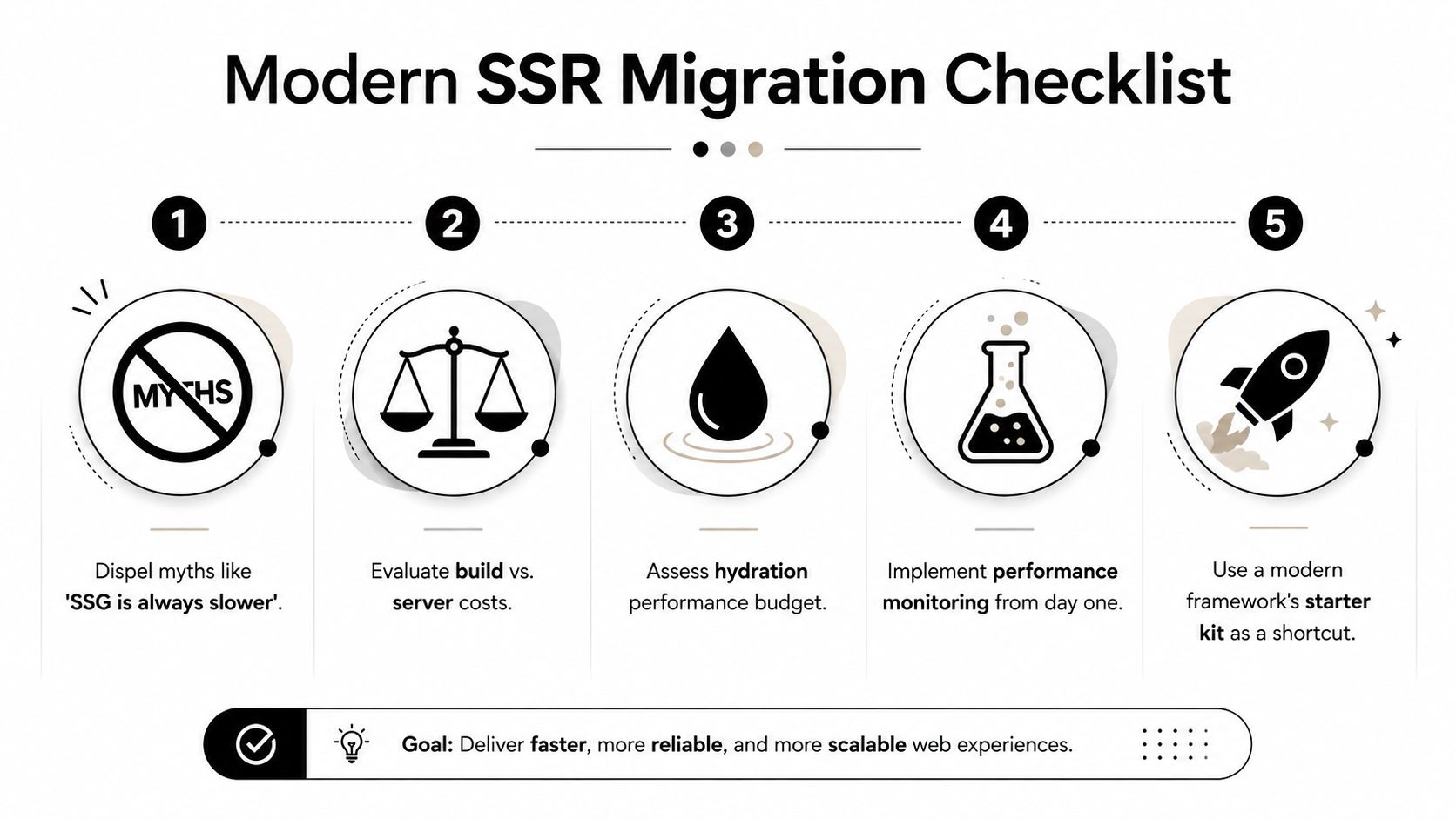
A useful SSR migration starts by clearing up the usual misunderstandings. SSR is not automatically slower, and the benchmark numbers discussed earlier show that it can improve the first visible render on constrained networks. SSR does not hurt SEO by default, because the page content arrives in HTML and is easier for crawlers to read. It also is not free, since the server does more work and the client still has to hydrate interactive parts.
A practical rollout path
Start with the routes that already carry the most traffic or the most business value. From there, decide where data must stay fresh, what can be cached safely, and how much hydration the team can support before interactivity starts to matter.
- Audit current Core Web Vitals: Use FCP, TTFB, and INP as the baseline, since web.dev frames them as key measures of perceived speed and responsiveness.
- Pick candidate routes first: High-value landing pages and product surfaces usually justify SSR before internal tools do.
- Define the cache story early: Route caching, edge caching, and invalidation rules shape the cost profile more than many teams expect.
- Set hydration boundaries: Decide which components must be interactive immediately and which can wait.
- Instrument before launch: Log server latency, hydration delays, and regressions from the first deployment.
If you are modernizing an app and want to add AI features along with a new rendering stack, Wonderment Apps can help with the application layer and the prompt management layer together, which keeps the admin tooling from becoming a separate project. That matters when the product team wants faster pages, controlled AI workflows, and a stack that can last for years.
If you are planning an SSR migration or trying to add AI features to a modern web app without rebuilding the entire admin experience, visit Wonderment Apps and talk through the architecture with a team that ships web, mobile, and AI-enabled products together.