

60% of data backups are incomplete, and 50% of backup restores fail according to Avast-based reporting, which is a brutal way to start a conversation about resilience. A lot of teams believe they've bought safety when they've really only bought storage. That gap is why backup and disaster recovery have to be treated as one operating system for business continuity, especially when AI-enabled apps, customer portals, and internal tools all depend on the same recovery chain.
Why Backups Without a Recovery Plan Still Fail
A backup job can finish cleanly and still leave you stranded during an outage. The same reporting that cites 60% incomplete backups and 50% failed restores also says only 54% of organizations have a company-wide disaster recovery plan, and only one in four regularly test it, which highlights the primary weakness. A copy of data is not the same thing as a working recovery process, and that distinction matters whether you run ecommerce, fintech, healthcare, media, or public-sector systems. Avast-based disaster recovery reporting
Backup is the creation of copies. Disaster recovery is the process for restoring applications, data, and IT resources after an outage. IBM makes that split explicit, and it's the right mental model for product teams too, because a modern app isn't just files, it's identity, configuration, integrations, and the workflows wrapped around them. IBM on backup and disaster recovery
For teams shipping AI features, the recovery chain gets even longer. A prompt vault, prompt versioning, internal database access parameters, logging, and cost tracking all become part of operational continuity once those services are customer-facing. If a platform can't restore those dependencies in the right order, the app may come back, but the experience won't.
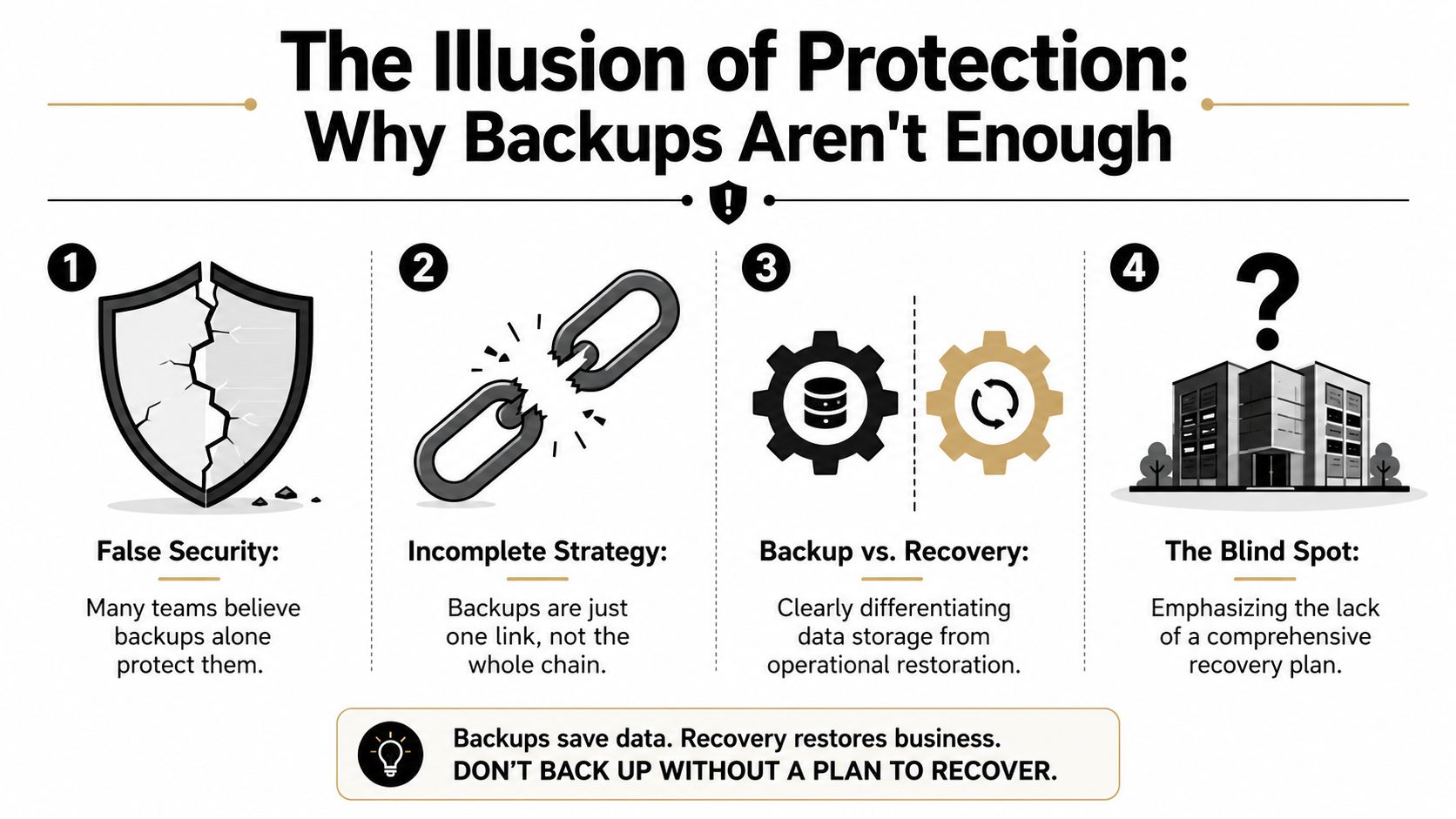
Practical rule: If the restore path hasn't been tested end to end, the backup is still a theory.
The failures to watch for are usually boring, which is why they get missed. Incomplete backups, untested restores, missing dependencies, stale credentials, and broken sequencing are the usual reasons a “protected” system still goes dark. For outage planning, that's the list that matters, not the marketing labels on the backup product.
See how these risks show up in real outage planning in this outage preparation guide.
Defining RTO and RPO That Actually Match Your Workloads
RTO and RPO are the two numbers that keep backup and disaster recovery honest. RTO, or Recovery Time Objective, is how long a system can be down before the business starts to hurt. RPO, or Recovery Point Objective, is how much data loss you can tolerate, measured by time since the last usable restore point. IBM lists both as core planning objectives, along with business impact analysis, risk analysis, dependency documentation, compliance review, and continuous testing. IBM on disaster recovery planning
A single global target sounds neat and usually fails in practice. A storefront, a warehouse system, and a reporting dashboard don't deserve the same recovery promise because they don't cause the same damage when they're offline. The storefront is customer-facing and revenue-sensitive. The warehouse system may tolerate a slightly different pace if operations can queue work safely. The dashboard is important, but it usually isn't the same emergency as checkout.
Here's the logic in plain English. If a workload can't afford much downtime, its RTO needs a tighter design, which usually means faster failover, closer replicas, or a more automated recovery path. If a workload can't afford much data loss, its RPO needs more frequent protection or a strategy that narrows the gap between writes and recoverability.
A simple tiering worksheet
| Workload | Business impact if down | RTO target | RPO target | Notes |
|---|---|---|---|---|
| Customer storefront | Direct revenue and trust loss | Tightest target | Tightest target | Needs the fastest restore path |
| Warehouse or fulfillment system | Operational delay | Moderate target | Moderate target | Can sometimes queue work safely |
| Analytics dashboard | Decision delay | Looser target | Looser target | Usually not customer-critical |
Useful habit: Set the target by the cost of being wrong, not by what the team can comfortably automate.
This is also where cloud migration planning and recovery planning overlap. If the app is moving, the recovery targets need to move with it, because the architecture you choose changes how fast you can restore, how much data you can afford to lose, and how many dependencies have to come back together. Cloud migration planning for apps
Choosing an Architecture That Fits Your Stack
The right backup and disaster recovery architecture is usually the one that matches your failure mode, not the one with the most features on a slide. On-premises setups give you direct control, cloud-native designs make scaling and remote recovery simpler, and hybrid models split the difference by keeping some systems warm while archiving colder data elsewhere. The trade-off is always some mix of recovery speed, recurring cost, and operational complexity.
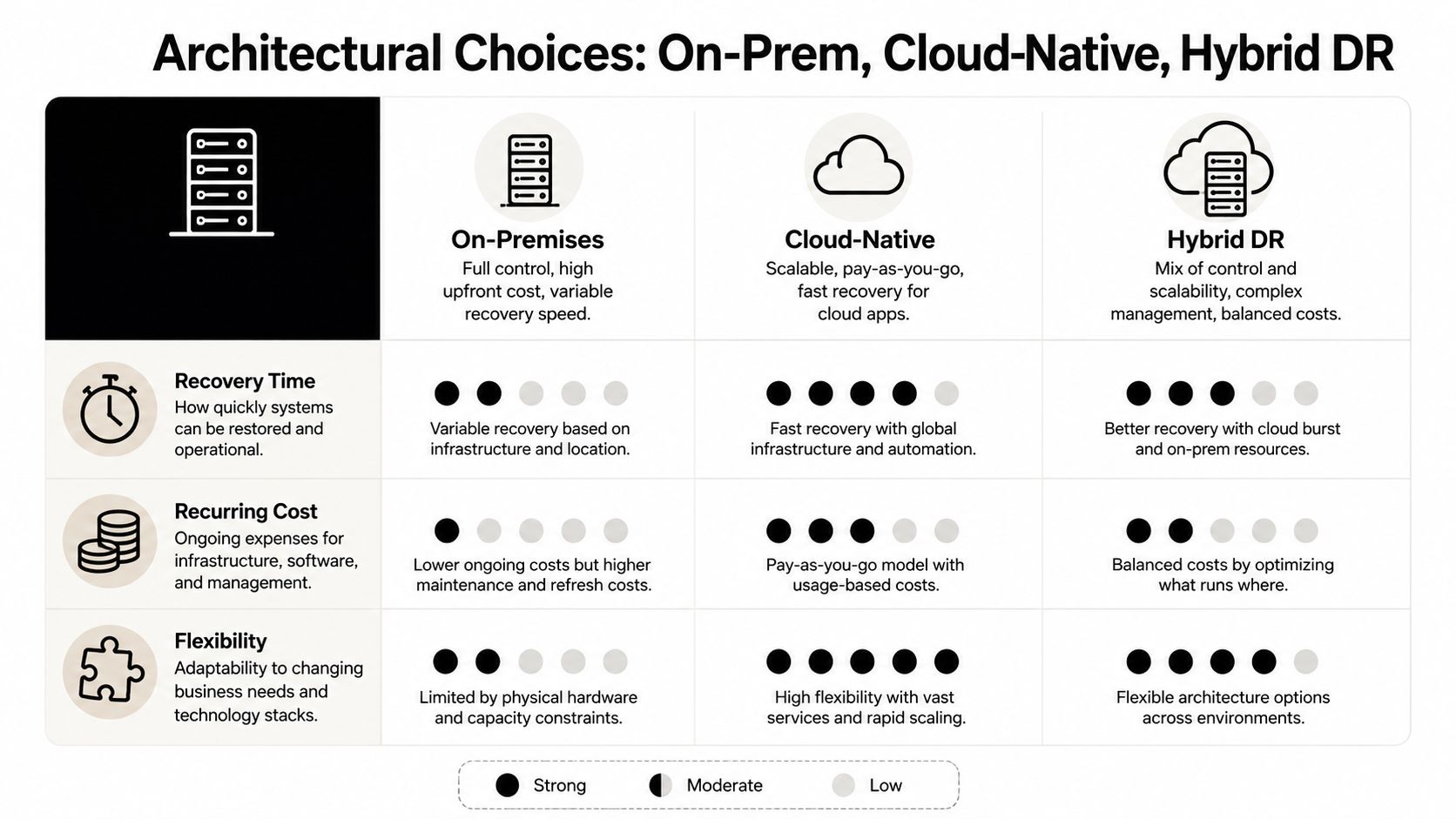
The comparison below is intentionally practical. It doesn't pretend one approach wins everywhere, because the best answer changes with workload type, compliance pressure, and how much downtime the business can absorb.
| Architecture | Typical RTO | Typical RPO | Relative cost | Best fit |
|---|---|---|---|---|
| On-Premises | Can be fast if everything is local and prepared | Depends on backup cadence | Often higher to maintain | Teams that want direct control and have stable infrastructure |
| Cloud-Native | Often faster for cloud-hosted apps | Can be tighter with automated replication | Usually easier to scale | Cloud apps, distributed teams, variable demand |
| Hybrid | Balanced, but more moving parts | Depends on how tiers are split | Balanced, sometimes complex | Businesses that want warm recovery for core systems and cold archives for the rest |
For an ecommerce platform with seasonal spikes, cloud-native or hybrid usually makes more sense because scaling pressure changes fast and recovery needs to follow traffic. For fintech, predictable restore behavior matters more than broad flexibility, so the architecture needs to be boring in the best way. Healthcare teams often care about data residency, access control, and continuity under regulatory scrutiny, which pushes them toward designs that separate hot systems from archival storage without losing auditability.
The hybrid pattern deserves more attention than it usually gets. Hot systems can replicate to a second region, while cold archives live in object storage. That setup won't be the simplest to manage, but it gives teams a realistic middle ground when a full secondary site is too expensive and cloud-only is too loose for the workload mix.
Decision test: If your team can't explain where the live app, the replica, the archive, and the credentials all sit, the architecture is too clever.
The cloud-native path is easier to understand when you're already operating that way, which is why this cloud-native architecture guide pairs well with DR planning.
Backup Strategies That Actually Restore Cleanly
Backup strategy sounds like a storage conversation until restore day exposes the hidden cost of the wrong choice. Incremental backups only copy what changed since the last backup, which saves space and bandwidth but can create a longer restore chain. Snapshots are excellent for fast rollback, especially after a bad deployment, but they're only as good as the consistency of the system they captured. Continuous data protection narrows the recovery point gap, but it adds more moving parts and more operational discipline.
The cleanest way to choose is to start with the failure you expect. If you're protecting a code release or a short-lived configuration mistake, snapshots are often the sharpest tool. If you're protecting an active transactional system, the restore path matters more than the storage bill, which is where more frequent protection starts to make sense. If you're trying to reduce data loss across a busy workload, continuous protection can help, but only if your team can operate it.
A good default is to mix strategies by workload tier instead of forcing one method everywhere. Critical systems can use faster, tighter protection. Less sensitive environments can use simpler backup cycles with longer retention. That keeps the finance team from overpaying for the reporting dashboard while keeping the checkout path more defensible.
Plain rule: The backup method is only good if it makes the restore faster, safer, or more reliable for that specific workload.
The restore button is where strategy gets judged. Incremental chains can be perfectly fine until one link is missing. Snapshots can be nearly instant until an application dependency wasn't captured cleanly. Continuous protection can reduce the gap, but it still needs a recovery process that knows what to bring back first.
A simple selection guide helps:
- Use snapshots for fast rollback of systems with clear consistency points, like some deployment workflows.
- Use incremental backups when storage efficiency matters and restore time can be tolerated.
- Use continuous protection for higher-value data where the recovery point has to stay very small.
If the environment spans multiple workloads, mix the methods instead of arguing for one universal answer. That's the practical answer many organizations reach after the first real outage.
Security, Immutability, and Compliance by Industry
Security belongs in the design, not at the end of the purchase order. Encryption at rest and in transit is table stakes, but it doesn't solve the bigger problem of a backup set being altered, deleted, or encrypted by an attacker with valid access. That's why the modern 3-2-1-1 pattern matters, it extends the classic 3-2-1 backup rule by adding an immutable copy protected by air-gap or object-lock controls, so ransomware and destructive admin actions can't wipe out every restore point at once. 3-2-1-1 backup guidance, 3-2-1 backup rule overview
A fintech lead usually asks a different question than a platform engineer. The engineer wants to know if the backup is restorable. The fintech lead wants proof that the transaction data stayed intact and that chain-of-custody can stand up in an audit. That means the platform needs encryption, access control, logging, and immutable copies that can survive a mistake by someone with privileged permissions.
Healthcare brings a different mix. The pressure there isn't only about getting data back. It's also about preserving availability and integrity in a way that fits HIPAA expectations and keeps clinical or administrative workflows usable. If a restore brings back records but not access paths or application dependencies, the system still hasn't met the operational need.
Here's the control set I'd expect any serious platform to cover:
- Encryption at rest and in transit for data wherever it moves or sits.
- Key management basics that keep encryption keys controlled through their lifecycle.
- Immutable backup copies that resist deletion or alteration.
- Audit trails and restore logs that make recovery activity traceable.
- Role separation so one credential can't erase both production and recovery copies.
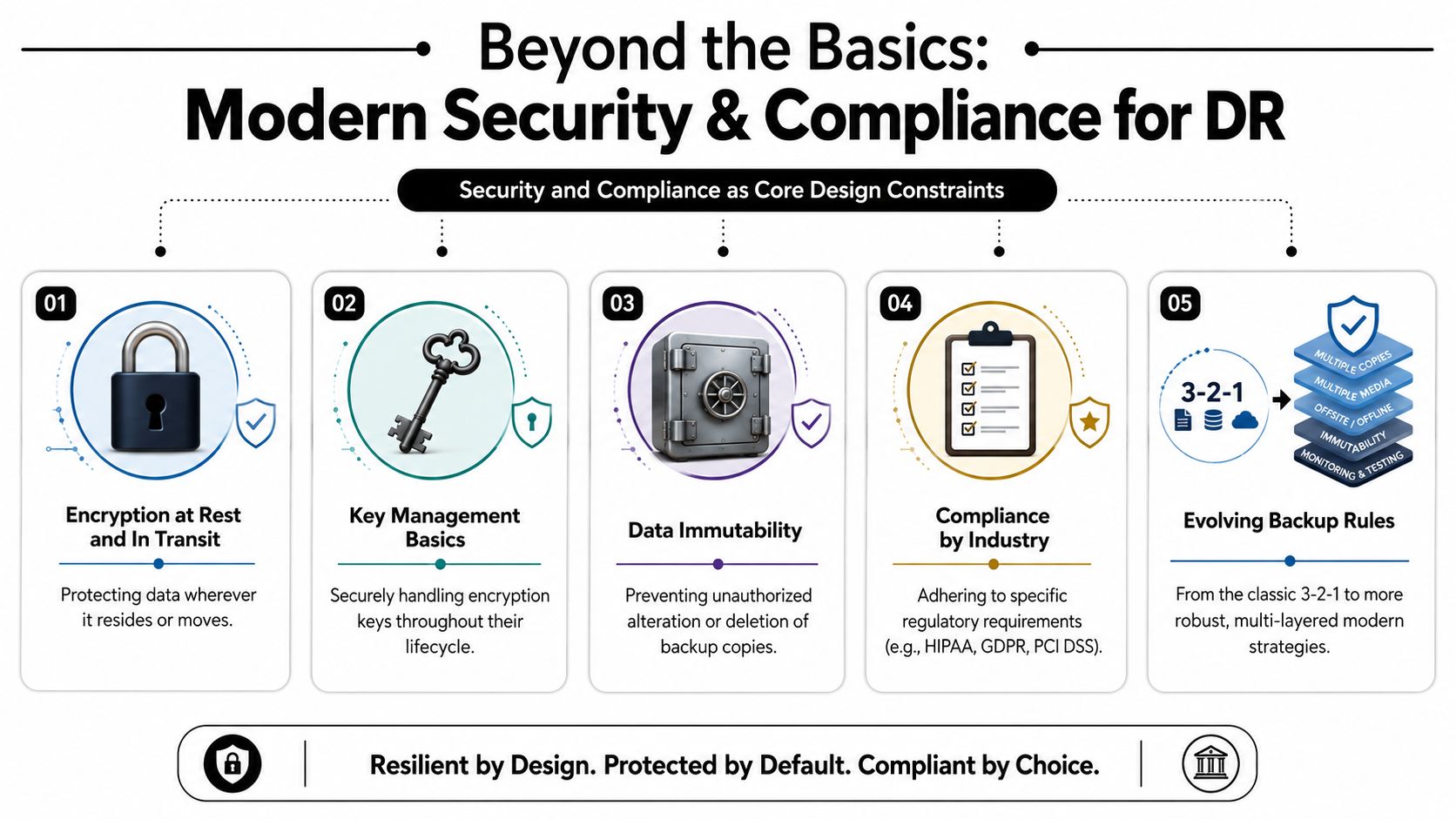
Modern compliance work is really about translating obligations into technical controls. If the business has to prove availability, protect integrity, and show that restore copies weren't tampered with, then the recovery design has to make those things visible, testable, and auditable. That's a more honest bar than “we have backups.”
Runbooks, Testing, and Proving Recoverability
A runbook is not a binder on a shelf. It's the script that tells your team what comes back first, who owns each step, what depends on what, and how to confirm the system is alive after the restore. Good runbooks include hardware, software, data, identities, network paths, third-party dependencies, and the order of operations needed to bring the service back without improvisation.
Testing is where the plan gets real. Guidance from U.S. continuity sources says disaster recovery plans should be inventoried, tested periodically, and updated after changes, and industry guidance goes further by recommending full-scope DR exercises at least annually for all systems, with more frequent testing for critical systems. AWS-style quarterly drills for mission-critical applications are a sensible benchmark because they force teams to keep the runbook current instead of treating it like documentation theater. Ready.gov business recovery planning, DR testing and failover validation guidance
A strong testing rhythm has three layers. First, tabletop walkthroughs let the team talk through the sequence without touching production. Second, restore tests validate that backups can be opened, mounted, and used. Third, full failover exercises prove that the application, its identities, and its dependencies can run in a real recovery path.
Runbook outline you can copy
- System name and business owner
- Critical dependencies and identities
- RTO and RPO targets
- Restore order
- Validation checks after restore
- Escalation contacts
- Rollback or failback steps
- Post-test update log
What breaks most often: Not the backup job, but the missing assumption about which service, credential, or API had to come back first.
The best recovery teams don't just test that data exists. They test whether the application can function after restore, including identity recovery and smoke checks at the end. That's how you prove recoverability instead of assuming it.
A Phased Rollout Plan and How Modern Toolkits Help
A rollout plan keeps recovery work from turning into a forever project. Start by discovering and tiering every workload, including the external dependencies and identity providers each one needs. Then define backup and recovery targets by criticality, implement the protections, and move into a repeated test-and-refine cycle. That order matters because teams often automate before they understand what they're protecting, and that's how blind spots survive.
Phase one is discovery. Phase two is design. Phase three is implementation and automation. Phase four is testing, review, and updates after every change. If you try to skip the dependency map, the first restore will remind you what you forgot.
For AI-enabled apps, the recovery chain now includes more than code and data. A prompt management system with versioning, a parameter manager for internal database access, logging across integrated AI services, and a cost manager for cumulative spend all shape how the app behaves after an incident. If those pieces aren't recoverable, the product may come back with the wrong prompt state, missing integrations, or broken access controls, which is a recovery failure even if the database is technically online.
That's where a centralized administrative layer becomes useful. It gives teams a single place to track prompt state, integration settings, and operational logs, so the app can resume cleanly instead of reconnecting from scratch. For product teams modernizing older software, that kind of control plane is the difference between restoring a service and restoring a working service.
A practical rollout checklist looks like this:
- Discover every workload and its downstream dependencies.
- Assign RTO and RPO by business tier, not by department habit.
- Choose the right backup pattern for each tier.
- Automate the restore path as much as possible.
- Test on a regular cadence and update the runbook after each drill.
If you're building or modernizing software, don't treat recovery as a separate operations problem. Treat it as part of the product design, because the customer experience only stays alive if the recovery chain does too.
Wonderment Apps helps teams build and modernize software that's ready for real-world disruption, including AI-enabled applications that need cleaner recovery chains, better integration control, and long-term resilience. If you want a partner that can help you design for continuity as well as launch, visit Wonderment Apps and take a closer look at how the right toolkit can keep your product online when it matters most.