

Cloud migration planning often begins at the moment an organization's current setup becomes painful. Releases slow down because environments are brittle. Reporting jobs fight with customer traffic. Security reviews take too long because nobody can clearly explain what talks to what. Then AI enters the roadmap, and the cracks widen. A personalization feature needs model access. Support wants AI-assisted workflows. Product wants prompt-driven search. Suddenly the question isn't just where your servers should run. It's whether your platform can support a very different operating model.
That's why cloud migration planning should be treated as the first move in AI modernization, not a one-time infrastructure cleanup. If you migrate without thinking about future model access, prompt governance, logging, and spend visibility, you can end up with a cleaner hosting bill and a messier application stack. The cloud gives you room to move. It doesn't create discipline by itself.
A lot of businesses are already making this shift. DuploCloud projects that by the end of 2025, over 94% of organizations will use cloud infrastructure, and 85% will be transitioning to a cloud-first approach. The same source says enterprise cloud migration projects average about $1.2 million and take roughly 8 months, which is why the planning phase deserves executive attention, not just technical enthusiasm (DuploCloud cloud migration statistics).
Your Starting Point Discovery and Assessment
When a company says, “We need to move to the cloud,” the first assumption is usually that the hard part is moving servers. It rarely is. The hard part is discovering what you run, who depends on it, and what breaks if one piece moves before another.
On-prem environments tend to grow like old city streets. There was a plan once. Then came shortcuts, workarounds, temporary integrations that became permanent, and a few systems nobody wants to touch because the person who built them left years ago. Good cloud migration planning starts by drawing a current-state map that business and technical teams both trust.
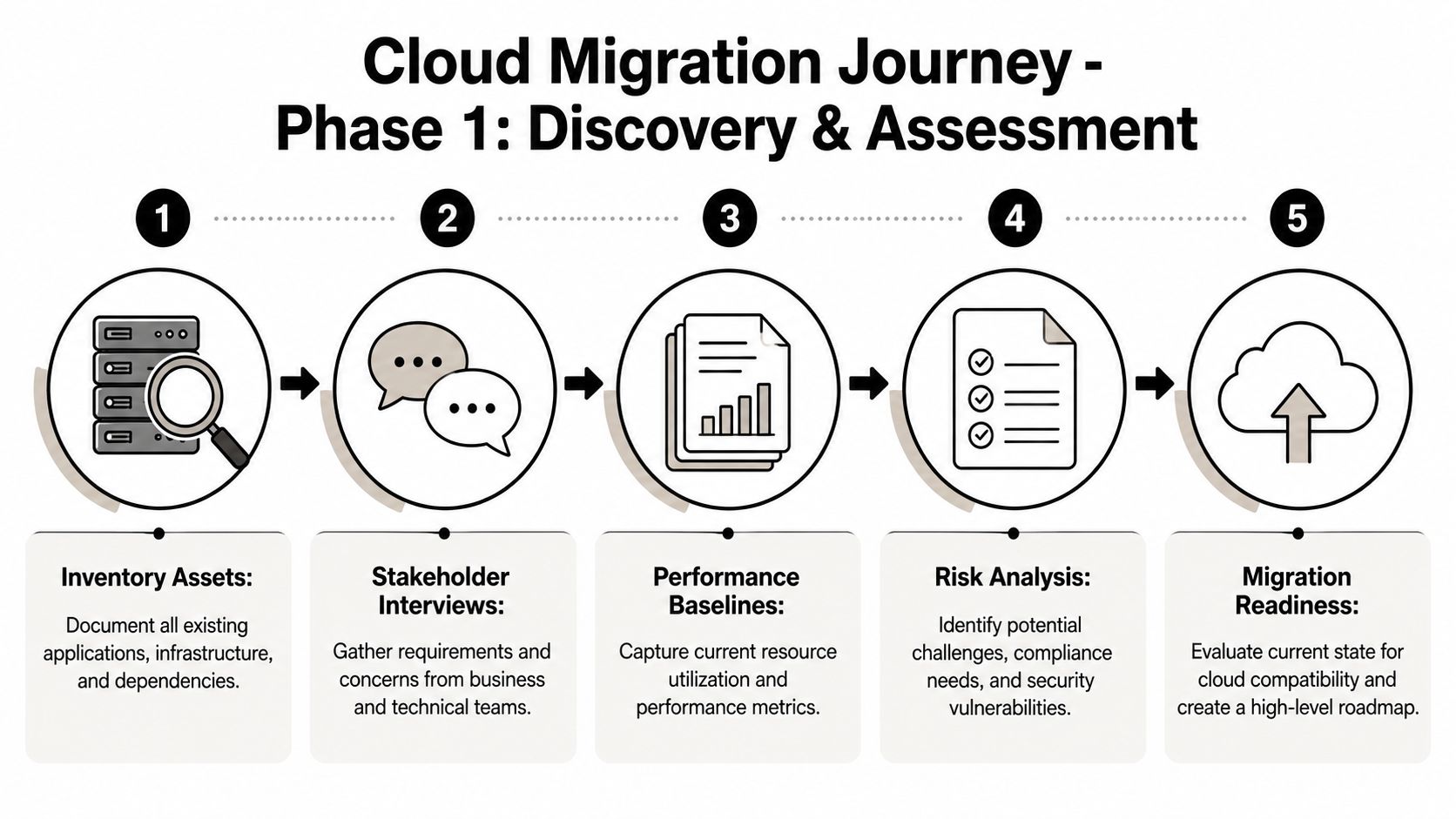
What to discover before you plan anything
A real discovery effort covers more than infrastructure inventory. You need to identify:
- Business-critical applications: Which systems generate revenue, support customers, or keep operations moving.
- Dependencies: APIs, databases, file shares, identity providers, scheduled jobs, and third-party services.
- Shadow IT: Spreadsheets, small tools, unmanaged scripts, or departmental apps that never made it into official diagrams.
- Performance baselines: Current response times, batch windows, peak loads, storage patterns, and failure points.
- Compliance and security constraints: Data handling rules, access boundaries, audit needs, and retention obligations.
If you skip this, your migration roadmap becomes fiction.
Practical rule: If an application owner can't explain what data the app needs, who uses it, and what upstream systems feed it, that workload isn't ready for scheduling.
Assess for the future state, not just the current one
This is also the right moment to ask a question many teams postpone for too long. What will this platform need to support after the migration?
If AI sits anywhere on your roadmap, the answer changes your architecture choices. You may need cleaner data boundaries, stronger observability, better secret handling, request logging, and a way to manage prompts and model behavior across environments. Those needs should influence network design, service boundaries, and access controls now, not after the migration has gone live and everyone is tired.
A phased, modernization-minded assessment often creates a better roadmap than a rushed lift-and-shift inventory. That's one reason older thinking about “move first, optimize later” keeps disappointing business leaders. There's useful context in Wonderment's piece on moving to the cloud, especially if you're trying to connect infrastructure decisions to longer-term product change.
What a strong assessment produces
By the end of discovery, your team should have these outputs:
- A workload inventory with owners, environments, and dependencies.
- A business impact view that ranks systems by criticality, not by volume.
- A readiness assessment showing what can move cleanly, what needs work, and what should stay put for now.
- A baseline KPI set so you can compare before and after migration outcomes.
- A future-state lens that includes AI-related governance requirements, not just compute and storage.
That's the map. Without it, the rest is guesswork.
Building Your Business Case and Strategic Roadmap
A migration without a business case turns into an expensive technical hobby. Infrastructure teams may still get pieces moved, but leadership won't have a clear answer to a basic question: why this, why now, and why this way?
The strongest business cases don't start with cloud features. They start with operating friction. Slow releases. Fragile integrations. Rising support burden. Compliance overhead. Inability to launch AI-powered experiences because the current platform can't support secure data access and controlled experimentation. Those are business problems with infrastructure roots.
Stop treating every workload the same
Many plans drift off course at this critical juncture. Teams assume the strategy is “move everything to cloud,” then debate sequencing. That's backward. The first strategic decision is whether each workload should be rehosted, replaced, retained, retired, or modernized in some other way.
Flexential's guidance is useful here because it reflects how mature programs work. Modern migration strategy explicitly includes retire, replace, and retain options. It also argues for a portfolio-based model where organizations define target architectures and phased moves, instead of treating migration like one uniform lift-and-shift exercise (Flexential on mitigating cloud migration risk).
That sounds obvious, but it changes funding conversations fast.
A finance system with strict controls may warrant a slower path. A neglected internal tool might be retired instead of migrated. A customer-facing commerce service may justify refactoring because future scale and AI-driven merchandising matter more than speed alone. A low-value legacy app might deserve no migration budget at all.
What executives actually need to see
Your roadmap should make trade-offs visible. It should show:
- Which workloads move first, and why they're low-risk or high-value
- Which systems stay put, and the business reason for that choice
- Which platforms should be replaced with SaaS instead of rebuilt in cloud infrastructure
- Where modernization is worth the effort, especially for products expected to support new digital or AI capabilities
- What governance model applies for security, compliance, support, and cost ownership
A good roadmap prevents two bad outcomes at once. It stops teams from over-engineering simple workloads, and it stops leadership from underfunding complex ones.
If you want a practical example of how detailed migration thinking can prevent avoidable failures, especially around business systems with lots of user impact, Ollo's playbook for avoiding M365 migration disaster is worth reading. It's a different migration domain, but the lesson carries over: the “small” planning gaps are usually what hurt you in production.
Build a roadmap people can run
A strategic roadmap isn't a slide full of arrows. It's an operating document. It should define decision criteria, phases, owners, and dependencies between business events and technical milestones. If your ecommerce peak season, audit window, or contract renewal cycle matters, the roadmap should reflect it.
That's where outside perspective often helps. A structured engagement around cloud strategy consulting can be valuable when internal teams know the estate well but need help turning that knowledge into an executable portfolio plan.
A roadmap earns trust when it says, clearly, “These workloads move now. These move later. These never move in the same way.” That's strategy. Everything else is activity.
Choosing Your Migration Patterns and Data Strategy
Once the roadmap is set, the next question is tactical but still business-driven: what migration pattern fits each workload?
Teams typically turn to the 7 Rs. The framework is helpful, but only if you use it as a decision tool instead of a vocabulary lesson. Each pattern represents a different balance of speed, cost, risk, and future flexibility.
Akamai cites Gartner's forecast that worldwide public cloud services spending will reach US$679 billion in 2024, which is a good reminder that these choices sit inside serious capital allocation decisions, not casual infrastructure housekeeping (Akamai cloud migration strategy guide).
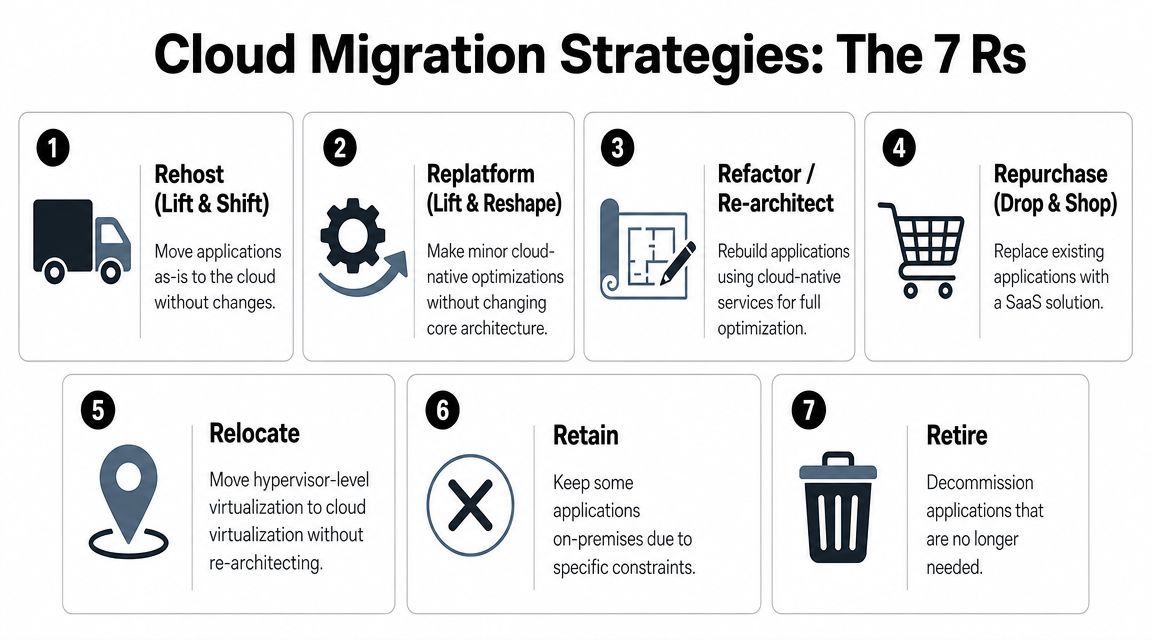
The 7 R's of Cloud Migration
| Strategy | Description | Best For |
|---|---|---|
| Rehost | Move the application largely as-is to cloud infrastructure | Stable workloads that need speed more than redesign |
| Replatform | Make limited changes to fit managed cloud services better | Apps that benefit from quick operational improvements |
| Refactor | Redesign the application around cloud-native architecture | High-value products that need scale, resilience, or AI readiness |
| Repurchase | Replace the current application with a SaaS product | Commodity capabilities like CRM, support, or collaboration |
| Relocate | Move virtualized environments with minimal architectural change | Environments tied to virtualization layers |
| Retain | Keep the application in place for now | Workloads with compliance, latency, licensing, or timing constraints |
| Retire | Decommission the application | Redundant, unused, or low-value systems |
How to choose without overcomplicating it
A few examples make the trade-offs clearer:
- Rehost works when an application is useful, reasonably stable, and not worth redesigning yet.
- Replatform makes sense when you want easier operations, such as moving a self-managed database toward a managed equivalent.
- Refactor is right for systems that sit at the center of your customer experience or future product strategy.
- Repurchase is often the smartest option for functions that don't create competitive advantage.
- Retain is not failure. It's discipline.
- Retire is often the highest-ROI migration decision because you stop paying to preserve something nobody needs.
The mistake is applying one pattern to everything because it simplifies planning. It simplifies the spreadsheet and complicates the outcome.
“The right migration pattern is the one that matches the workload's business value and future role, not the one your infrastructure team can execute fastest.”
Your data strategy matters as much as your app strategy
Applications move with baggage. That baggage is data. In AI modernization, it's even heavier because data isn't just historical record anymore. It becomes inference context, retrieval content, training input, audit material, and cost driver.
Your data plan should define:
- Authoritative sources: Which database or service owns each dataset
- Synchronization method: One-time move, staged sync, or parallel operation during transition
- Governance: Access controls, retention rules, masking needs, and auditability
- Quality checks: How you confirm data completeness and consistency before cutover
- AI-readiness: Whether the data is structured and accessible enough for future prompt workflows, search, recommendations, or automation
A sloppy data plan creates a polished outage.
For teams preparing a detailed migration path for databases specifically, Wonderment's guide to database migration best practices is a useful complement to application-level planning. It helps connect architecture choices with the less glamorous, more important work of moving data safely.
Assembling Your Team and Creating the Migration Runbook
A migration succeeds when ownership is obvious. It struggles when everyone is “involved” but nobody is accountable for the exact moment something must happen.
The team doesn't need to be huge, but it does need clear roles. Most programs need a cloud architect, an application lead for each major workload, a data lead, security representation, QA, operations, and a business-side owner who can make timing and priority decisions. If customer impact is possible, add a communications lead. Silence creates panic faster than downtime does.
Use phases, then turn them into a runbook
A practical structure is to work in phases: discovery, design, migration, go-live, and ongoing support. During migration, teams should separate infrastructure, application, and data moves. Before cutover, they should back up legacy systems and establish a final data sync or freeze to aim for minimal downtime (SAM Solutions cloud migration strategy guide).
That phase model is useful because it turns a giant project into controlled handoffs.
What belongs in the runbook
The runbook is the script for migration day. It shouldn't read like a strategy memo. It should read like a flight checklist.
Include these elements:
Pre-migration checks
Confirm target environments, access paths, backup status, monitoring, and change approvals.Execution sequence
Define the order of infrastructure provisioning, application deployment, data movement, and validation.Decision gates
Mark the exact points where the team pauses to verify results before moving ahead.Rollback triggers
State what conditions require rollback, who can call it, and what steps follow.Post-go-live tasks
Validate integrations, user access, logs, alerts, and support handoff.
Bake security into the runbook
Security reviews often arrive too late because teams treat them like a checkpoint after architecture. That doesn't work in migration. Access controls, data handling, audit logging, secrets management, and compliance evidence should appear inside the runbook itself.
A simple way to think about it is this: if a task changes risk, it belongs in the script.
Field note: The cleanest migrations I've seen were not the fastest. They were the ones where every critical step had an owner, a timestamp, and a verification method.
A runbook lowers stress because it removes improvisation. On migration day, that matters more than optimism.
Executing the Move Testing Cutover and Validation
The cutover window is where planning gets honest. Up to this point, most issues are theoretical. During execution, every weak assumption becomes visible.
A disciplined migration weekend feels less dramatic than people expect. The team gathers, reviews the runbook, confirms backups, validates the target environment one more time, and starts the sequence. First comes the final sync or data freeze. Then application changes, infrastructure steps, service redirection, and controlled validation. Nobody should be inventing fixes in a group chat while production traffic waits.
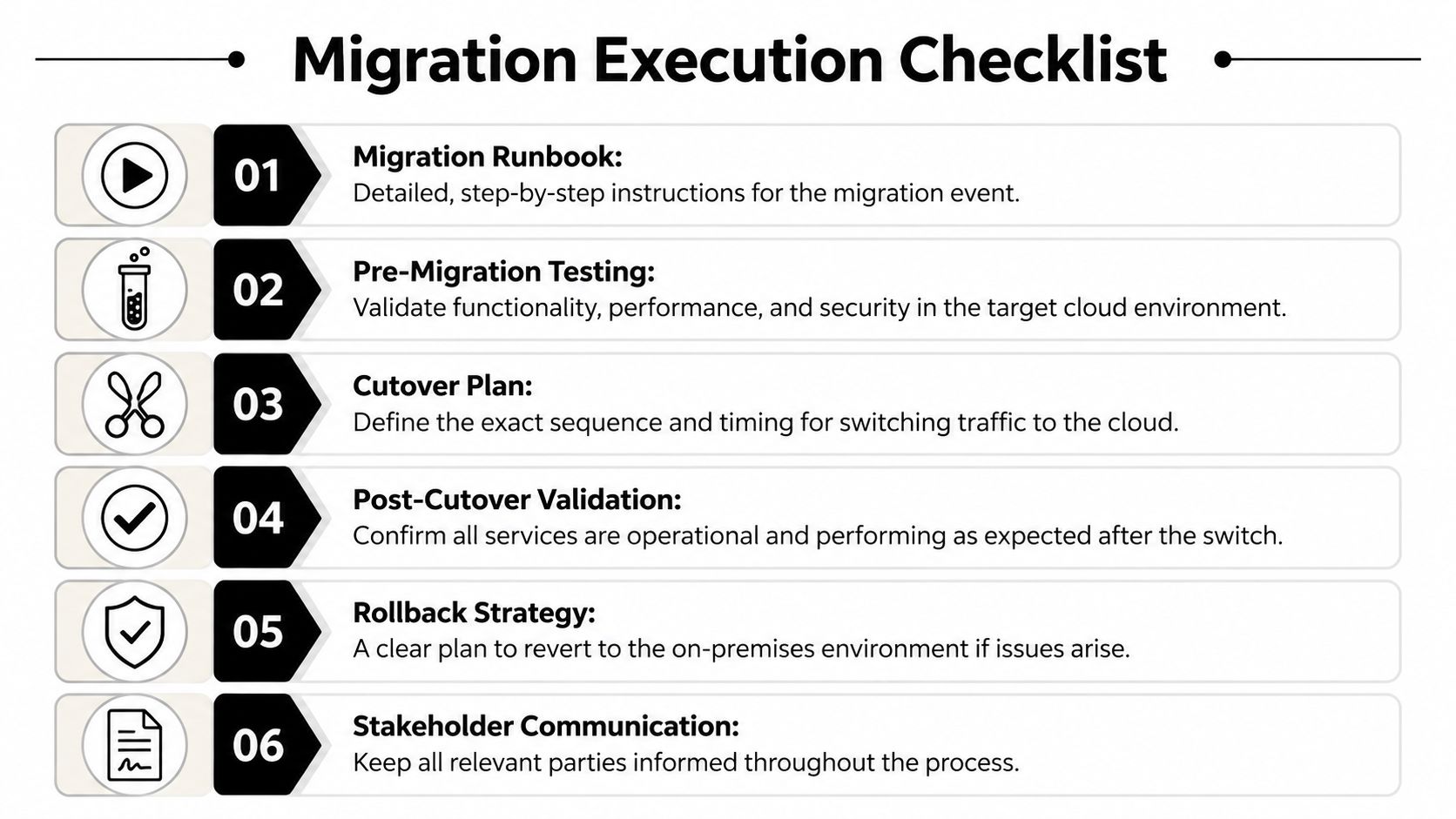
Testing before and after the cutover
Strong teams test twice. First in the target environment before the move. Then again immediately after traffic shifts.
The checks usually include:
- Functional testing: Can users sign in, complete core actions, and reach connected services?
- Performance testing: Does the application behave acceptably under expected load?
- Security validation: Are permissions, logging, and access boundaries working as intended?
- User acceptance testing: Can business owners confirm the workflows they care about most?
This isn't the moment for exhaustive product QA. It's the moment for targeted confidence checks against known business-critical behavior.
Design rollback before you need it
Rollback plans often exist as a sentence, not a plan. That's not enough. A practical rollback design answers three questions clearly:
- What conditions trigger rollback?
- How long can you spend troubleshooting before that decision is made?
- What exact technical and business steps restore the prior state?
If rollback requires heroics, it isn't real.
Go-live is not successful because the switch happened. It's successful when users can work, data is intact, and the support team isn't discovering surprises from customers first.
Validate what leadership actually cares about
Right after cutover, the team should verify more than server health. Check the things that matter to the business:
- Orders flow end to end
- Reports still populate
- Customer notifications fire correctly
- Support agents can access the tools they need
- Audit trails remain intact
- Monitoring and alerting are catching real signals
A migration should end with a controlled handoff, not with exhausted engineers saying, “It seems fine.” That phrase usually means validation was too shallow.
After the Move Optimization Observability and AI Mastery
Getting into the cloud is a milestone. It isn't the win by itself. Value shows up in what you can operate, improve, and launch after the move.
Stabilization is the initial phase, involving observation for hidden dependencies, infrastructure tuning, closing alerting gaps, and right-sizing resources. That's normal. Cloud migration planning is incomplete if it ends on cutover day, because the first version of a cloud environment is rarely the best version.
Move from infrastructure visibility to operational clarity
Observability is where cloud maturity starts to show. You need logs, metrics, traces, alert thresholds, and ownership for what happens when something degrades. It's the difference between hearing a smoke alarm and knowing which room is on fire.
For AI-enabled applications, observability expands. Now you also need visibility into prompt behavior, model responses, failures across providers, and cost patterns that can creep up if nobody watches them. Standard infrastructure dashboards won't cover that operating layer.
The AI layer most migration guides miss
This is the part many cloud migration articles skip. Once your apps are modernized enough to integrate AI, you inherit a new set of governance problems:
- Prompts change and need version control
- Parameters connecting AI flows to internal data need guardrails
- Logs need to show what happened across models and services
- Teams need cost visibility at the feature and usage level
- Product, engineering, and compliance all need a shared operating record
That's administrative work, but it's essential administrative work. Without it, AI features become hard to test, harder to audit, and expensive to scale.
One practical option in that post-migration layer is Wonderment Apps' prompt management system, which includes a prompt vault with versioning, a parameter manager for internal database access, centralized logging across integrated AIs, and cost management dashboards. That kind of tooling fits after migration because the cloud gives you the platform flexibility, while the administrative layer gives you control.
Optimization is now a product discipline
The strongest teams treat post-migration optimization as part of product delivery, not just platform maintenance. If a recommendation engine gets added, they monitor not only latency but also model behavior and spend. If support adds AI assistance, they track operational usefulness, governance, and failure handling. If marketing launches personalization, they watch the full chain from data freshness to user experience.
For leaders shaping that next phase, Cyndra's AI business playbook is a useful companion read because it frames AI adoption as an operational and business design challenge, not just a model-selection exercise.
Cloud migration planning earns its full return when it creates a platform that's easier to change, safer to govern, and ready for AI without chaos. That's the difference between moving infrastructure and modernizing a business.
If your team is preparing a migration and wants to connect cloud architecture with AI-ready application delivery, Wonderment Apps can help you map the roadmap, build the right team, and put the operational controls in place for modern software, including prompt management, integrations, logging, and cost visibility.