


React Server-Side Rendering is a powerful technique for generating a web page’s complete HTML on a server, rather than forcing the user's browser to do all the work. The immediate payoff? Users and search engines get a fully-formed page right away, leading to faster load times and significantly better SEO. Modernizing an application with SSR is a critical step, especially when you're looking to integrate advanced features like AI. To make that process seamless, you need the right tools. For instance, our team at Wonderment developed a prompt management system that acts as an administrative toolkit, plugging into your existing app to help you manage AI integrations, from prompt versioning to cost tracking. It's the kind of tool that turns a powerful concept like SSR into a scalable, intelligent reality.
Why Modern Web Apps Need Server Side Rendering
In a world where speed is everything, a slow-loading website isn’t just an inconvenience; it's a critical business failure. Many modern web applications, built with fantastic libraries like React, run into a fundamental roadblock: they often depend on Client-Side Rendering (CSR). With CSR, the browser gets a nearly empty HTML file and has to download, parse, and run a bunch of JavaScript just to show any content.
Think of it like getting a meal kit delivered to your door. You have all the raw ingredients, but you still need to do the prep work, follow the recipe, and cook the meal yourself before you can eat. It works, but there's a frustrating delay—that blank white screen or loading spinner—before you see the final product.
For any business, that initial wait time is costly. It drives up bounce rates, frustrates users, and, maybe most importantly, tanks your performance in search engine rankings. Search engine crawlers can struggle to index content that isn't there in the initial HTML, making your site invisible to potential customers.
The Immediate Advantage of SSR
React Server-Side Rendering flips this entire model on its head. Instead of a meal kit, SSR is like having a gourmet meal delivered to your door, fully cooked and ready to eat. The server handles all the heavy lifting upfront.
When a user requests a page, the server:
- Fetches all the necessary data from APIs or databases.
- Renders the React components into a complete HTML document.
- Sends this fully-formed page directly to the browser.
The result is an almost instantaneous display of content. The user sees the page immediately, and search engines can crawl and index it efficiently because all the content is there from the very start. This approach directly patches the core weaknesses of purely client-side apps, which is why so many organizations invest in top-tier technologies for front-end developers to build faster, more scalable applications.
Turning Performance into Profit
The benefits of React Server Side Rendering aren't just technical metrics; they translate directly into real business outcomes. For example, e-commerce platforms that adopted SSR have reported major improvements in first contentful paint and overall load times. These upgrades boosted their organic traffic by 15% and increased conversion rates by around 7% in just three months. On top of that, many websites saw a 30-50% jump in their organic search visibility in the six months after implementing SSR, underscoring the massive SEO advantage. You can find more details about these performance gains by exploring React SSR case studies.
This shift from a technical "nice-to-have" to a core business strategy is essential for any application aiming to compete effectively. By serving content instantly, you create a better user experience, improve your search ranking, and set a strong foundation for future growth.
This foundation is even more critical when modernizing an application to handle complex integrations like AI. Managing server-side logic efficiently is the key to delivering dynamic, AI-powered content without killing performance. This is where specialized administrative tools become invaluable. For instance, a dedicated prompt management system can orchestrate the complex interactions between your app and various AI models, streamlining everything from prompt versioning to cost management. It’s the control panel that ensures your high-performance, server-rendered application can run an advanced AI show smoothly.
Choosing the Right Rendering Strategy
Walking into the world of React rendering can feel a bit overwhelming. It’s like going to a hardware store for a single screw and finding a dozen aisles of different fasteners. Each option—Client-Side Rendering (CSR), Server-Side Rendering (SSR), Static Site Generation (SSG), and Incremental Static Regeneration (ISR)—has a specific job. Picking the right one is a huge deal for your app's performance, how it scales, and ultimately, its success.
Let's make this simple with an analogy. Think about building a piece of furniture:
- Client-Side Rendering (CSR) is the flat-pack kit. You get a box of parts (JavaScript) and the instructions (a basic HTML skeleton). Your user's browser has to put everything together before they can use it. It feels very app-like once it's built, but there's that initial assembly time where you're just staring at a pile of parts.
- Server-Side Rendering (SSR) is like getting a fully assembled piece of furniture delivered to your door. The server does all the heavy lifting, building the complete piece before it even arrives. You can use it the second it shows up, which is fantastic for making a great first impression on users and search engines.
- Static Site Generation (SSG) is like having a massive warehouse full of identical, pre-built pieces of furniture. When an order comes in, you just grab one and ship it out instantly. This is unbelievably fast and efficient for content that doesn’t change much, like a blog post or a company's marketing site.
Comparing Rendering Approaches
Choosing between these strategies means weighing trade-offs. You're balancing initial load time, SEO power, server costs, and how complex the development will be. There's no single "best" method; the right choice comes down to what your project actually needs. A dynamic, behind-a-login dashboard has completely different requirements than a public e-commerce store. Getting these differences is key to picking the right user interface frameworks for your project.
This decision tree gives you a simple way to think about the choice, focusing on whether your content is dynamic and how critical SEO is to your business.
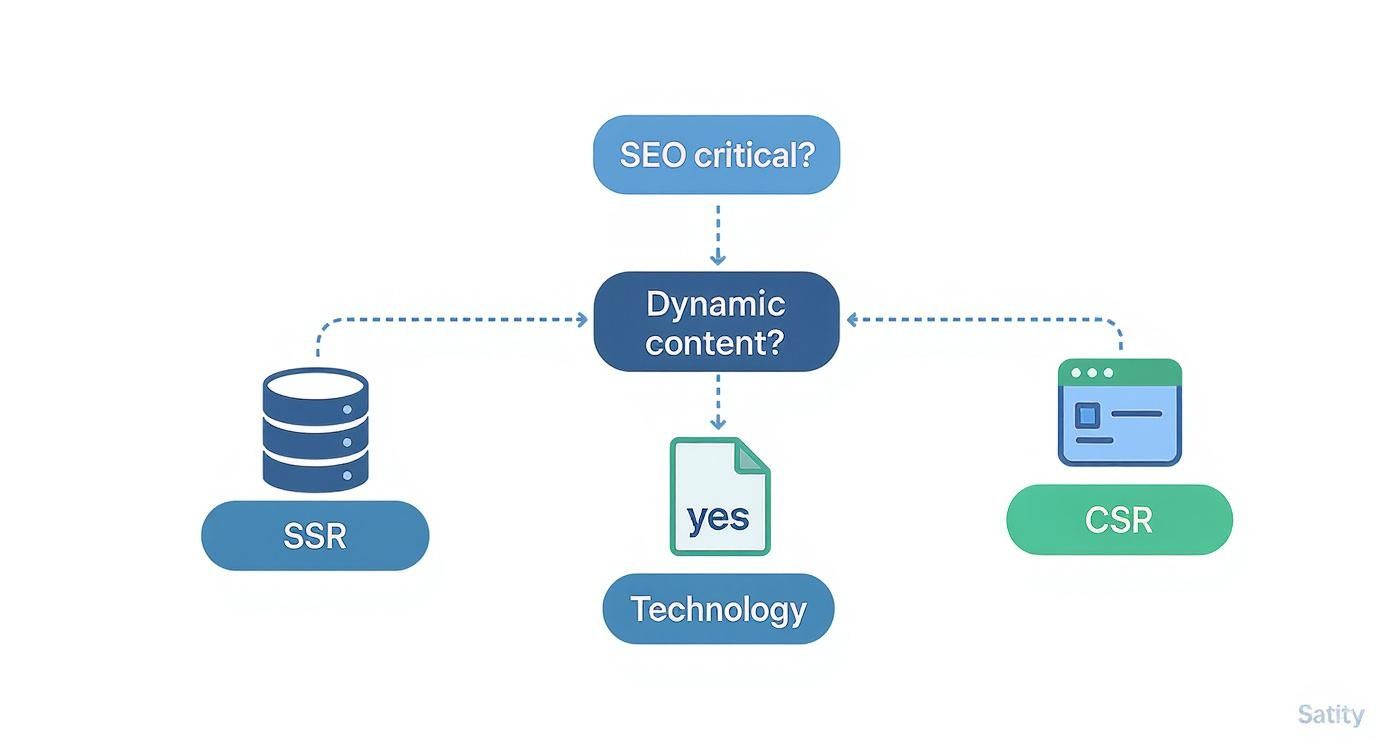
As the visual guide makes clear, the road to Server-Side Rendering is the obvious choice when you need both top-notch SEO and highly dynamic, personalized content.
A Detailed Breakdown of Rendering Strategies
To really get into the weeds, let's compare these strategies side-by-side. The table below breaks down the key differences, benefits, and best-fit scenarios for CSR, SSR, SSG, and ISR, helping you see exactly what you gain and give up with each approach.
Comparison of React Rendering Strategies
| Strategy | Initial Load Time | SEO Performance | Server Cost | Best For |
|---|---|---|---|---|
| Client-Side Rendering (CSR) | Slower | Poor (requires search engines to execute JS) | Low (server just sends static files) | Internal dashboards, admin panels, complex single-page applications (SPAs) |
| Server-Side Rendering (SSR) | Faster | Excellent (sends fully-rendered HTML) | High (server renders a page for each request) | E-commerce sites, news portals, social media feeds, dynamic marketplaces |
| Static Site Generation (SSG) | Fastest | Excellent (pre-built HTML is instantly available) | Very Low (files are served from a CDN) | Blogs, marketing sites, documentation, portfolios |
| Incremental Static Regen (ISR) | Fastest | Excellent (combines static speed with updates) | Low to Medium (rebuilds pages on a schedule) | Large e-commerce sites, news sites with frequent but not instant updates |
Ultimately, each approach shines in different situations. CSR is perfect for web applications that behave more like desktop software. SSG is the undisputed champ for speed and simplicity if your content is static. But SSR hits that perfect sweet spot for content-driven sites that need to be both dynamic and easily discoverable.
Picking a rendering strategy is a foundational architectural decision. When you line up your choice with your main business goals—whether that's dominating search results, delivering static content at lightning speed, or creating a rich, interactive experience—you put your application on the right track from day one.
How to Implement React SSR with Next.js
Alright, let's move from theory to practice. How do you actually do React Server Side Rendering? The undisputed champion in this arena is Next.js.
Sure, you could cobble together a custom SSR solution with a Node.js server and Express. But that path is filled with complexity—you'd be responsible for handling all the server configuration, routing, and rendering logic yourself.
Think of it this way: building a custom SSR setup is like assembling a car from scratch. It’s a massive undertaking that requires deep mechanical knowledge and a ton of time. Using Next.js is like getting a high-performance, expertly engineered car straight from the factory. You just turn the key and go.

This framework-first approach has been a huge factor in React's dominance. By 2025, React is already powering over 11 million websites and is the favorite for about 40% of frontend developers. Its architecture can accelerate development by roughly 60% over older methods, and React sites often see 15-20% faster page rendering.
SSR takes this even further. Some studies show a 20% bump in search crawling speed and ranking metrics after implementation. You can find more on React's performance trends and developer adoption to see the bigger picture.
Getting Started with a Next.js App
Kicking off a new Next.js project is incredibly straightforward. As long as you have Node.js on your machine, you're good to go. Just open your terminal and pop in this one command:
npx create-next-app@latest my-ssr-app
This single line scaffolds a complete project, pre-configured for both development and production. Once it finishes, just cd my-ssr-app and run npm run dev. That's it. You now have a live React application, fully capable of server-side rendering.
The first thing you'll notice is the pages directory. This is the heart of Next.js's file-based routing system. There's no separate router to configure; you just create a file, and it instantly becomes a route.
pages/index.jsbecomes your homepage (/).pages/about.jsbecomes/about.pages/products/[id].jscreates dynamic routes like/products/123.
Fetching Data on the Server with getServerSideProps
So, where does the SSR magic happen? It's all in a special function called getServerSideProps. This is your gateway to fetching data on the server for every single request and injecting it into your page as props.
Here’s the flow: a user requests a page, Next.js executes getServerSideProps on the server, waits for your data fetching to finish, and then uses that data to render the page component. The browser receives a complete HTML document, ready to display.
Let's see it in action. Imagine a page that needs to show a list of products from an API.
// pages/products.js
function ProductListPage({ products }) {
return (
Our Products
- {products.map((product) => (
- {product.title}
))}
);
}
export async function getServerSideProps(context) {
// This code runs on the server for every request
const res = await fetch('https://api.example.com/products');
const products = await res.json();
// The 'products' data will be passed as a prop to the component
return {
props: {
products,
},
};
}
export default ProductListPage;
Key Takeaway: The
getServerSidePropsfunction is the core of true React Server Side Rendering in Next.js. Everything inside it runs only on the server, guaranteeing your page hits the browser with all its data already baked in.
This approach elegantly solves the biggest challenge of SSR: getting fresh, request-specific data into your components before they render. For businesses looking to build scalable, high-performance web applications, professional Next.js development services can provide the expert guidance needed to master this powerful framework.
Advanced SSR Performance Optimization
Getting a React SSR application up and running is one thing. Making it truly fast, especially for an enterprise-level product, is a whole different ballgame. This is where you move beyond the basics and start thinking seriously about performance optimization. It's how you turn a functional SSR setup into a high-performance machine that can handle real-world pressure.

Simply rendering on the server isn’t enough. You have to get strategic about how that content is delivered and made interactive. This means adopting more sophisticated techniques to squash potential bottlenecks and give your users a fantastic experience.
Streaming and Selective Hydration
Two of the most powerful concepts in modern SSR are streaming and selective hydration. Traditional SSR has a major flaw: it makes the user wait for the entire HTML document to be generated before sending anything. If just one part of your page relies on a slow API, the whole page gets held hostage.
- Streaming blows this problem up by sending HTML to the browser in chunks as it's ready. The user starts seeing the page layout, text, and images almost instantly, even while the server is still grinding away on data for more complex components.
- Selective Hydration takes this a step further. Instead of making the entire page interactive at once—which can literally freeze the browser on complex pages—it activates components on demand. The most critical parts of the UI, like the navigation bar or a search input, become interactive first. Less important things can hydrate later, or even only when a user actually interacts with them.
When used together, these two techniques dramatically improve how fast your site feels. Users get content sooner and can interact with it quicker, creating a much smoother, more responsive experience.
Multi-Layer Caching Strategies
Every time your server has to render a page from scratch, it's burning CPU cycles and memory. For a high-traffic site, this quickly becomes a bottleneck and sends your hosting costs through the roof. A smart, multi-layer caching strategy is absolutely non-negotiable for scaling SSR.
Caching in SSR is all about being smart with your resources. The goal is to render a page once and then serve that pre-built HTML to as many users as possible, for as long as possible, without sacrificing freshness.
An effective caching setup involves several layers:
- CDN Edge Caching: A Content Delivery Network (CDN) is your first line of defense. It stores copies of your rendered pages in data centers all over the world, physically closer to your users. This means near-instant responses and absorbs huge amounts of traffic before it ever touches your server.
- Server-Side Caching: For pages that can't live at the edge (think personalized content), you can set up caching directly on your server with tools like Redis or Memcached. This stops you from re-running the same expensive data fetches for every single request.
- Component-Level Caching: You can even get more granular. Within a single page, you can cache the output of individual components that don't change often. This technique, often called fragment caching, can massively speed up rendering for complex UIs.
Beyond these core strategies, advanced tuning gets into the nitty-gritty, like diligently optimizing images for web performance.
The Future with React Server Components
The evolution of React Server-Side Rendering and new tech like React Server Components (RSC) is fundamentally changing how we build web apps. While SSR is great for SEO and getting that initial content on the screen fast (FCP), it does put a heavier load on your server.
React Server Components step in to optimize this. They cut down on duplicate UI logic, allow content to be streamed progressively, and slash the size of the JavaScript bundles sent to the client. This all leads to better performance and easier maintenance. RSCs aren't a replacement for SSR; they're a powerful partner. They enable a hybrid approach where some components are rendered once on the server and their code never even gets sent to the browser, further reducing the amount of JavaScript a user has to download.
Modernizing Your App with SSR and AI
When you start connecting the dots between React Server Side Rendering and Artificial Intelligence, the blueprint for the next generation of software starts to take shape. SSR isn't just another performance hack; it’s the foundational layer you need to build modern, AI-driven applications that feel both intelligent and instantly responsive.
Without it, even the most brilliant AI features get bogged down by a slow, clunky user experience.
Think about an e-commerce platform that runs on AI. Its real value comes from serving up dynamic, personalized product recommendations on the fly. If that platform is built with old-school client-side rendering, those custom recommendations only pop up after the browser has already downloaded and executed a massive JavaScript bundle. This delay doesn't just annoy users; it makes the personalized content completely invisible to search engine crawlers, killing any SEO benefit.
With SSR, the server actually works with the AI model before a single byte gets sent to the browser. It generates the custom product grid, complete with images and descriptions, and delivers a fully-formed HTML page. The user sees their personalized recommendations immediately, and so do search engines. This is the new standard for building dynamic, scalable apps.
Managing AI Complexity on a High-Performance Stage
Bringing AI into the mix introduces a whole new level of complexity. You're not just fetching data from a database anymore. You're now managing prompts, juggling multiple AI models, monitoring performance, and keeping a very close eye on costs.
This is where a solid admin tool becomes absolutely essential. SSR builds the high-performance stage, but you need a control room to actually run the AI show.
This is exactly why we built the Wonderment Apps prompt management system. It's an administrative toolkit designed to plug right into your existing application, giving you a central dashboard to modernize and manage all of your AI integrations from one place.
Our system gives you the backstage controls needed for a seamless production:
- A Prompt Vault with Versioning: This ensures your AI's responses stay consistent and predictable. You can test, refine, and roll back prompt versions just like you would with your code, preventing any unexpected AI behavior from going live.
- A Parameter Manager: This securely connects your AI models to your internal databases. It allows the AI to pull real-time data—like user history or product inventory—to generate content that’s genuinely personalized and accurate.
- A Unified Logging System: We track every single interaction across all your integrated AI models. This gives you a single source of truth for debugging, auditing, and just understanding how your AI is being used.
- A Cost Manager: Get a clear, cumulative view of your AI service expenses. You can monitor token usage and API calls in real-time, which helps prevent budget surprises and lets you optimize your spending.
SSR delivers the speed and SEO-friendliness required for modern web standards, while a powerful management tool gives you the control and visibility to leverage artificial intelligence effectively and responsibly. Together, they create a complete solution for building software that is both fast and smart.
At the end of the day, modernizing an app isn't just about adopting new tech—it's about integrating it into a cohesive, manageable system. React Server Side Rendering creates the fast, accessible front-end experience users expect, while a dedicated backend toolkit like ours provides the governance and control you need to deploy AI with confidence. This two-part approach is how you build an application that not only meets today's performance demands but is also ready to scale with whatever innovations come next.
Common Questions About React SSR
Diving into React Server Side Rendering usually kicks up a few common—but very important—questions. Getting straight answers is the key to figuring out where SSR fits into your workflow and how to actually use it well. Let's clear up some of the usual points of confusion.
Does React Server Side Rendering Replace Client-Side Rendering?
Not at all. Think of it as a partnership, not a replacement. They’re like a tag team working together to deliver a better user experience. SSR handles the opening act, sending a fully-rendered HTML page to the browser for a lightning-fast first load. This first step is crucial for great SEO and getting content in front of your users instantly.
Once that static page lands, client-side React takes the baton in a process called hydration. It attaches all the event listeners and brings the page to life, making it the dynamic, app-like experience everyone expects. You really get the best of both worlds: the instant content of a classic website and the rich feel of a single-page app.
Is React SSR More Expensive to Host?
The short answer is yes, it often is. Unlike client-side rendering where the server just has to toss out some static files, SSR needs an active Node.js server running all the time. This server has to execute React code, fetch data, and build the HTML from scratch for every single user request.
This whole process naturally eats up more CPU and memory, which can translate to higher hosting bills, especially if your site gets a lot of traffic. But you have to see this extra expense as a strategic investment.
The costs tied to SSR are often balanced out by the real business benefits it brings, like better search rankings, higher user engagement, and improved conversion rates. The trick to managing server load and keeping those costs down is implementing smart, multi-layered caching strategies.
When Should I Not Use React SSR?
SSR is a powerful tool, but it’s not the right one for every single job. It’s often overkill for apps where public visibility and SEO just aren't the main goals. The most classic example is any application that lives behind a login screen.
Think about these situations where a standard Client-Side Rendering (CSR) approach is probably the smarter choice:
- Internal Dashboards and Admin Panels: These are for internal use, so you don't care if Google can index them.
- Complex Web-Based Tools: Apps like Figma or other highly interactive, state-heavy software care way more about in-app responsiveness than the initial load time.
- Simple Single-Page Applications (SPAs): If the app is simple and SEO isn't a business driver, the extra architectural headache of SSR just doesn't pay off. In these cases, CSR is simpler to build, cheaper to host, and gets the job done perfectly.
How Does Data Fetching Work in React SSR?
This is one of the biggest shifts in thinking between SSR and CSR. In a client-side app, your components show up first and then they go get data—that's why you see all those loading spinners. With SSR, the whole process is flipped on its head: the data is fetched on the server before a single line of HTML is created.
Frameworks like Next.js have really elegant ways to handle this, mainly through a special async function called getServerSideProps. The workflow is simple but incredibly powerful:
- A user asks for a page from your app.
- The server finds the right page component and looks for
getServerSideProps. - It runs this function, kicking off any API calls or database queries you put inside.
- The server waits for all that data to come back successfully.
- It then takes the data it received and passes it as props into your React component.
- Finally, it renders the component with its data already there, creating a complete HTML page to send back to the user's browser.
This server-first approach to data means the user never sees a loading state on the initial view. The content is just there from the very beginning, fully formed and ready to go.
At Wonderment Apps, we specialize in transforming applications with powerful technologies like React SSR and AI. If you're looking to modernize your software, build a high-performance application that can scale, and integrate intelligent features with confidence, our team is here to help. See how our prompt management system can streamline your AI integrations. Request a demo of our toolkit today.