

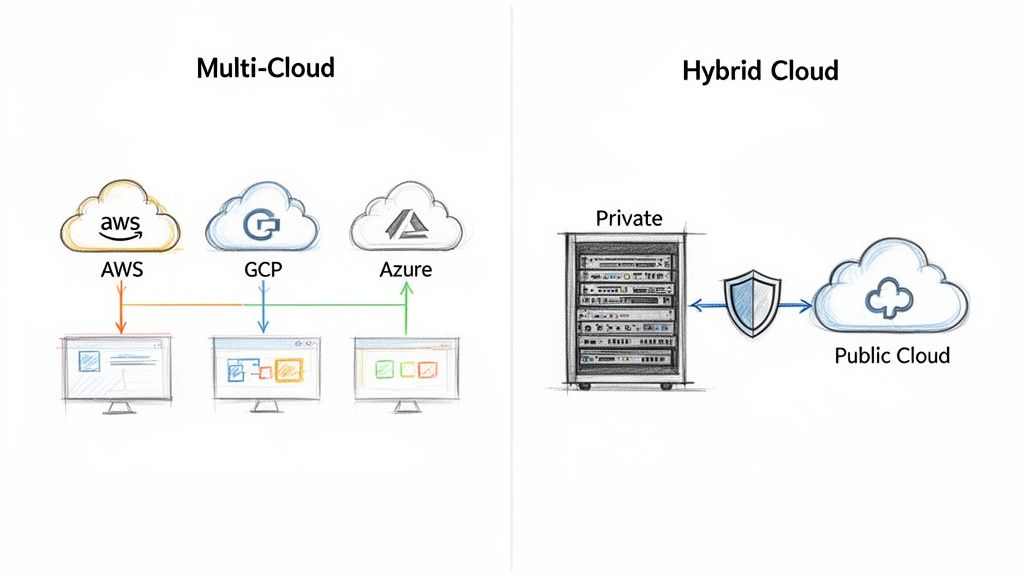
The whole multi cloud vs hybrid cloud discussion really just comes down to one thing: what your infrastructure is made of. A multi cloud setup means you're using services from two or more public cloud providers—think mixing and matching the best tools from AWS and Google Cloud. On the other hand, a hybrid cloud strategy blends your own private, on-premise servers with at least one public cloud, creating a single, connected environment.
Choosing between them is a huge decision, especially when you're looking to modernize your software by integrating AI. To truly harness the power of AI across different cloud services, you need a way to manage it all without the chaos. This is where having a smart administrative tool, like a prompt management system, becomes a game-changer. It gives developers and entrepreneurs a central command center to plug into their existing apps, streamlining AI integration and ensuring your software is built to last. We'll show you how a tool like this fits into your cloud strategy.
Unpacking the Core Difference
Choosing between a multi cloud and hybrid cloud setup is a huge decision. It dictates how your applications will scale, how you handle security, and even your ability to innovate down the road. This isn't just a technical choice about where data lives; it’s about architecting an infrastructure that can support your business goals, especially as you start weaving advanced AI services into your software.
The market trends are clear: businesses are embracing diverse cloud environments. By 2026, a staggering 92% of organizations are expected to be using a multicloud strategy that combines various public and private cloud services. Today, the average company is already relying on 2.2 public clouds, showing a clear preference for picking specialized services from multiple vendors. These numbers paint a picture of an industry moving away from single-provider solutions.
Multi Cloud Vs Hybrid Cloud At a Glance
To make this distinction crystal clear, let's break down the fundamental differences. This table offers a quick snapshot, but remember the best choice always depends on how you need to manage resources, secure data, and control costs. For a deeper dive, this Multi Cloud vs Hybrid Cloud UK Business Guide is a great resource.
| Aspect | Multi Cloud | Hybrid Cloud |
|---|---|---|
| Infrastructure Types | Uses multiple public clouds only (e.g., AWS, Azure, Google Cloud). | Combines private infrastructure (on-premise servers) with one or more public clouds. |
| Primary Goal | To avoid vendor lock-in and select the best service for each specific task or workload. | To balance the security and control of a private cloud with the scalability of a public cloud. |
| Common Use Cases | E-commerce sites using one cloud for hosting and another for AI-driven recommendations. | Financial institutions keeping sensitive data on-premise while using a public cloud for their mobile app. |
| Complexity Focus | Managing different provider APIs, security models, and billing systems. | Integrating and securing the network connection between on-premise and public cloud environments. |
Ultimately, succeeding with either model hinges on modernizing your applications to be both flexible and intelligent, which is especially true when integrating AI. Having the right administrative tools is non-negotiable.
A well-architected cloud strategy isn't just about infrastructure—it's about creating a manageable ecosystem. Without a centralized way to control services, especially AI integrations, complexity can quickly undermine the benefits.
Think about it: a prompt management system can serve as a command center, giving you a versioned prompt vault, secure database access, and unified logging across every AI model you use. A tool like that transforms a distributed, chaotic system into a streamlined engine for growth. The journey of moving to the cloud is a critical step for modern businesses, and picking the right architecture is where it all begins.
A Practical Comparison of Cloud Architectures
Definitions only get you so far. The real story in the multi cloud vs hybrid cloud debate is told through their architecture. These aren't just slightly different setups; they represent fundamentally distinct approaches to building, connecting, and managing your digital infrastructure. The architectural model you choose dictates everything from how data flows and where applications live to how you maintain control.
Think of a multi-cloud setup like assembling a custom toolbox. Instead of getting a pre-packaged kit from one brand, you pick the best drill from DeWalt, the best saw from Bosch, and the best wrench from Craftsman. Each tool is selected for its specific strength, creating a collection that's perfectly suited for a wide range of jobs.
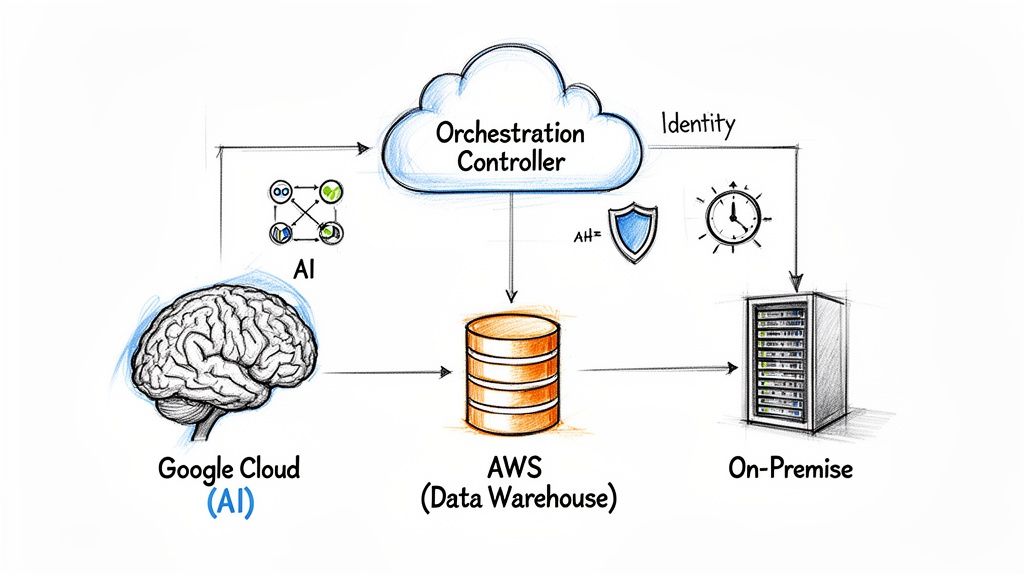
This is exactly what happens in a multi-cloud strategy. A company might lean on Google Cloud Platform for its incredible AI and machine learning services while simultaneously using Amazon Web Services (AWS) for its massive, scalable data warehouses. Each service operates in its own environment, but they're all orchestrated to work toward a common business goal.
The Multi Cloud Orchestration Challenge
The architectural puzzle in a multi-cloud world isn't about building bridges between clouds; it's about creating a central command center. The goal is to manage all these separate pieces through a single, unified strategy.
- Identity Management: You need a way to ensure a user has the same permissions and identity across AWS, Azure, and Google Cloud. Without a centralized identity provider (IdP), you're stuck managing three separate sets of credentials and security policies—a recipe for inefficiency and risk.
- Networking: Even though services run on different clouds, they often need to talk to each other. This might mean setting up secure connections between Virtual Private Clouds (VPCs) on different platforms or using an orchestration tool that handles the networking layer for you.
- Data Flow: Data is rarely static. In this model, analytics data might land in AWS, get processed, and then be piped over to a Google Cloud AI service for deeper analysis. A key part of the architecture is managing these data pipelines and keeping a close eye on data transfer (egress) costs.
The core principle of multi-cloud architecture is specialization. You are actively choosing to manage complexity in exchange for access to best-of-breed services, which can provide a significant competitive advantage.
This approach leans heavily on abstraction. Teams use tools like Terraform or unified cloud management platforms to deploy and manage resources with one set of commands, no matter which provider is running underneath.
The Hybrid Cloud Integration Imperative
A hybrid cloud architecture is a completely different beast. It's less about picking different tools and more about extending your existing workshop with a powerful new annex. Your private, on-premise data center is the heart of the operation, and the public cloud acts as a seamless, scalable extension of it. Here, the architectural focus is all about the integration point.
This model is often driven by non-negotiable requirements like data sovereignty or ultra-low latency. For instance, a healthcare provider might be legally required to keep patient health records (PHR) on private servers within a specific country.
Here’s how the architecture makes that happen:
- The Secure Link: A dedicated, secure network connection—like a VPN or a direct interconnect—is the absolute backbone of a hybrid cloud. This isn't just a basic link; it's a high-bandwidth, low-latency pipeline designed to make the public and private clouds feel like one cohesive environment.
- Latency-Sensitive Workloads: A manufacturer might run its factory floor control systems on-premise, where response times have to be instantaneous. The data from those systems can then be synced to a public cloud for long-term analysis and predictive maintenance modeling, where a little latency doesn't hurt.
- Unified Management: The holy grail of hybrid cloud is a "single pane of glass" for management. You need tools that can move workloads back and forth, apply consistent security policies across both environments, and manage resources holistically.
In the end, the choice comes down to your core priorities. Are you optimizing for the best features from multiple vendors, or are you focused on extending your private infrastructure with the massive scale of the public cloud?
Navigating Security and Compliance Risks
When you're weighing multi cloud vs hybrid cloud, security and compliance can't be an afterthought—they're the entire foundation. Each model brings a totally different set of risks and regulatory headaches to the table, and you absolutely need a specific plan for each. If you gloss over these differences, you're practically inviting security gaps, compliance failures, and major business disruptions.
In a multi-cloud setup, you're juggling the unique security protocols of several different providers. This creates a complex puzzle where the shared responsibility model is splintered across multiple platforms. Sure, each provider secures its own infrastructure, but you're left holding the bag for everything else: configuring security policies, managing identities, and protecting data consistently across all of them. That's a lot harder than it sounds.
A single, simple misconfiguration on one cloud can domino and expose your entire operation. The real challenge is creating one unified security posture when the tools and controls you're working with are completely different.
The Multi Cloud Security Challenge
Managing security across multiple clouds means you have to think bigger than just platform-specific tweaks. The goal is to build a security layer that smooths over the differences between providers.
- Unified Threat Detection: You can't just rely on the AWS security dashboard and then pivot to Google Cloud's. You need a central Security Information and Event Management (SIEM) tool that pulls in logs and alerts from every cloud environment you use, giving you a single pane of glass.
- Consistent Identity and Access Management (IAM): Trying to manage separate IAM roles for each cloud is a recipe for disaster. A centralized identity provider (IdP) is non-negotiable; it enforces the same access rules everywhere, which is critical for maintaining control and stopping unauthorized access in its tracks.
- Automated Policy Enforcement: Manually applying security policies across different clouds just doesn't scale. Using infrastructure-as-code (IaC) tools lets you define your security rules once and then deploy them consistently, no matter which provider you're on.
For a closer look at specific threats and how to handle them, exploring common cloud security challenges and practical fixes can give you some valuable, real-world context.
The Hybrid Cloud Compliance Imperative
With a hybrid cloud, the security focus shifts dramatically. Instead of juggling a handful of public vendors, your number one concern is the connection point—the digital bridge—between your private infrastructure and the public cloud. This connection is a prime target for attacks and has to be fortified like a castle.
On top of that, hybrid models are often chosen specifically for compliance reasons. Regulations like GDPR in Europe or HIPAA in the U.S. have incredibly strict rules about where personal data can be stored and processed.
In a hybrid cloud, the network perimeter is not a wall; it's a dynamic, two-way gate. Securing this connection is the most critical element of the entire security architecture, as it protects the sensitive data you’ve chosen to keep on-premise.
This makes data governance absolutely paramount. You need crystal-clear rules that dictate which data is allowed to move to the public cloud and which must stay locked down behind your private firewall. This usually involves:
- Data Classification: Putting a system in place to tag data based on its sensitivity level (e.g., public, internal, confidential).
- Secure Connectivity: Using robust VPNs or dedicated direct connections to encrypt every bit of traffic flowing between your on-premise and cloud environments.
- Auditing and Monitoring: Maintaining constant visibility into who is accessing data and where it's moving. This is the only way to prove you're meeting regulatory demands.
No matter which model you choose, a secure foundation is everything. Implementing core application security best practices from day one is the single most effective way to cut down on risk in either environment.
Comparing the Financial and Operational Costs
When you’re weighing multi-cloud against hybrid cloud, the conversation always lands on money. But just comparing service prices doesn't give you the full picture. To make a smart financial choice, you have to look at the Total Cost of Ownership (TCO). This includes what you pay the vendors and all the hidden operational costs that can sneak up on you.
From a pure spending angle, a multi-cloud strategy looks pretty good. Spreading your workloads across providers like AWS, Azure, and Google Cloud means you can shop for the best deals on specific services—maybe compute from one and AI from another. This setup helps you dodge vendor lock-in, giving you more power to negotiate better prices or switch if costs go up.
But that flexibility has a steep operational price. Trying to track spending across a handful of different billing systems is a serious headache. Without one unified view, it’s far too easy to lose track of your spending and get hit with a budget-busting bill at the end of the month.
The Multi-Cloud Cost Puzzle
In a multi-cloud setup, your financial model is almost all Operational Expenditure (OpEx). You pay as you go, which is fantastic for scaling but a nightmare for complexity.
- Diverse Billing Cycles: Every cloud provider has its own pricing, discounts, and billing schedules. Trying to create a single, clear financial forecast from that mess is tough.
- Data Egress Fees: One of the sneakiest costs is moving data between clouds. For example, running an analytics job on data sitting in AWS with a Google Cloud AI service can rack up major data transfer fees that you might not see coming.
- Specialized Tooling: To get a handle on it all, you’ll likely need to invest in third-party cost management platforms. These tools are crucial for visibility and optimization, but they’re another line item on your budget.
The Hybrid Cloud Financial Trade-Off
A hybrid cloud model is a different financial beast, mixing predictable capital costs with fluctuating operational ones. This approach demands a serious upfront Capital Expenditure (CapEx) to buy, house, and maintain your own on-premise servers and network hardware.
That initial investment can be hefty, but it creates a stable, predictable cost base for your consistent workloads. The variable part comes from the public cloud services you spin up to manage demand spikes or run certain applications. This balance can be incredibly cost-effective, but only if you’re disciplined.
The real cost of a hybrid cloud isn't just the server purchase. It's the relentless expense of maintenance, power, cooling, and the specialized talent you need to run an on-premise data center. These operational costs are fixed—you pay them whether your hardware is maxed out or sitting idle.
This blended model requires a sophisticated financial strategy. It's no secret that industries are pouring massive amounts of money into the cloud, cementing its role as a core business function. The financial sector alone is expected to invest $190 billion in public cloud services in 2024, and the healthcare cloud market is set to grow by $25.54 billion between 2020 and 2025. You can dig into more of these cloud computing statistics on spacelift.io to see just how this spending is reshaping industries.
At the end of the day, both models require strict financial governance. Without the right cost management tools and clear rules in place, the financial perks of either strategy can get wiped out by unchecked operational complexity and those pesky hidden fees.
Choosing the Right Model with Real-World Examples
Theoretical comparisons are great, but the real test in the multi-cloud vs. hybrid cloud debate is how these models perform in the wild. The right choice depends entirely on your industry, regulatory constraints, technical needs, and business objectives. Seeing these strategies in action provides the clarity needed to match your own requirements to the right architecture.
Let's explore a few practical scenarios where each model is the clear winner. By looking at how real industries solve their unique challenges, you can start to map out a path for your own projects.
This decision tree shows how a single, fundamental financial question—whether you can or want to invest in capital expenditure (Capex)—can immediately steer your choice.
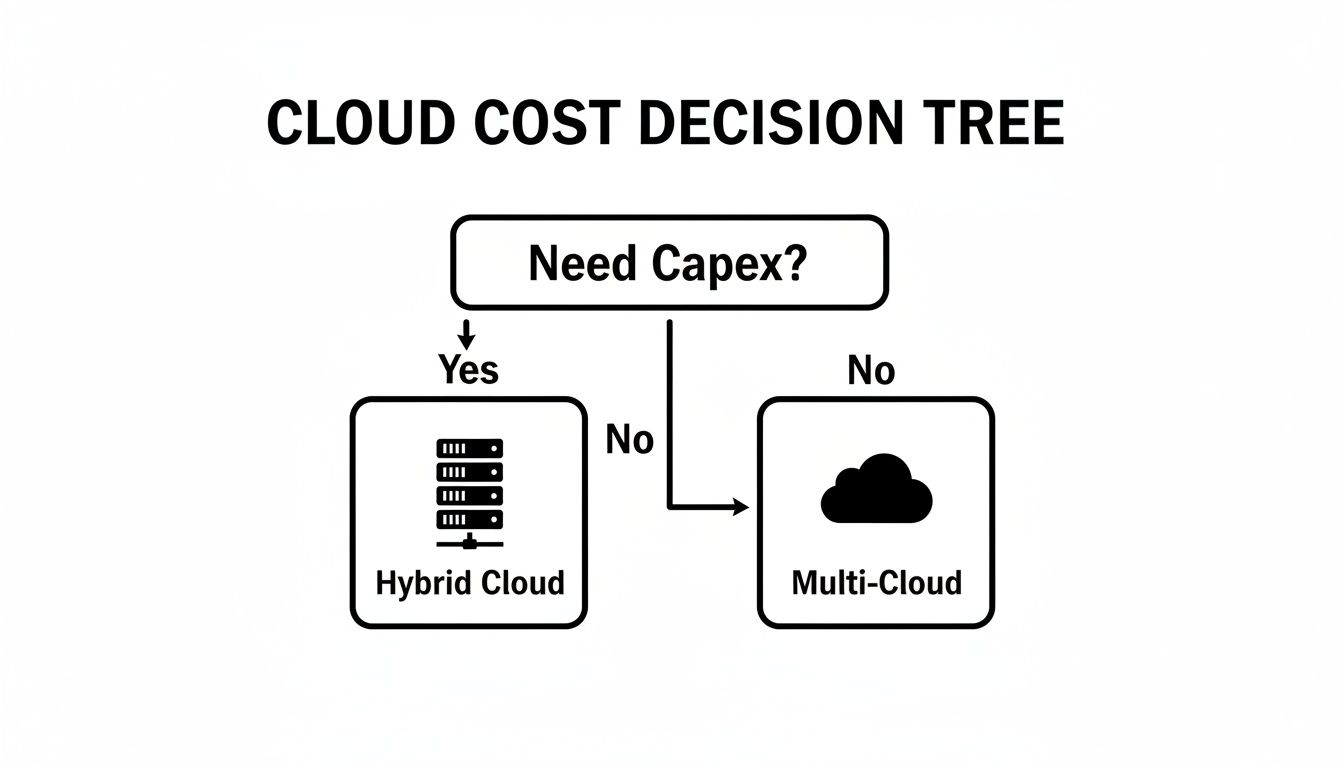
The visualization gets to the heart of it: a hybrid cloud almost always involves upfront Capex for on-premise hardware, while a multi-cloud approach is built entirely on operational spending (Opex).
Multi-Cloud in Action: The E-commerce Powerhouse
Imagine a large e-commerce retailer gearing up for the holiday shopping frenzy. Their number one goal is to deliver a flawless customer experience while maximizing sales with sophisticated personalization. This is a perfect job for a multi-cloud strategy.
Here’s how they might build their platform:
- Core Infrastructure on AWS: They could run their main website, shopping cart, and inventory systems on Amazon Web Services (AWS). AWS is known for its robust, scalable, and reliable compute and database services—exactly what you need for handling massive traffic spikes on Black Friday.
- AI and Analytics on Google Cloud: For product recommendations and deep customer behavior analysis, they could tap into Google Cloud Platform (GCP). GCP's AI and machine learning services, like Vertex AI, are exceptionally good at creating the kind of personalized shopping experiences that drive conversions.
In this scenario, the company isn't locked into one provider. They are picking the best-of-breed service for each specific job—scalability from one cloud and powerful analytics from another. Yes, there's an operational challenge in managing the APIs and data flows between them, but the business advantage is a superior, more competitive platform.
A multi-cloud approach is about strategic selection. You're consciously trading the simplicity of a single vendor for the performance and innovation advantages that come from picking the absolute best tool for every task.
This model is also common in media and entertainment, where a company might use one cloud for high-performance content delivery and another for complex video rendering and transcoding.
Hybrid Cloud in Action: The Compliant Fintech Innovator
Now, let's look at a financial technology (fintech) company handling sensitive customer data, like personal identification details and transaction histories. This company must follow strict regulatory standards like PCI DSS and GDPR, which dictate exactly how and where data is stored. For them, a hybrid cloud model isn't just an option; it's non-negotiable.
Their architecture would look very different:
- Private Cloud for Core Data: All sensitive customer data, transaction logs, and core banking systems would live on-premise in a private data center. This gives the company total control over security, access, and compliance, making audits much smoother.
- Public Cloud for Customer-Facing Apps: The company's mobile app and online customer portal could run on a public cloud like Microsoft Azure. This lets them leverage the cloud's scalability, global reach, and development tools to build a fantastic user experience without putting core data at risk.
The lynchpin of this architecture is the secure, high-speed connection between the private data center and the public cloud. The mobile app can query the on-premise database for information through a secure API, ensuring that sensitive data is never actually stored in the public environment.
This same model is a staple in healthcare, where patient records are kept on-premise to comply with HIPAA, while patient-facing scheduling apps run in the public cloud.
Matching Your Needs to the Right Cloud Model
To make this even clearer, let's map some common industry needs and technical requirements directly to the cloud model that serves them best.
| Industry or Use Case | Recommended Model | Primary Reason |
|---|---|---|
| E-commerce & Retail | Multi-Cloud | Best-of-breed services for different functions (e.g., AWS for checkout, GCP for AI recommendations). |
| Fintech & Banking | Hybrid Cloud | Strict data sovereignty and compliance needs (e.g., PCI DSS) require keeping sensitive data on-premise. |
| Healthcare | Hybrid Cloud | Patient data must be kept private and secure under regulations like HIPAA, while apps run in the public cloud. |
| Media & Entertainment | Multi-Cloud | Different clouds excel at different tasks like content delivery (CDN), transcoding, and rendering. |
| Public Sector & Government | Hybrid Cloud | Need for secure, private environments for sensitive citizen data while using public cloud for public-facing services. |
| Gaming | Multi-Cloud | Leveraging different cloud providers for low-latency hosting in various geographic regions. |
| IoT & Manufacturing | Hybrid Cloud | Edge computing on-premise for real-time processing, with data aggregation and analytics in the public cloud. |
| Startups (No Legacy Systems) | Multi-Cloud | Avoids Capex and allows for picking the most cost-effective or feature-rich service for each need. |
Ultimately, these real-world examples show there's no single "best" answer. The right choice is the one that aligns with your specific operational realities, regulatory burdens, and strategic goals.
Future Proofing Your Apps with AI Integration
Choosing between a multi-cloud or hybrid cloud setup isn't just about infrastructure. Let's be honest, the real value comes from the applications you build on top of that foundation. To have any kind of competitive edge, your apps need to be smart and adaptable, which means artificial intelligence is no longer a "nice-to-have"—it's a core requirement.
This is where your cloud strategy gets really interesting. Each major public cloud provider has its own suite of powerful, unique AI services. A multi-cloud approach gives you the freedom to cherry-pick the absolute best AI tool for any given task. On the other hand, a hybrid model becomes essential if your AI workloads involve sensitive data that simply cannot leave your private servers.
No matter which path you choose, weaving AI into distributed systems adds a whole new layer of complexity. Taming this complexity is the secret to turning a potentially chaotic cloud environment into a true engine for innovation.
Building Your AI Command Center
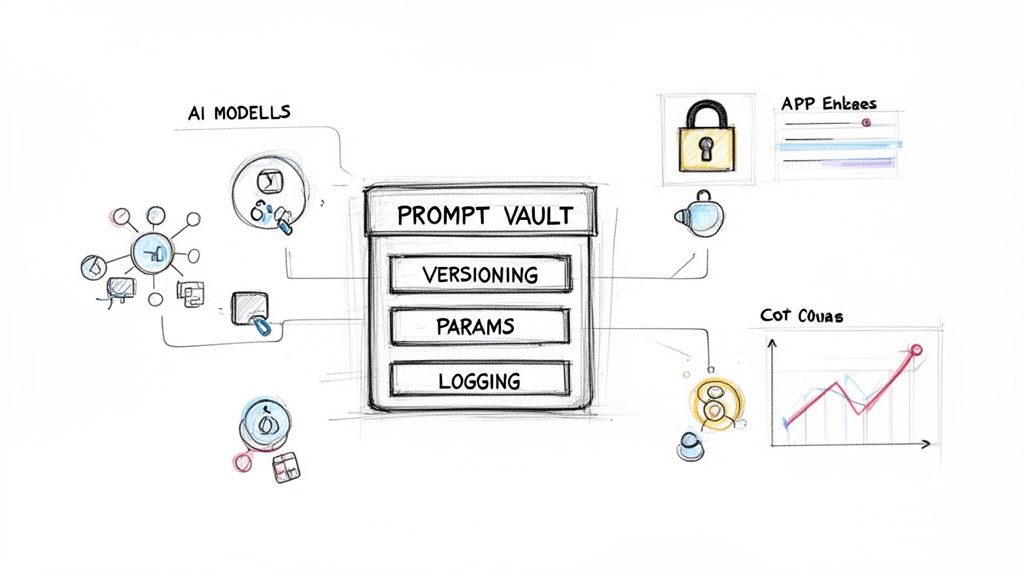
When you start modernizing software with AI, you quickly realize you need a central command center. You need a single place to manage, monitor, and control all those intelligent features. This is exactly what a prompt management system delivers. Think of it as the administrative toolkit that brings order to your entire AI ecosystem.
A robust system like this is built on a few non-negotiable pillars, especially if you plan to scale your AI features responsibly:
- A Centralized Prompt Vault: This is your single source of truth for all the prompts that power your AI. With versioning, you can track every change, test new instructions, and sleep well knowing every part of your app is using the correct, most effective prompt.
- A Secure Parameter Manager: For AI to be genuinely useful, it often needs access to your internal data. A parameter manager acts as a secure bridge, letting AI models tap into your databases without ever compromising security or exposing sensitive info.
- Unified Logging and Analytics: If you're pulling AI models from different clouds, you absolutely need one place to see what's going on. A unified logging system tracks every single interaction across all your AIs, giving you a complete, unbiased picture of performance and usage.
An administrative toolkit for AI isn't just a "nice-to-have" feature; it's the operational backbone of a modern, intelligent application. It provides the control and visibility necessary to manage costs, ensure consistency, and scale with confidence.
Maintaining Control Over AI Costs
One of the biggest hurdles with AI is the cost. Every single call to an AI model has a price tag, and in a complex multi-cloud or hybrid environment, those costs can spiral out of control before you even notice. This is precisely why a dedicated cost manager is a critical piece of any AI toolkit.
By tracking your cumulative spend across all AI services in one dashboard, you can see exactly where your money is going. This allows you to make informed, data-driven decisions to optimize usage. For business leaders wanting to truly leverage artificial intelligence in their software initiatives, this level of financial oversight is non-negotiable. It’s what transforms AI from an unpredictable expense into a manageable, strategic investment that delivers real business value.
Frequently Asked Questions
When you get down to the brass tacks of multi-cloud vs. hybrid cloud, a lot of practical questions come up. Business leaders need clear, straightforward answers to make the right call for their company's future. Let's tackle some of the most common ones we hear.
Can I Use Multi-Cloud and Hybrid Cloud Together?
Yes, and in fact, many large organizations do precisely that. This blended approach is often called a hybrid multi-cloud strategy, and it combines the core strengths of both models to create an incredibly flexible and powerful infrastructure.
Think of it this way: a company could use several public cloud providers (that’s the multi-cloud part) for different specialized services, while also linking them back to its own private, on-premise hardware (the hybrid part). This gives you the ultimate control to place every workload exactly where it makes the most sense—based on performance, security, cost, or compliance needs.
Which Strategy Is Better for a Small Business or Startup?
For most startups and small businesses, a multi-cloud strategy is almost always the most practical and budget-friendly place to start. The big reason is simple: it lets you avoid the massive upfront cost of buying and maintaining physical servers and data centers.
A new company can launch quickly on a single public cloud and then strategically sprinkle in services from other providers as they grow and their needs change. The pay-as-you-go model gives you instant access to world-class infrastructure without needing a huge capital investment. A hybrid model usually only enters the picture for businesses that already have on-premise hardware or have to deal with strict regulations from day one.
What Are the Biggest Challenges in Managing a Multi-Cloud Environment?
The three biggest headaches are complexity, security, and cost control. Each cloud provider has its own unique ecosystem of tools, APIs, and security rules, which can quickly become an operational nightmare for your team to juggle.
In a multi-cloud setup, complexity is the enemy of security and financial discipline. Without a unified management layer, the small differences between providers can compound, creating visibility gaps that lead to security risks and uncontrolled spending.
Trying to enforce consistent security policies and maintain a single view of threats across all clouds is a serious challenge. On top of that, tracking your spending with different vendors and their unique billing systems can get incredibly messy, leading to shocking bills if you’re not carefully managing it all with specialized tools.
How Does AI Integration Impact the Multi-Cloud vs. Hybrid Cloud Decision?
AI has a huge say in this decision. The big cloud players each offer their own powerful, distinct AI and machine learning platforms, like Google's Vertex AI or Amazon's SageMaker. A multi-cloud strategy is perfect for companies that want to cherry-pick the absolute "best-of-breed" AI tool for each specific job.
On the other hand, a hybrid strategy might be non-negotiable if your AI models have to be trained on extremely sensitive or proprietary data that legally can't leave your own servers. In either case, the new core challenge becomes managing the prompts, integrations, and costs of these AI models across a scattered system—a problem that modern prompt management platforms are built to solve.
Ready to modernize your application with AI but need a way to manage the complexity? The Wonderment Apps administrative toolkit gives you a central command center for all your AI integrations. Our prompt management system is designed for entrepreneurs and developers to plug directly into their software. It includes a prompt vault with versioning, a secure parameter manager for database access, a unified logging system across all integrated AIs, and a cost manager to see your cumulative spend. Innovate with confidence and control.