

When you get right down to it, website usability testing is simply watching real people try to get things done on your site. It’s the single best way to see where they get confused, frustrated, or completely stuck—problems that your analytics dashboards can show you are happening, but never explain why.
The whole point is to stop guessing. You get to swap out your team's internal assumptions for direct observations of actual user behavior. This is how you build an excellent app experience that scales, and as you'll see, it's the perfect starting point for integrating modern AI features. In fact, the insights from usability testing are the secret ingredient for building smarter, more responsive software, and a great prompt management system is the tool that makes it possible. We'll show you how.
Why Guess When You Can Just… Know?
Ever feel like you're shouting into the void, wondering why shopping carts are abandoned or why that shiny new sign-up form is being ignored? The truth is, most website issues aren't technical bugs; they're human ones. Your backend could be a fortress of engineering genius, but if a visitor can’t figure out where the "checkout" button is, none of that power matters.
This is where usability testing cuts through the noise. It’s a direct line into your users' thought processes, peeling back the curtain on their experience. You'll quickly uncover the hidden friction points, confusing navigation, and unclear copy that sends them straight to your competitors.
The Real Cost of a Clunky Experience
Ignoring usability isn’t just a design problem—it’s a business problem with a very real price tag.
The financial case for this is pretty staggering. For every $1 you invest in user experience (UX), the average return is an incredible $100. That’s a 9,900% ROI. Yet, despite this, only 55% of companies are actually doing any kind of UX testing, leaving a massive opportunity for those who are willing to listen to their users.
A frustrating website experience hits your bottom line directly. It leads to:
- Lower Conversion Rates: If people can't figure out how to buy, sign up, or find information, they simply won't. It's that simple.
- Higher Support Costs: A confusing interface means more support tickets, emails, and phone calls from frustrated users who need help with basic tasks.
- A Damaged Brand: A website that’s a pain to use makes your whole brand feel unprofessional and out of touch.
These problems are almost always rooted in flawed assumptions about how users think and behave. A well-designed test shows you exactly how a real person gets from point A to point B. Defining these paths clearly is crucial, and our guide on creating powerful user flows offers a ton of insight into that process.
"Your most unhappy customers are your greatest source of learning."
— Bill Gates
This is the heart of usability testing. When you actively look for points of friction, you're not just fixing bugs. You're gathering the mission-critical intelligence needed to build a website people actually enjoy using.
Turning User Frustration into Smarter Features
Just gathering feedback isn't enough. The real magic happens when you act on those insights to create a better, more intuitive experience. Modern AI tools can seriously speed this up, helping you deploy intelligent features that directly address what you've learned.
For instance, say a usability test shows that users are constantly getting lost trying to find answers to their questions. That's a perfect opportunity to implement an AI-powered chatbot. A tool like Wonderment Apps' prompt management system gives you the underlying infrastructure to do this right. It lets your team manage, version, and fine-tune the prompts that power your AI features, ensuring the chatbot gives genuinely helpful, context-aware answers based on the exact pain points you observed.
This is how you turn a user's complaint into an intelligent, automated solution that makes the experience better for everyone.
Designing a Test That Delivers Real Insights
A great usability test is more than just watching people click around your site; it's a carefully designed experiment. The quality of what you learn is directly tied to the quality of your test plan. A vague plan gets you noisy, unusable data. A sharp, focused plan? That's a magnet for clarity.
This is your playbook for setting up a study that actually delivers actionable results. It all starts with moving beyond generic goals like "see if the site is easy to use" and defining razor-sharp objectives.
Pinpoint Your Core Objective
What specific question are you really trying to answer? A clear objective is the foundation of any successful usability test. Without one, you're just collecting random observations that lead nowhere.
You have to get specific. Are you trying to figure out why 30% of users are abandoning their carts on the shipping page? Or maybe you're assessing whether the copy on your new pricing tiers is clear enough for first-time visitors to pick the right plan.
Here are a few examples of strong, focused objectives:
- Discover: Identify the primary points of friction people hit when they try to schedule a demo.
- Validate: Confirm if users can find and use the new "compare products" feature without any help.
- Assess: Determine if the redesigned navigation menu helps users find key information faster than the old one.
A well-defined goal is your best defense against scope creep. It ensures every part of your test—from the tasks you write to the people you recruit—is perfectly aligned to get you the feedback you need.
Write Scenarios That Feel Real
Once your objective is locked in, you need to create tasks for your participants. The secret here is to avoid writing a rigid, step-by-step script. Instead, you'll want to craft realistic user scenarios that give people a goal and some context, then let them figure out how to get there.
A bad task sounds like this: "Click on 'Products,' then find the 'Blue Widget,' and add it to your cart." This just tests if they can follow instructions, not how intuitive your website is.
A good scenario is much more natural: "You're planning a weekend project and need a specific tool. Find the 'Blue Widget' on the site and get it ready for purchase." This prompts them to solve a problem, revealing their genuine thought process and how they'd actually navigate your site.
For more complex elements, you can even explore advanced methods. For instance, you can A/B test your videos for optimal user experience to compare different versions and see what resonates best with users.
The infographic below shows the simple but powerful flow of turning a question into concrete knowledge through testing.

This process is the core of any effective usability study—it's how you move from just guessing to having evidence-backed understanding.
Recruit the Right People
Your test is only as good as your participants. If you recruit people who don't represent your actual target audience, you'll get misleading results. Simple as that. Testing a product for enterprise accountants with college students isn't going to uncover the right kind of problems.
Get specific about your user persona. Think about demographics, technical skills, and their familiarity with your industry or product. The good news? You don't need hundreds of people. Landmark research shows you only need five users to uncover about 85% of the usability problems on your website.
The magic number is five because you hit a point of diminishing returns. After the fifth user, you start observing the same issues repeatedly, and the cost of recruiting more participants outweighs the value of the new insights you'll gather.
This small number makes usability testing accessible even for teams with tight budgets. The goal isn't to find every single bug; it's to find the most critical roadblocks that are tripping up your real users. By focusing on these three pillars—clear objectives, realistic scenarios, and the right participants—you set the stage to uncover truly game-changing insights.
Selecting Your Usability Testing Toolkit
Choosing the right tools for a website usability test can feel overwhelming, but it really boils down to one key question: what kind of feedback do you need right now? Your toolkit will directly shape the insights you get, so matching your tools to your project goals, timeline, and budget is everything.
The biggest decision you'll make right out of the gate is whether to run a moderated or unmoderated test.
Think of it like this: a moderated test is a guided conversation. You have a facilitator—either in person or on a video call—who can ask follow-up questions, probe deeper into a user's confusion, and truly understand the why behind their actions. It’s rich, qualitative, and perfect for exploring complex workflows or early-stage concepts where you need that deep context.
An unmoderated test, on the other hand, is all about speed and scale. You use a platform to send tasks to participants, who complete them on their own time while their screen and voice are recorded. You get quantitative data and candid feedback fast, making it ideal for validating specific design changes or gathering feedback from a huge, diverse audience.
The Rise of Remote Testing Platforms
Not that long ago, formal usability testing meant renting a lab with a two-way mirror and a bowl of stale pretzels. Thankfully, those days are mostly gone. Today, remote testing platforms have completely democratized user research, allowing you to get global feedback right from your desk.
This shift has made it faster and more affordable than ever to understand how real people experience your website.
These platforms handle all the heavy lifting:
- Participant Recruiting: They provide access to large panels of testers you can filter by demographics, location, and technical proficiency.
- Task Management: They deliver your scenarios and instructions in a clean, structured way.
- Data Collection: They record screens, clicks, and audio, often providing automated transcripts and highlight reels.
This technology allows you to move from a question to an answer in days, not weeks, turning user research into a continuous part of your development cycle instead of a rare, expensive event.
Comparing Popular Usability Testing Tools
The market is full of excellent options, and each has its own strengths. Platforms like UserTesting are the industry heavyweights, offering vast participant pools and advanced features for both moderated and unmoderated studies. They are fantastic for large-scale enterprise projects where you need really detailed demographic targeting.
On the other hand, tools like Maze excel at rapid, unmoderated testing that plugs directly into your design process. It’s built for speed, allowing you to test prototypes from Figma or Adobe XD and get quantitative metrics like bounce rates, misclick rates, and heatmaps almost instantly.
The screenshot from Maze's website shows its focus on turning prototypes into actionable data by testing with real users.

This really highlights how modern tools close the gap between design and user feedback, giving you concrete numbers to guide your decisions. Then you have tools like Lookback, which specialize in high-quality, live moderated research, making remote interviews feel as personal and insightful as in-person sessions.
Choosing between these approaches is a critical step in your planning. This table breaks down the core differences to help you decide.
Moderated vs. Unmoderated Testing Showdown
| Factor | Moderated Testing | Unmoderated Testing |
|---|---|---|
| Depth of Insight | High. Can ask "why" and explore unexpected issues. | Low to Medium. Observes "what," not "why." |
| Speed | Slower. Requires scheduling and live facilitation. | Fast. Get results in hours, not days. |
| Cost | More expensive due to facilitator time and incentives. | More affordable, especially at scale. |
| Scale | Small sample sizes (typically 5-8 participants). | Large sample sizes (hundreds or thousands). |
| Participant Bias | Higher risk, as the facilitator's presence can influence behavior. | Lower risk. Users are in their natural environment. |
| Best For… | Complex tasks, prototypes, discovery research. | Simple tasks, A/B testing, validating designs. |
Ultimately, the right choice depends entirely on your research goals.
Your choice of tool should align with your core objective. Need deep, exploratory feedback on a new concept? Go moderated with a tool like Lookback. Need to quickly validate if a button is in the right place? An unmoderated test on Maze is your best bet.
There is no single "best" tool—only the best tool for the job at hand. By understanding the fundamental difference between moderated and unmoderated approaches, you can build a flexible toolkit that delivers the right kind of insights, right when you need them.
Running Your Test and Gathering Great Data
With your plan in place and participants ready to go, we’ve arrived at the most insightful part of the process: actually connecting with users. This is where your well-laid plans turn into those game-changing 'aha!' moments. Running a great session is an art, a delicate balance between structured observation and natural, free-flowing conversation.
The main goal here is to make people comfortable. You want them to feel safe enough to give you their honest, unfiltered thoughts. Always start by reassuring them that there are no right or wrong answers. They aren't being tested; the website is. This simple shift in framing gives them permission to speak their minds and share genuine reactions without worrying about saying the wrong thing.
Facilitating for Honest Feedback
The most powerful tool in your facilitator's kit is the think-aloud protocol. This is a simple but profound technique where you gently prompt participants to verbalize their thoughts, expectations, and frustrations as they move through the site. You'll want to lean on open-ended questions that encourage detailed stories, not just one-word answers.
So, instead of asking, "Was that easy to find?" you could try something like, "Tell me what you were hoping to find on this page, and how this lines up with what you expected." That small change in how you ask the question can unlock a huge amount of rich, qualitative feedback.
A few more of my go-to prompts:
- "What's your very first impression of this page?"
- "Can you walk me through what you're trying to do right now?"
- "What do you imagine will happen if you click that button?"
Your job is to be a neutral guide, a quiet observer. You have to fight the urge to jump in and help them if they get stuck. Their struggles are your data. Patiently watching where users get confused or lost provides the most valuable clues about your website's biggest friction points.
Measuring What Matters Most
Observing behavior gives you the crucial "why," but you need some hard data to back up your findings. You need to measure the "what." Capturing both qualitative observations and quantitative metrics is what paints the full picture of your user experience.
These key usability metrics give you objective proof of how well (or not well) users can accomplish their goals. The numbers become invaluable for tracking improvements over time and for showing stakeholders the real impact of your design changes.
Key metrics to keep an eye on include:
- Task Success Rate: The percentage of people who actually complete a given task. This is your most fundamental, must-have usability metric.
- Time on Task: How long does it take a user to get the task done? Longer times can signal confusion, a clunky design, or unclear navigation.
- Error Rate: The number of slip-ups a user makes while trying a task. This could be anything from clicking the wrong link to entering data in the wrong format.
These numbers turn your subjective notes into a structured dataset. Analyzing this data is a lot like working with other business intelligence sources, where spotting patterns is the key to making smarter choices. To get the most from this information, it's crucial to have solid systems in place; you can learn more about this by applying data pipelines to business intelligence.
Combining the What and the Why
The real power of usability testing of a website happens when you weave these two data types together. For instance, your metrics might show that the task success rate for your checkout process is a dismal 60% (that's the quantitative "what").
But it's the think-aloud protocol that reveals the "why": users keep telling you they're getting stuck because the shipping cost isn't shown until the very last step. This uncertainty makes them nervous, and they abandon the cart in frustration.
Combining metrics with user narratives creates a compelling story. The numbers show the scale of the problem, while the user quotes and stories make the issue real and urgent for your team.
This comprehensive approach is vital. Even in controlled tests, task success rates average around 78%. A good user testing process can uncover up to 85% of usability problems that would otherwise go completely unnoticed. That's a huge deal, especially when you consider that 79% of users will bounce from a site to search elsewhere if they can't find what they need.
By gathering both the numbers and the stories, you're not just finding problems—you're understanding them deeply enough to build solutions that actually work.
From Feedback to Fixes: An Actionable Framework
The last participant has logged off. You’re now sitting on a mountain of raw data—hours of recordings, pages of notes, and a spreadsheet full of metrics. This stuff is gold, but it isn’t useful just yet. The final, and arguably most critical, step is turning this pile of observations into a clear, prioritized action plan.
Let’s be honest: data is useless until you do something with it. The goal isn't to create a hundred-page report that gathers dust on a shelf. It’s to build a concise, actionable roadmap that your designers and developers can immediately start working from. This is where you connect the dots between a user's frustration and a developer's next task.
Synthesizing Your Findings
First things first, you need to sift through everything to spot recurring themes and critical pain points. A fantastic way to do this is with an affinity map. Gather your team, grab a stack of sticky notes, and write down every single observation, user quote, and data point on its own note.
Then, start grouping them on a whiteboard or wall. You’ll quickly see patterns emerge. Maybe three different users mentioned that the "Continue" button was hard to find, or four of them struggled to locate shipping information. These clusters are your core usability problems.
This process beautifully blends the qualitative stories with your quantitative metrics. You can pair a quote like, "I had no idea how much shipping would be, so I just gave up," with the hard data that your task success rate for checkout was only 50%. That combination creates a powerful and undeniable case for change.
The Impact vs. Effort Matrix
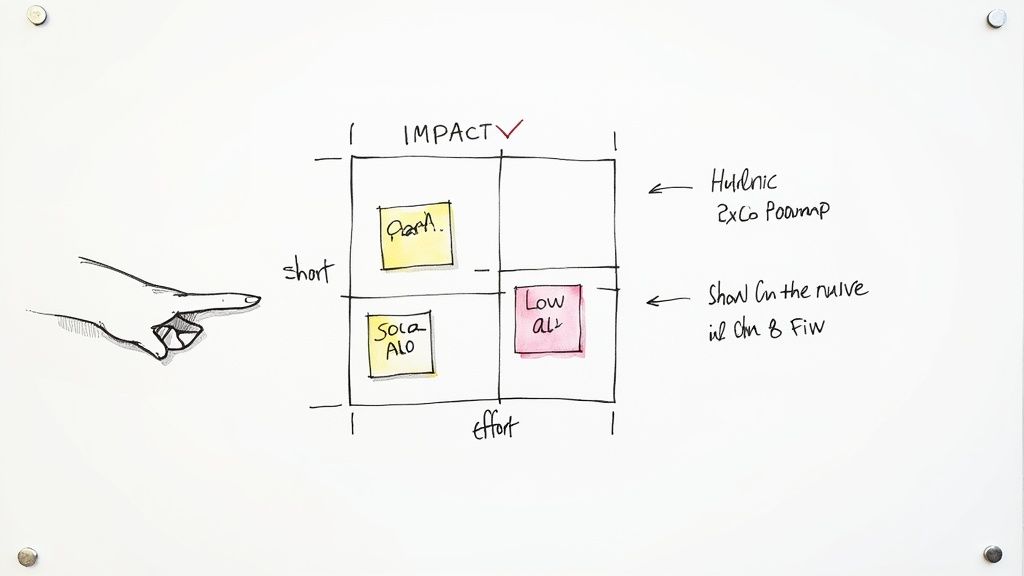
With a clear list of issues, the inevitable question is, "What do we fix first?" It’s easy to get overwhelmed. A simple but incredibly effective way to cut through the noise is the Impact vs. Effort matrix.
This is a simple four-quadrant grid where you plot each issue you’ve identified:
- High Impact, Low Effort (Quick Wins): These are the no-brainers. Fix them immediately. A classic example is clarifying the label on a confusing button or making a key link more prominent.
- High Impact, High Effort (Major Projects): These are the big initiatives that will deliver huge value, like redesigning a clunky checkout flow. They require careful planning but should be top priorities.
- Low Impact, Low Effort (Fill-ins): Think of these as minor tweaks that are nice to have. Tackle them when you have downtime, but don’t let them distract from bigger fish.
- Low Impact, High Effort (Time Sinks): Avoid these like the plague. They consume a ton of resources for very little user benefit. Your matrix will make it obvious which tasks fall into this trap.
Prioritization isn't about doing everything; it's about doing the right things in the right order. The Impact vs. Effort matrix moves your team from a chaotic to-do list to a strategic action plan.
This framework ensures you’re always working on what matters most, tackling the low-hanging fruit and critical blockers first to deliver immediate improvements to the user experience.
From Report to Roadmap
Your final output shouldn't be a long, dense document. Nobody reads those. Instead, create a simple presentation or a shared document that highlights the top 3-5 usability problems. Keep it visual and to the point.
For each problem, include three things:
- The Finding: A clear, one-sentence summary of the issue.
- The Evidence: Key quotes, short video clips, and hard metrics to back it up.
- The Recommendation: A specific, actionable suggestion for how to fix it.
This approach is all about creating momentum. We know that design and usability have a massive influence on user behavior. Research shows that around 94% of users judge a website by its design, and they form that opinion in just 50 milliseconds. You can explore user experience statistics on UserGuiding.com to see just how critical this is.
Your goal is to turn insights into fixes as quickly as possible, because even small delays have big consequences. By creating a clear roadmap, you empower your team to start building a better website today.
Using AI to Modernize Your User Experience
Usability testing is brilliant at telling you where the problems are; AI is how you solve them at scale. The rich, qualitative insights you've just gathered from watching users are the perfect blueprint for deploying intelligent features that genuinely improve their journey.
This is the real magic. You can move from just fixing broken flows to proactively enhancing the entire experience.
Imagine using your test findings to power a chatbot that understands the exact contextual questions users ask. Or what about building a recommendation engine that surfaces content based on the actual behavior you just observed? These aren't futuristic ideas; they are practical applications of AI that address the real-world friction you've uncovered.
You can learn more about how SaaS companies are using AI to improve their products in our detailed guide.
Building a Smarter Application with Wonderment Apps
Successfully weaving these features into your product requires a solid technical foundation. This is where Wonderment Apps' prompt management system becomes essential for your development team. It’s an administrative tool you can plug into your existing app or software to modernize it, giving you a central hub to control, version, and monitor all the AI prompts that power your site’s intelligent features.
Without a centralized system, managing AI integrations can quickly become chaotic. Think inconsistent user experiences, runaway costs, and a maintenance nightmare. Our platform provides the necessary guardrails to avoid that mess.
Key features include:
- A prompt vault with versioning so you can track changes and roll back to previous versions of your AI prompts.
- A parameter manager for securely accessing your internal database and providing contextual information to the AI.
- A comprehensive logging system across all integrated AIs to monitor performance and user interactions.
- A cost manager that lets you see your cumulative AI spend, so there are never any surprises.
This kind of infrastructure is what allows you to confidently turn raw user feedback into sophisticated, automated solutions. By bridging the gap between user research and AI implementation, you create a website that feels less like a static page and more like a responsive, helpful partner.
Request a demo to see how our tool can help you build a smarter, more user-centric application that is built to last.
Common Usability Testing Questions
Even the best-laid plans run into questions. When you're in the trenches of usability testing, certain queries always seem to pop up from team leads, stakeholders, and project managers. Let's tackle some of the most common ones head-on.
How Many Users Do I Really Need?
This is the big one, and the answer is probably fewer than you think. You don't need a massive, statistically significant sample size to find the big problems.
Landmark research from the Nielsen Norman Group still holds true today: testing with just 5 users will typically uncover about 85% of the usability issues on your site. It's a classic case of diminishing returns. After the fifth person, you'll just be watching people stumble over the same broken button again and again.
For more complex platforms or if you want to validate your initial findings, bumping that number up to 10-15 users makes sense. But the key is, starting small is not just okay—it's incredibly effective.
What Is the Real Cost of Testing?
The cost of usability testing can swing wildly. A scrappy, DIY test using your own network might only cost you your time. On the other end, a full-scale moderated study run by a fancy agency can easily run into the thousands.
Unmoderated remote platforms offer a fantastic middle ground, often coming in at just a few hundred dollars for a complete study. The real takeaway here isn't the price tag, though. It's the return on investment.
The cost of finding and fixing a problem early is almost always a tiny fraction of the cost of developing the wrong thing or losing customers to a confusing experience.
How Is This Different From A/B Testing?
I get this question all the time. It's a frequent point of confusion, but they really are two different tools for two different jobs. Think of it this way: one tells you why, the other tells you what.
- Usability Testing is qualitative. It's about observation. You're watching real people interact with your product to understand why they get stuck, why they get confused, and what their actual pain points are.
- A/B Testing is quantitative. It’s a numbers game. You pit two versions of a page (A and B) against each other with live traffic to see which one performs better on a single, specific metric, like clicks or sign-ups.
They aren't competitors; they're partners. The best teams use insights from usability testing to form a strong hypothesis ("I think changing this headline will make the value clearer"), then use A/B testing to prove at scale whether that change actually moves the needle.
At Wonderment Apps, we believe understanding your users is the foundation of building software that lasts. Our prompt management system helps you turn those user insights into intelligent, AI-driven features that modernize your application and delight your customers.
Ready to build a smarter user experience? Learn more at wondermentapps.com.