


In today's competitive landscape, building a successful mobile app is about more than just slick design and functional code. It's about creating intelligent, scalable experiences that anticipate user needs and adapt in real-time. This requires a modern approach, especially when integrating complex technologies like AI. For teams in fintech, retail, and healthcare, this means moving beyond basic functionality to build secure, compliant, and deeply personalized applications. The challenge, however, isn't just conceptual; it's logistical.
Managing the countless prompts, parameters, and API calls needed for AI integration can quickly become chaotic, driving up costs and slowing down innovation. That's where a robust prompt management system becomes a game-changer. At Wonderment Apps, we developed a powerful administrative tool that plugs directly into your existing software to modernize it for AI. It gives you a centralized vault for prompt versioning, a parameter manager for secure database access, and a cost manager to track cumulative AI spend. Before we dive into our top 10 mobile development tips, consider how modernizing your app's core with such a tool can lay the foundation for scalable, future-proof growth. To delve deeper into the specifics of AI-powered development, learn how to build a mobile app with AI from scratch.
This guide is designed for product and engineering teams aiming to build exceptional applications. We will cover a comprehensive roundup of actionable strategies, from architecture and performance optimization to security and CI/CD. Let's explore the practical tips that separate good apps from truly great ones.
1. Master Responsive Design with a Mobile-First Mindset
Adopting a mobile-first mindset is one of the most impactful mobile development tips for creating successful applications. This strategy reverses the traditional design process: instead of designing for a large desktop screen and then stripping features to fit a mobile device, you begin with the smallest screen. This forces a focus on core content and essential functionality, resulting in a cleaner, more efficient user experience.
By starting with mobile constraints, your team naturally prioritizes what is most important to the user journey. This leads to faster load times and a more intuitive interface on the devices where users are most active. As you scale the design up for tablets and desktops, you progressively enhance the experience by adding features and leveraging the additional screen real estate, rather than trying to cram a bloated desktop design into a small viewport. This approach ensures your application feels intentional and optimized on every platform.
Why Mobile-First Matters
The mobile-first approach directly impacts performance and usability. Prioritizing mobile means optimizing assets like images and scripts from the start, which benefits all users regardless of their device. Companies like Airbnb and Spotify exemplify this principle, offering seamless, fast, and intuitive experiences that originate from a mobile-centric design philosophy. This disciplined approach prevents feature bloat and keeps the core user experience sharp and focused. For an in-depth look at how this philosophy shapes modern application design, explore the evolving trends in UX and UI design.
Actionable Implementation Steps
- Prioritize Core Content: Identify the single most important action a user needs to take on each screen and build the mobile UI around it.
- Utilize Modern CSS: Implement CSS Flexbox and Grid for fluid, adaptable layouts that respond gracefully to different screen sizes without complex code.
- Optimize Media: Serve images in next-gen formats like WebP and use the
<picture>element orsrcsetattribute to deliver appropriately sized images for different screen resolutions. - Test on Real Devices: While emulators are useful, nothing beats testing on actual hardware to understand touch target accuracy, performance, and real-world usability.
2. Native vs Cross-Platform Development Strategy
One of the most foundational mobile development tips is to establish a clear strategy for your development approach: native or cross-platform. This decision shapes your entire project, impacting performance, development speed, and long-term maintenance costs. Native development involves building separate applications for each platform (iOS and Android) using their specific languages, like Swift and Kotlin. Cross-platform development uses a single codebase with frameworks like React Native or Flutter to create apps for both platforms simultaneously.
Choosing the right path requires a strategic evaluation of your project's goals. A native approach delivers the highest performance and deepest integration with device hardware, offering an unparalleled user experience. Conversely, a cross-platform strategy significantly accelerates time-to-market and reduces initial development costs by leveraging a unified codebase. The trade-off often lies in performance compromises and potential limitations in accessing certain native device features, making this decision a critical early checkpoint.
Why This Strategy Matters
The choice between native and cross-platform directly influences your app's performance, budget, and scalability. Native apps, like Apple Maps and Instagram, offer buttery-smooth animations and instant responsiveness because they are built specifically for the underlying operating system. However, this comes at the cost of two separate development teams and codebases. Cross-platform solutions, popularized by companies like Facebook (React Native) and Google (Flutter), enable faster development cycles and easier maintenance. This allows a smaller team to launch on both platforms quickly, making it an ideal choice for MVPs and content-driven apps.
Actionable Implementation Steps
- Evaluate Project Requirements: Prioritize your needs. If your app requires heavy computation, complex animations, or deep hardware integration (like advanced camera functions), a native approach is often superior.
- Balance Speed and Maintenance: For projects where speed-to-market is the primary driver, cross-platform is a strong contender. However, factor in the long-term complexity of maintaining a non-native codebase.
- Prototype and Test Performance: Before full commitment, build a proof-of-concept for performance-critical features on your chosen framework. Test rigorously on a range of target devices, not just high-end models.
- Leverage Native Modules: If you choose a cross-platform framework, plan to use native modules for performance-intensive tasks. This hybrid approach can provide a balance between development speed and user experience.
3. Performance Optimization and App Size Management
In a competitive mobile landscape, performance is not a feature; it is a fundamental requirement. Focusing on performance optimization and app size management ensures your application is fast, responsive, and resource-efficient. Users have little patience for slow-loading apps or those that consume excessive storage and battery life. A lean, optimized application leads directly to higher user retention, better reviews, and improved conversion rates, making this one of the most critical mobile development tips for success.

This discipline involves a continuous process of profiling, optimizing, and monitoring. It means compressing assets, streamlining code, and implementing smart caching strategies to minimize load times and reduce the app's footprint. The goal is to deliver a smooth user experience, even on lower-end devices or in areas with poor network connectivity. By keeping the app lean, you also make it more accessible to users in emerging markets where device storage and data costs are significant concerns.
Why Performance and Size Matter
Slow performance is a primary driver of app abandonment. A snappy, lightweight application feels more professional and reliable, building user trust. Companies like Google, with their "Go" suite of apps (Maps Go, Gmail Go), and Meta with Facebook Lite, have demonstrated that a smaller, faster app can capture a massive user base by prioritizing accessibility and efficiency. This approach reduces friction from download to daily use, ensuring the application remains on the user's device long-term.
Actionable Implementation Steps
- Profile Your App: Regularly use native tools like Xcode Instruments for iOS and Android Profiler to identify CPU, memory, and network bottlenecks in your code.
- Optimize All Assets: Serve images in modern, efficient formats like WebP. Compress videos and use code minification to shrink the size of your JavaScript and CSS bundles.
- Implement Caching: Adopt an offline-first caching strategy to store frequently accessed data locally, reducing network requests and making the app feel instantaneous.
- Analyze Your App Bundle: Use tools like Android Studio's APK Analyzer or third-party solutions to inspect your app's package and identify large dependencies or unused assets that can be removed.
4. Implement a Robust State Management Architecture
A systematic approach to managing application state is one of the most critical mobile development tips for building scalable and maintainable apps. State management architecture provides a predictable way to handle data that changes over time, such as user inputs, server responses, or UI element states. As applications grow in complexity, managing this state without a clear structure can lead to unpredictable behavior, tangled code, and debugging nightmares.
Implementing a formal architecture ensures a single source of truth for your application's data, making its flow unidirectional and easy to trace. This separation of concerns decouples the UI from business logic, allowing developers to modify one without unintentionally breaking the other. Whether using the Provider pattern in Flutter or Redux in React Native, the goal is to create a predictable and transparent data flow that simplifies development and enhances stability.
Why a State Management Strategy Matters
A well-defined state management strategy directly impacts an app's reliability and scalability. It prevents common issues like inconsistent UI, race conditions, and excessive re-renders that degrade performance. Frameworks like Redux, popularized by Dan Abramov, introduced developer tools that allow for time-travel debugging, where you can inspect and replay state changes step-by-step. This level of insight is invaluable for quickly identifying and fixing complex bugs, especially in large-scale applications where state interactions are numerous and intricate.
Actionable Implementation Steps
- Choose Based on Complexity: Select an architecture appropriate for your app's scale. Simple apps might only need local state management, while complex ones benefit from global solutions like Flutter's Provider/Bloc or React Native's Redux.
- Keep State Immutable: Where possible, treat your state as immutable. Instead of modifying the existing state directly, create a new state object with the updated values. This prevents side effects and makes changes easier to track.
- Separate Logic from UI: Abstract your business logic and state modifications away from your UI components. This makes both the UI and the logic more reusable, testable, and easier to reason about.
- Utilize DevTools for Debugging: Leverage state management devtools like Redux DevTools or the Flutter DevTools to visualize state changes, inspect the state tree, and identify performance bottlenecks caused by unnecessary UI updates.
5. Secure Data Storage and Authentication
Implementing robust security measures is a non-negotiable mobile development tip for any application handling user information. This practice involves safeguarding data both in transit and at rest, ensuring that credentials, personal details, and other sensitive information are protected from unauthorized access. With mobile devices being prime targets for security threats, a failure to prioritize security can lead to devastating data breaches, loss of user trust, and significant legal repercussions.
Proper security architecture begins with treating all data as potentially vulnerable. By building your app on a foundation of secure coding practices, you protect not only your users but also your brand's reputation. This means going beyond basic password protection and implementing layered security protocols that cover everything from network communication to on-device storage, creating a resilient defense against common and emerging threats.

Why Security Matters
In today's digital landscape, robust security is the bedrock of user trust and application integrity. Fintech apps like Stripe integrate PCI-compliant payment systems to protect financial transactions, while messaging apps like WhatsApp use end-to-end encryption to secure user communications. These industry leaders demonstrate that security is not an afterthought but a core feature. Following guidelines from sources like the OWASP Mobile Security Project ensures your application adheres to proven standards for protecting sensitive data.
Actionable Implementation Steps
- Use Platform-Specific Secure Storage: Leverage the native, hardware-backed secure enclaves provided by the operating systems. Use Keychain Services for iOS and the Android Keystore system to store cryptographic keys and sensitive data like API tokens or user credentials.
- Enforce Secure Communication: Mandate HTTPS for all network requests to encrypt data in transit. For highly sensitive applications, implement SSL/TLS pinning to prevent man-in-the-middle attacks by verifying the server's certificate.
- Implement Strong Authentication: Integrate proven authentication providers like Google Sign-In or Sign in with Apple, which offers privacy-focused features. Ensure your session management is secure, with tokens that expire and are properly invalidated upon logout.
- Validate All Inputs: Never trust data coming from the client. Always perform rigorous, server-side validation on all inputs to protect against injection attacks and other common vulnerabilities.
6. Implement Comprehensive Testing and Quality Assurance
A robust testing strategy is not an optional add-on; it is a core component of successful mobile development that ensures reliability and user trust. Implementing a comprehensive quality assurance (QA) process involves multiple layers, from granular unit tests that verify individual functions to broad end-to-end tests that simulate full user journeys. This multi-faceted approach prevents bugs, catches regressions before they reach production, and ultimately protects your brand's reputation by delivering a stable, high-quality experience.
By integrating testing directly into the development lifecycle, teams can identify and resolve issues early, drastically reducing the cost and complexity of fixes. A well-defined QA strategy ensures that new features do not break existing functionality and that the application performs reliably across a diverse ecosystem of devices and operating systems. This disciplined process is fundamental for building applications that can scale and evolve without accumulating technical debt.
Why Comprehensive Testing Matters
Adopting a thorough testing culture directly impacts application stability, performance, and user retention. Frameworks like Jest and React Native Testing Library enable developers to write effective unit and integration tests, while tools like XCTest (iOS) and Espresso (Android) are essential for native UI testing. For complete user flow validation, end-to-end testing frameworks like Detox are invaluable. Companies like Google and Meta have championed these practices, demonstrating that rigorous testing is a prerequisite for building world-class mobile applications used by billions. A great QA plan prevents shipping a buggy product, which is one of the most important mobile development tips for maintaining user satisfaction.
Actionable Implementation Steps
- Set Code Coverage Goals: Aim for a practical code coverage target, typically around 70-80%, to ensure critical business logic is thoroughly tested without chasing diminishing returns.
- Embrace Test-Driven Development (TDD): Write tests before writing the implementation code. This practice encourages simpler, more modular code design and guarantees testability from the start.
- Leverage Cloud-Based Testing Labs: Use services like Firebase Test Lab or Sauce Labs to run automated tests on a massive variety of real and virtual devices, ensuring broad compatibility.
- Automate Your Testing Pipeline: Integrate your test suites into a CI/CD pipeline (e.g., using Jenkins, GitHub Actions) to automatically run checks on every code commit, providing rapid feedback to developers. For a deeper dive into effective QA, explore these top quality assurance tips for test case planning.
7. Offline-First Development and Data Synchronization
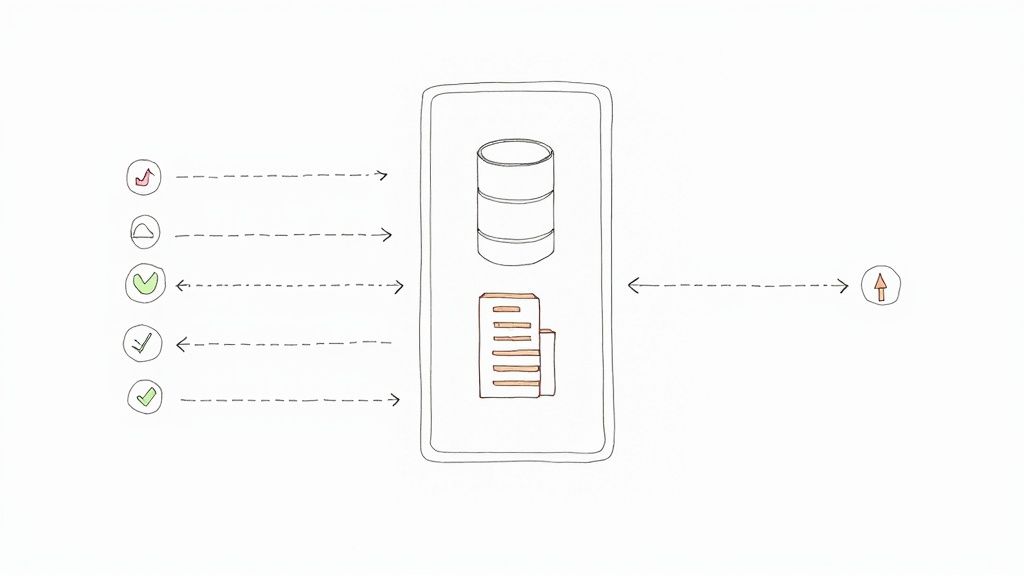
Building an offline-first application is a powerful mobile development tip that ensures your app remains functional and responsive, even with an unstable or nonexistent internet connection. This architectural approach treats network connectivity as an enhancement rather than a requirement. The app primarily interacts with a local database on the device, providing a seamless user experience regardless of network status. Changes are saved locally and then synchronized with a remote server once a connection is re-established.
This strategy is critical for mobile environments where users move through areas with varying connectivity, such as subways, airplanes, or rural locations. By designing for the offline state first, you guarantee that core functionalities are always available. This builds user trust and reliability, as the app performs consistently without frustrating loading screens or error messages caused by a poor connection.
Why Offline-First Matters
An offline-first approach fundamentally improves the user experience by delivering instant responsiveness and unwavering reliability. Because all operations are performed against a local database, the UI feels incredibly fast. For applications in sectors like healthcare, field services, or retail, this is not just a convenience but a necessity. Companies like Trello and Google Maps master this by allowing users to interact with boards or navigate maps offline, with data automatically syncing in the background. This architecture reduces server load and minimizes data usage, creating a more efficient and resilient application.
Actionable Implementation Steps
- Choose a Local Database: Implement a robust local database like SQLite, Realm, or leverage the offline persistence capabilities of Firebase Firestore to store data on the device.
- Implement a Sync Strategy: Develop a clear data synchronization mechanism. Track local changes and queue them for upload. Decide on a conflict resolution strategy, such as "last-write-wins" or a more complex custom logic, for when data is modified both locally and on the server.
- Provide User Feedback: Use clear UI indicators to inform users when they are offline and when data is actively syncing. This manages expectations and prevents confusion.
- Test Network Conditions: Rigorously test your application under various simulated network conditions, including no connectivity, slow 2G/3G speeds, and intermittent connections, to ensure the sync logic is fault-tolerant.
8. Prioritize Accessibility and Inclusive Design
Integrating accessibility and inclusive design into your mobile development process is not an optional feature; it's a fundamental requirement for building high-quality, ethical, and successful applications. This approach ensures your app is usable by everyone, including the one billion people worldwide with disabilities. By designing for inclusivity from the outset, you create a better, more robust user experience for your entire audience, not just a segment.
This proactive stance moves beyond mere compliance and embraces the principle of universal design. It involves considering a wide range of human abilities and ensuring that all users can perceive, understand, navigate, and interact with your application effectively. An accessible app broadens your market reach, enhances brand reputation, and often improves overall usability and SEO, making it one of the most critical mobile development tips for modern teams.
Why Accessibility Matters
Designing for accessibility directly impacts legal compliance, market potential, and user satisfaction. Companies like Target have faced legal action for failing to meet accessibility standards, highlighting the serious risks of neglect. Conversely, industry leaders like Apple and Google have made accessibility a core part of their platforms, providing extensive tools and guidelines. Their commitment demonstrates that building inclusive products is not only a social responsibility but also a competitive advantage that fosters user loyalty and expands the potential customer base.
Actionable Implementation Steps
- Provide Semantic Context: Use semantic HTML and native components with correct labels. For instance, label buttons with their function (e.g., "Submit Form") rather than just "Button" for screen readers.
- Ensure Sufficient Contrast: Adhere to WCAG guidelines by maintaining a minimum color contrast ratio of 4.5:1 for text and visual content, making it readable for users with low vision.
- Support Dynamic Text Sizes: Allow users to increase text size up to 200% without breaking the UI or losing content. Use scalable units like
sp(scale-independent pixels) on Android and Dynamic Type on iOS. - Test with Assistive Technologies: Go beyond automated tools by manually testing your app with actual assistive technologies like VoiceOver (iOS) and TalkBack (Android) to understand the real-world user experience.
9. Implement Robust Analytics and User Monitoring
Integrating robust analytics and user monitoring is a fundamental mobile development tip that transforms guesswork into a data-driven strategy. This practice involves tracking user interactions, monitoring application health, and analyzing behavioral patterns to understand how people engage with your app. By moving beyond simple vanity metrics, you gain a clear picture of what works, what doesn't, and where users encounter friction, enabling continuous, informed improvements.
This data-centric approach allows your team to validate new features, identify critical bugs before they impact a wider audience, and optimize the user journey for better retention and conversion. Instead of relying on assumptions, you can pinpoint specific drop-off points in a signup flow or identify which features are most valued by your power users. This level of insight is crucial for building a product that not only functions correctly but also resonates deeply with its target audience.
Why Data-Driven Insights Matter
Effective analytics and monitoring are the bedrock of product evolution. Tools like Firebase Analytics, Mixpanel, and Amplitude provide deep insights into user behavior, while platforms like Sentry and New Relic focus on application performance, tracking crashes and latency issues. For example, a fintech app can use event tracking to see exactly where users abandon the loan application process, revealing a confusing UI element that needs redesigning. This granular data allows teams to allocate resources effectively, focusing development efforts on changes that deliver the most significant impact on user experience and business goals.
Actionable Implementation Steps
- Define Clear Event Naming Conventions: Establish a standardized, scalable naming system for events and user properties to ensure your data remains clean and easy to analyze as the app evolves.
- Track User Journeys, Not Just Screens: Map out and monitor key user flows (e.g., onboarding, checkout, feature adoption) to understand behavior patterns and identify bottlenecks.
- Implement Comprehensive Error Logging: Integrate a crash reporting tool like Sentry to capture and diagnose errors, crashes, and Application Not Responding (ANR) events in real time.
- Respect User Privacy: Always obtain explicit user consent before tracking data, provide clear privacy policies, and ensure compliance with regulations like GDPR and CCPA.
- Use Cohort Analysis: Group users by shared characteristics or acquisition dates to analyze long-term behavior and measure the impact of product changes on user retention over time.
10. Continuous Integration/Continuous Deployment (CI/CD) Pipelines
Automating your build, test, and deployment processes with Continuous Integration/Continuous Deployment (CI/CD) pipelines is a transformative mobile development tip. This practice eliminates manual, error-prone tasks by creating an automated workflow that triggers every time code is committed. CI involves developers frequently merging their code changes into a central repository, after which automated builds and tests are run. CD then automatically deploys the validated code to a target environment.
Adopting CI/CD ensures that every change is rigorously tested, maintaining code quality and stability. This automation accelerates the release cycle, allowing teams to deliver new features and bug fixes to users faster and more reliably. By catching issues early in the development lifecycle, CI/CD pipelines reduce the cost and effort required for remediation, leading to a more efficient and predictable development process.
Why CI/CD Matters
The primary benefit of CI/CD is the dramatic increase in development velocity and reliability. Automated pipelines enforce consistency, ensuring every build and deployment follows the same validated steps. Platforms like Bitrise and GitHub Actions are purpose-built for mobile, offering seamless integration with tools like Fastlane to automate everything from code signing to generating App Store screenshots. This allows developers to focus on building features instead of managing complex release logistics. For a deeper dive into structuring these workflows, explore these CI/CD pipeline best practices.
Actionable Implementation Steps
- Automate Everything: Script the entire process from code checkout to deployment. Use tools like Fastlane or Bitrise to handle building, testing, code signing, and distributing to TestFlight or Firebase App Distribution.
- Implement Quality Gates: Integrate automated static analysis (linting), unit tests, and code coverage checks into your pipeline. Configure the pipeline to fail if these quality thresholds are not met.
- Manage Environments: Create separate, automated deployment jobs for different environments like development, staging, and production. Use environment variables to manage configurations like API keys and server URLs.
- Automate Versioning: Implement an automated versioning strategy, such as semantic versioning (SemVer), to increment build and version numbers with each successful pipeline run. This ensures clear and consistent release tracking.
10-Point Mobile Development Tips Comparison
| Strategy / Item | Implementation complexity | Resource requirements | Expected outcomes | Ideal use cases | Key advantages |
|---|---|---|---|---|---|
| Responsive Design and Mobile-First Approach | Medium — requires layout planning and progressive enhancement | Front-end developers, responsive frameworks (CSS Grid/Flexbox), device testing | Consistent UX across devices; better mobile performance and SEO | Public websites, apps targeting broad device variety, startups prioritizing mobile | Single codebase; improved mobile performance; future-proof layouts |
| Native vs Cross-Platform Development Strategy | Variable — High for native, Medium for cross-platform | Platform specialists or cross-platform devs, multi-OS testing, native modules | Trade-off between optimal performance and faster time-to-market | Performance-critical apps (native); MVPs and multi-platform products (cross-platform) | Native: best performance & API access; Cross-platform: faster delivery, lower costs |
| Performance Optimization and App Size Management | High — requires profiling, continuous tuning | Performance engineers, profilers, bundle analyzers, image/asset tools | Faster startup, lower battery/data use, better retention and store ranking | Large feature-rich apps, markets with limited bandwidth/storage | Improved retention, faster perceived performance, smaller install size |
| State Management Architecture | Medium–High — architectural design and learning curve | Experienced developers, state libraries (Redux/Provider), devtools | Predictable behavior, easier debugging and scalable codebase | Complex apps with shared/global state and many interactions | Predictability, easier testing and maintenance, organized state flow |
| Secure Data Storage and Authentication | High — security expertise and careful implementation | Security engineers, platform secure storage (Keychain/Keystore), encryption libraries | Reduced breaches, regulatory compliance, stronger user trust | Apps handling personal, financial or sensitive data | Compliance, user trust, protection against data breaches |
| Testing Strategies and Quality Assurance | Medium — initial investment in tests and maintenance | QA engineers, test frameworks, CI integration, device farms | Fewer production defects, faster regression detection, higher confidence | Apps with frequent releases, critical functionality, large teams | Early bug detection, safer refactoring, improved code quality |
| Offline-First Development and Data Synchronization | High — complex sync and conflict resolution logic | Local DBs (SQLite/Realm), sync queues, backend support, testing tools | Reliable offline UX, smoother interactions, reduced data usage | Apps used in intermittent connectivity or remote areas | Better availability, improved perceived performance, resilience |
| Accessibility and Inclusive Design | Medium — requires design changes and specialized testing | UX designers, accessibility tools, assistive-technology testing | Expanded user base, legal compliance, improved UX for all users | Public-facing services, regulated sectors, inclusive products | Legal compliance, broader reach, enhanced reputation and UX |
| Analytics and User Monitoring | Low–Medium — planning and instrumentation required | Analytics platforms (Firebase/Amplitude/Sentry), data team, storage | Data-driven decisions, early issue detection, conversion insights | Growth-focused apps, product optimization, performance monitoring | Behavioral insights, crash/performance monitoring, ROI measurement |
| Continuous Integration/Continuous Deployment (CI/CD) Pipelines | Medium — initial setup complexity, ongoing maintenance | CI/CD tools (Fastlane, GitHub Actions), infrastructure, DevOps skills | Faster, reliable deployments, consistent builds, rapid feedback | Teams with frequent releases, multiple environments, automated testing | Faster time-to-market, reduced human error, consistent release process |
Unify Your Strategy and Modernize Your App for the Future
Navigating the landscape of mobile application development is a journey of continuous learning and adaptation. Throughout this guide, we've explored a comprehensive suite of mobile development tips, moving from foundational principles like responsive, mobile-first design to advanced strategies involving CI/CD pipelines and robust state management. Each tip serves as a critical pillar supporting the creation of a high-quality, user-centric application.
We dissected the strategic choice between native and cross-platform development, highlighted the non-negotiable need for performance optimization and app size management, and underscored the importance of secure data storage. By embracing thorough testing strategies, designing for offline-first functionality, and championing accessibility, you build not just an app, but a resilient and inclusive digital experience. These pillars work in concert to create a product that is fast, secure, and accessible to all users, laying the groundwork for long-term success.
From Foundational Excellence to Intelligent Evolution
Mastering these technical and strategic elements is the price of entry in today's competitive market. However, the future of mobile applications is undeniably intelligent. The next frontier involves weaving Artificial Intelligence and Machine Learning seamlessly into the user experience, a task that introduces a new layer of complexity. This is where many development roadmaps falter, bogged down by the intricacies of managing multiple AI integrations, controlling costs, and ensuring consistent, high-quality outputs.
The challenge is no longer just about building a functional app; it's about building a smart app that can evolve. This evolution requires a unified strategy that encompasses not only the front-end user experience but also the backend architecture that powers its intelligence. Without a centralized system to manage AI prompts, control data access, and monitor spending, teams risk creating a tangled, inefficient, and expensive ecosystem. This is the modern bottleneck to innovation.
The Power of a Centralized AI Management System
To truly modernize your application and build it to last, you need more than just good development practices; you need the right operational tools. Imagine a central dashboard where you can plug into your existing app or software to:
- Manage and Version Prompts: Create, test, and deploy prompts for various AI models from a single "prompt vault," complete with versioning to ensure consistency and easy rollbacks.
- Control Data Access: Securely manage parameters that allow AI models to access your internal databases, giving you granular control over what information is used.
- Monitor and Control Costs: Track cumulative spending across all integrated AI services with a powerful cost manager, preventing budget overruns and providing clear visibility into your spend.
- Log and Analyze Interactions: Maintain a comprehensive logging system across all integrated AIs, providing invaluable data for debugging, optimization, and compliance audits.
This is the strategic advantage offered by a dedicated prompt management system. It transforms the chaotic process of AI integration into a streamlined, observable, and governable workflow. By abstracting this complexity, you empower your development team to focus on what they do best: innovating and enhancing the core user experience. This unified approach is the most critical of all our mobile development tips because it ensures your application is not just built for today but engineered to thrive for years to come. Your app becomes a living, intelligent platform ready to scale and adapt to the next wave of technological advancement.
Ready to bridge the gap between classic mobile development and next-generation AI integration? The tips in this article will build a strong foundation, but a tool like ours can help you build the future. See how the prompt management system from Wonderment Apps provides the administrative power to control, monitor, and scale your AI features seamlessly. Schedule a demo today and start modernizing your application with confidence.