

StatCounter's worldwide mobile figures show Android at 69.17% and iOS at 30.81%, while in the United States the split flips: iOS leads with 53.51% to Android's 46.47%. That contrast makes “Android vs iOS” a market-planning question, not a contest to name the better phone. StatCounter's mobile operating-system figures can help set your rollout priorities, but your own customers, revenue, and quality requirements should make the final call.
A practical plan usually treats both platforms as eventual destinations, then decides which one gets the earliest investment in testing, distribution, and support. And if you're adding AI, keep its prompts and operating controls outside store-specific app code, so the feature can evolve without maintaining separate logic for each platform.
Android and iOS Share That Should Set the Roadmap
A platform's market share is a starting point for deciding where to invest first, not a score for judging the platform. StatCounter reports Android at 69.17% and iOS at 30.81% of measured mobile operating-system activity worldwide. In the United States, the figures reverse: iOS has 53.51% and Android 46.47%. These figures reflect measured web activity, not a census of devices sold, active phones, or installed apps. StatCounter's worldwide and U.S. mobile figures can help frame the decision, but they do not show which store will convert better for your product.
Tie rollout order to the markets that can generate revenue, then account for the quality-assurance work each platform requires. A business targeting customers across several price tiers may prioritize Android coverage, while keeping iOS on the same roadmap. If U.S. revenue is a priority, plan for iOS parity early rather than assuming Android's worldwide lead reflects your local audience.
| Market | Android share | iOS share | Rollout implication |
|---|---|---|---|
| Worldwide measured activity | 69.17% | 30.81% | Prioritize Android reach while keeping iOS on the roadmap |
| United States | 46.47% | 53.51% | Plan for iOS parity early if U.S. revenue matters |
| Combined measured field | 99.98% combined | Included in Android column | Focus platform investment on Android and iOS |
The combined row shows that the reported Android and iOS figures account for 99.98% of measured global mobile operating-system activity. It is not a separate market-share category. For most app roadmaps, the practical takeaway is to focus platform investment on these two ecosystems rather than treating a third mobile OS as a growth bet.
Practical rule: Start with the countries and customers that matter to your business, then use their likely store behavior to set release order.
Keep AI operations in the rollout plan, too. Wonderment AI plugs into the admin backend of any app, so prompt logic can live there rather than in each store-specific client. That gives the team a place to manage prompt behavior across platforms without tying it to the first app store you launch in.
Before choosing a first store, write down three things:
- Top countries: Where are your priority customers?
- Revenue share: What percentage of revenue comes from each country?
- Store conversion: Which store already converts for your product, if either does?
Stacks Devices and UX Conventions That Scale
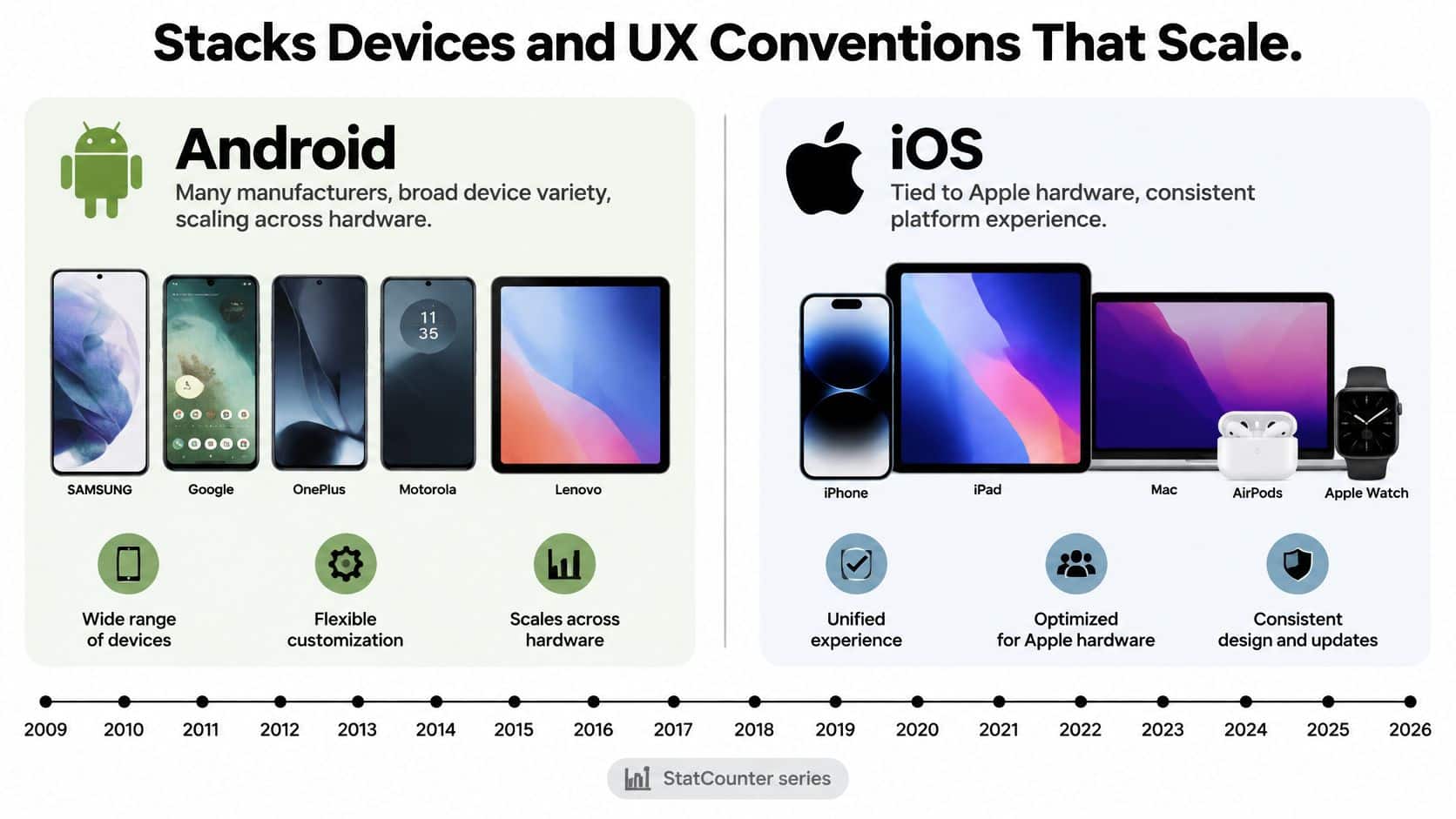
Android and iOS ask engineering teams to manage different kinds of variety. Android is distributed across many manufacturers and device types. iOS is closely tied to Apple hardware. StatCounter's long-running series makes the platforms trackable from 2009 through October 29, 2026, with a latest worldwide cut reporting Android at 69.31% and iOS at 30.66%. The important product consequence isn't just reach: Android QA must cover a broader device matrix, while iOS testing focuses on Apple's device families and platform-specific release expectations.
| Factor | Android | iOS |
|---|---|---|
| Primary native languages | Kotlin and Java | Swift and Objective-C |
| Native UI toolkits | Jetpack Compose and XML views | SwiftUI and UIKit |
| Device span | Phones, tablets, foldables, desktops, cars, TVs, XR | iPhone and iPad size classes |
| Adaptive model | Tier 3, Tier 2, and Tier 1 scope decision | Size classes and Dynamic Type |
| Fleet variance | Many OEMs, OS versions, and patch levels | Apple hardware and software family |
| Median crash-free sessions | 99.81% | 99.93% |
| Store review and signing | Google Play policies | App Store review and signing |
The breadth of Android goes well beyond phone screens. Google's Android quality guidance covers devices such as tablets, foldables, desktops, car infotainment systems, TVs, connected displays, and extended-reality devices. It also accounts for multi-window, multi-display, multi-instance, and picture-in-picture use.
Make adaptive support a deliberate scope choice
Google's adaptive tiers help turn “support Android screens” into a clear project decision. Tier 3 means the app runs across devices, though some layouts may be suboptimal. Tier 2 adds optimized layouts for screen sizes and device configurations, plus stronger support for external input. Tier 1 goes further with device-specific experiences such as foldable postures, multitasking, drag-and-drop, and stylus support where the product needs them.
iOS needs its own design work, not a resized Android interface. Use iPhone and iPad size classes, support Dynamic Type, and make navigation feel at home on Apple devices. Kotlin and Swift give teams platform-specific native implementations; a shared client such as React Native can help keep one design system and business-logic layer aligned across both stores. But don't share every interaction: permission prompts, back behavior, and store-review copy need platform-specific treatment.
The right framework depends on your product's screens, integrations, team, and release needs, not on a logo in a hiring profile. Use this guide to choosing a technology stack to help structure that decision. Before feature work spreads, write down the supported form factors and the three task flows users must complete reliably.
Crash Rates Memory Pressure and Quality Gates
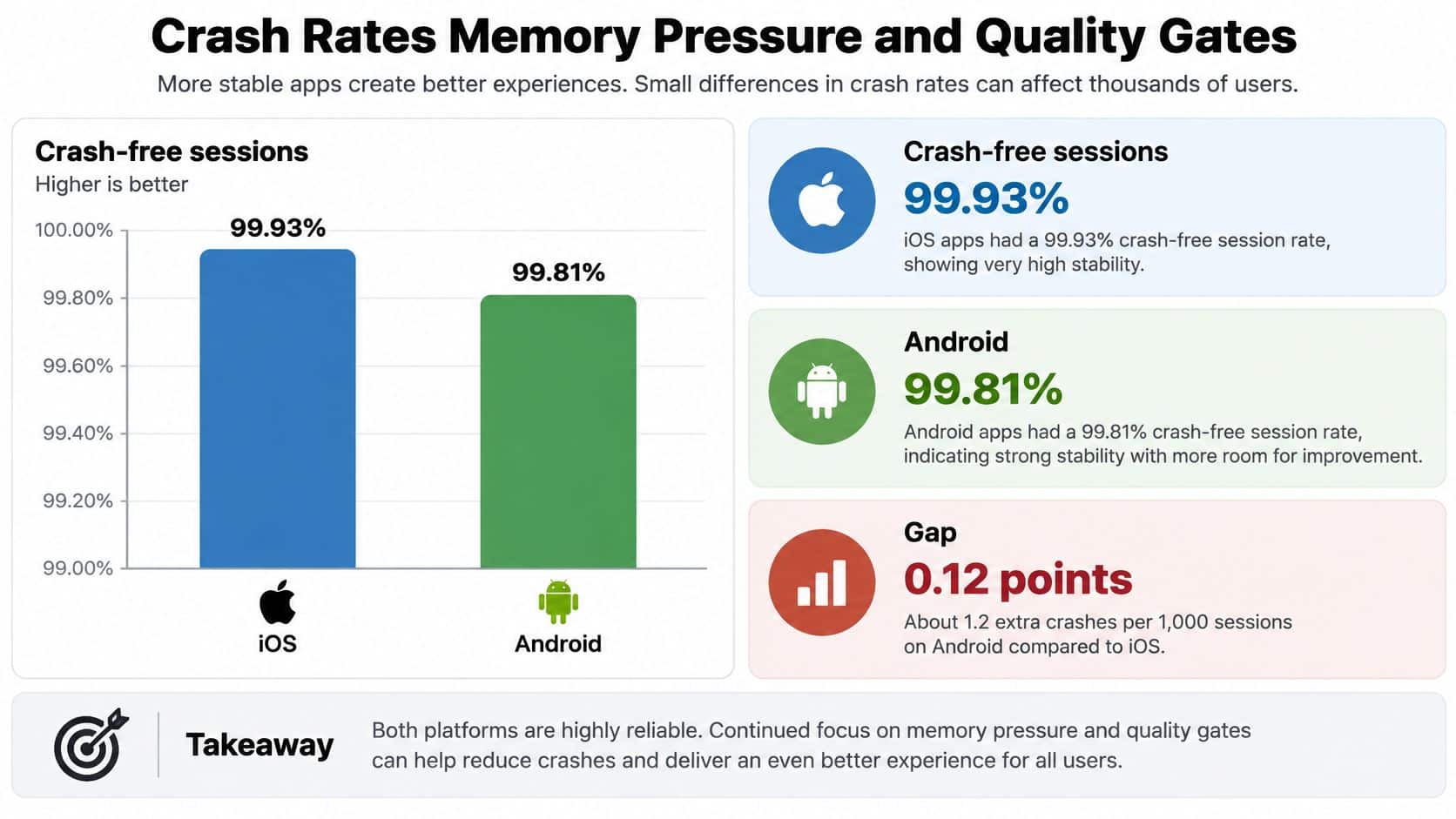
The bigger reliability planning difference in one large real-world mobile observability benchmark was memory pressure, not crash-free sessions. Android recorded a median low-memory-warning rate of 12.94%, compared with 5.49% on iOS, more than twice the iOS rate. The mobile observability benchmark also reported median crash-free session rates of 99.81% on Android and 99.93% on iOS, a gap of 0.12 percentage points, or about 1.2 additional affected sessions per 1,000 on Android. These findings are observational, not a controlled hardware test, so they should guide test priorities rather than be treated as proof that one platform is universally slower or less stable.
| Signal | Android | iOS | Engineering response |
|---|---|---|---|
| Median crash-free sessions | 99.81% | 99.93% | Monitor both; don't rewrite an app over a 0.12-point gap |
| Extra affected sessions per 1,000 | About 1.2 more | Baseline | Use as a reliability target, not a platform verdict |
| Median low-memory warnings | 12.94% | 5.49% | Budget media and test process death hardest on Android |
| Gaming low-memory warnings | 26.02% | 18.79% | Gate video and game rollouts on memory tests first |
Turn reliability evidence into release gates
For Android, build a wider device and memory matrix into release validation. Budget image and video memory, restore state through activity and app lifecycle changes, and check what happens when the operating system terminates a process under pressure. In the benchmark, gaming sessions had a 26.02% median low-memory-warning rate on Android and 18.79% on iOS. That's a useful warning for media-heavy products, not a reason to skip testing on either platform.
A shared codebase doesn't eliminate platform testing. After a cross-platform port, validate iOS crashes, battery use, responsiveness, and interaction patterns independently. Google's quality guidance also treats technical quality as more than appearance: stability, performance, and resource use sit alongside user value, a delightful experience, effective use of premium devices, and safety. Google Play's framework links high quality with increased store visibility. Teams looking to strengthen these habits can also review this resource on improving product quality at startups.
Put measurable checks in release tickets rather than relying on “looks good on my phone.” For example, specify a crash-free session target, a memory-warning ceiling, responsiveness checks on a lower- and higher-capability device, and post-launch telemetry with an owner responsible for acting on it. A clear test plan also helps teams use mobile QA best practices to catch platform-specific issues before a wider rollout.
Matching screens isn't a launch. Reliable behavior, quality gates, and monitoring are part of the product.
Security Distribution and How Each Store Pays
Security comes down to the controls you can apply and the environments you're prepared to support, not a slogan about one platform being “open” or “closed.” Android combines a Linux-based kernel with SELinux, per-app sandboxing, permission controls, Verified Boot, and hardware-backed key storage. Its broad OEM model offers flexibility but also means device configuration and security patch levels can vary. A comparative analysis of Android and iOS platform security describes a more centralized iOS design, including a cryptographically verified boot chain, mandatory sandboxing and code signing, encrypted storage, and the Secure Enclave.
| Control point | Android | iOS |
|---|---|---|
| Boot and integrity | Verified Boot | Cryptographically verified boot chain |
| App isolation | Per-app sandboxing | Mandatory app sandboxing and code signing |
| Key protection | Hardware-backed key storage | Secure Enclave |
| Environment governance | Set patch and OEM support rules | Support a narrower hardware and software family |
Academic comparative analyses generally report greater exposure to malware and security breaches in Android, but the operating-system label alone doesn't determine risk. Version, patch status, distribution channel, permissions, and implementation quality all matter. For fintech, healthcare, and public-sector products, write an operational policy: set a minimum security-patch level, control Play distribution, use device attestation where appropriate, encrypt local storage, request only necessary permissions, and define which OEM variants you support.
Keep distribution and payment decisions distinct
Google Play reaches Android users, while Android's wider distribution model also allows sideloading and OEM-specific options. The App Store uses Apple's review and signing requirements. Pick the channels that match your audience and governance needs, then document how updates, support, and review work for each.
Both ecosystems can support subscriptions, one-time in-app purchases, and advertising. Store commissions and alternative billing options depend on the applicable program and region, so finance should consult the current store schedule rather than relying on a percentage copied from an old comparison article.
Enterprise deployment also needs its own plan. A business distributing managed devices should consider Android Enterprise or OEM management alongside Apple's business deployment options. That's a different operational problem from helping a consumer install an app.
Publish the support policy in plain language: state which operating-system versions and security patch dates your app supports, and what users should expect when a device falls outside that policy.
Audience Scenarios and Ship Order
The right first platform depends on what your product must accomplish for a particular audience. A launch plan should connect its platform choice to the customer's market, the team's testing capacity, and the product's operational needs.
| Audience | Ship first | Don't skip | Main watch-out |
|---|---|---|---|
| Global ecommerce, many price tiers | Android | iOS if U.S. revenue is material | Low-RAM catalog and image weight |
| U.S. retail and media | iOS | Android for the other half of U.S. share | Worldwide share will mis-rank conversion |
| Fintech and healthcare | Both from beta | Patch policy and review rules | A late store becomes a support incident |
| Public sector and nonprofits | Android reach plus managed iOS | Offline and accessible task flows | Staff phones and public phones differ |
| Gaming and long-form video | Both, memory-gated | Media budgets before new features | Gaming low-memory warnings run high on both |
A global ecommerce team serving many price tiers can ship Android first to establish reach, while bringing iOS into the same planning cycle if U.S. checkout revenue is material. Test low-memory phones early, especially if the catalog relies on large product images. U.S. retail and media businesses should plan iOS parity from the first release and support Android for the rest of their audience. Segment performance by country, device price band, store, and conversion; don't use browser share as a substitute for installed-app behavior.
Fintech and healthcare teams should bring both apps through beta rather than leave one platform as an afterthought. Public-sector and nonprofit services need to consider affordable public devices and staff members' managed phones together. For both, prioritize accessible task flows and offline behavior over visual sameness. Gaming and long-form video products should hold expansion until memory checks pass, with bitrate and image budgets set before adding extra social features.
Tie AI rollout to product governance
The same audience-based discipline applies when adding AI features to mobile or desktop software. NIST's AI Risk Management Framework organizes work into Govern, Map, Measure, and Manage. Its guidance calls for named roles and responsibilities, mapping intended use and failure modes, testing before deployment and during operation, measuring trustworthiness, and maintaining documented response plans. NIST's AI Risk Management Framework gives teams a way to manage features such as recommendations, conversational assistance, fraud screening, or document analysis even when the model changes after the app binary ships.
Use this four-line ship-order rule:
- Global revenue across broad price tiers: Android first, with iOS in the same planning cycle.
- A U.S. profit pool: iOS parity immediately.
- A regulated product: Both platforms, with review and OEM patch policies decided before launch.
- A media-heavy product: Don't widen the audience until memory gates pass.
Circle the row that best matches where your money or mission comes from. For help sizing that audience against the competitive field, use this guide to audience size and competition for your app or website. Wonderment Apps listens, advises, then designs and develops; Wonderment Managed Projects provides full-service technical coding and product development for digital projects of any size or scale.
What to Ask Before You Hire Mobile Developers
A framework name isn't proof that a team can support a product after launch. Ask developers to show shipped work on both platforms, then examine how they test and maintain it. A team that can explain its device coverage, release controls, and monitoring approach gives you more useful evidence than a slide full of technology logos.
Use these questions to structure interviews:
- What have you shipped? Ask to see iOS and Android products and hear how the team handled platform-specific behavior rather than duplicating screens.
- What devices and task flows do you test? Request the design system, device matrix, accessibility checks, performance profiles, and evidence of support for non-phone Android form factors if your product needs them.
- How do you manage a release? Ask about staged rollout controls, automated tests, crash monitoring, API versioning, and capacity testing.
- Which implementation shape fits the work? Native Kotlin and Swift give each platform its own UI pipeline. A shared React Native client can keep business rules aligned, but payments, biometrics, and background work may still need native modules.
- Who stays responsible after launch? Name the engineers, QA, UX, and product owner who will maintain the app and its support policy.
Maintenance load comes from people and the test matrix. As an illustrative scenario, a team covering 12 Android device and OS combinations plus four iPhone and iPad families has a broader test load than one supporting four iPhone families on the current OS. Either way, don't borrow QA time from feature work and call the gap “efficiency.”
A useful scorecard records the evidence sample, device matrix, crash tooling, and person on call after launch. Use the same scorecard for every partner, including Wonderment. Its team includes React, iOS, and Android developers, manual and automated QA engineers, product managers, and UX designers. For guidance on who should own a store release, compare the options in this overview of choosing an App Store launch approach.
Prompt Management Layer and NIST Controls
AI behavior can change without an app release. If prompts are embedded separately in Android and iOS code, a small update may require duplicated work and produce inconsistent results. An administrative layer lets teams manage AI alongside the product, rather than tying prompt changes to a particular store's client.
Wonderment AI plugs into the admin backend of an app. Its administrative toolkit supports prompt management, integrations, and token cost control, helping teams add AI capabilities to existing software.
These responsibilities can be organized around NIST's Govern, Map, Measure, and Manage functions. Governance establishes owners and release rules. Mapping documents intended use, data flows, and possible failure modes. Measurement tracks factors such as accuracy, safety, latency, and cost. Management prepares the team to respond when a model or feature behaves unexpectedly.
The same approach applies whether the product runs on Android, iOS, desktop, or several environments. Plan for evaluation, logging, and periodic review as part of product operations, so model changes can be assessed before they affect users.
Wonderment Apps develops mobile applications for iOS and Android, and its AI toolkit plugs into an app's admin backend. Visit Wonderment Apps to discuss your audience and platform rollout.