

A UX competitive analysis is when you research and evaluate the user experience of competitor products. The goal is to pinpoint their strengths, weaknesses, and overall strategies. This process helps you find gaps in the market, dodge common mistakes, and uncover opportunities to build something genuinely better. It's a foundational step whether you're building a new app from scratch or looking to modernize a legacy application with AI.
At Wonderment Apps, we see this analysis as the first step in creating scalable, intelligent software experiences. It's not just about knowing the competition; it's about finding opportunities to integrate AI in a way that truly serves your users. This is where having the right tools, like a robust prompt management system to plug into your app, can turn insights into a powerful competitive advantage. We'll touch on how that works in a bit.
Why a UX Competitive Analysis Is Your Secret Weapon
In a packed marketplace, a stellar user experience (UX) isn't just a nice feature—it's the core differentiator that separates the leaders from everyone else. Before you write a single line of code or sign off on a design, getting a clear picture of the competitive landscape is your most strategic move. Think of a UX design competitive analysis as your map for navigating this terrain.
This process is so much more than a simple checklist of who has what feature. It's about digging into the why behind your competitors' design choices. Why did they structure their onboarding flow that way? What are users complaining about in their app store reviews? Where are the friction points in their checkout process that you can completely eliminate?
Uncover Strategic Opportunities
When you systematically put other players in your space under the microscope, you can hit several critical business goals:
- Spot Market Gaps: Find those underserved user needs that your competitors are completely ignoring. This is where real innovation is born.
- Validate Product Ideas: See how similar features have been built and received by actual users. This gives you hard evidence to back up your concepts or pivot early.
- Sidestep Costly Mistakes: Learn from the design flaws and usability nightmares that have already tripped up your rivals. You'll save yourself a ton of time and development resources.
- Benchmark Your Experience: Objectively measure how your UX stacks up against the industry standard and find areas for immediate improvement.
The financial upside of this work is massive. It's been shown that every $1 invested in UX can yield a staggering $100 return—that's a 9,900% ROI. This isn't just a hypothetical number; companies that truly commit to superior UX design practices, often guided by rigorous competitor audits, grow twice as fast as their peers. You can dig deeper into how great design impacts your bottom line by understanding the ROI for your app or website.
Modernize with Intelligence
If you're looking to modernize an existing application, a competitive analysis is even more critical. It shows you exactly where rivals are using AI to create smarter, more personalized, and scalable experiences. Are they using AI-powered recommendations? Is their customer support running on a smart chatbot?
Answering these questions helps you map out your own AI integration strategy. This is where an administrative tool like a prompt management system becomes invaluable. By using the insights from your competitive analysis, you can leverage a tool like this—with its prompt vault, parameter managers, and cost controls—to efficiently build and roll out AI features that don't just match but actually surpass what the competition is doing. This is how you turn simple analysis into a direct competitive advantage.
Setting the Stage for a Successful Analysis
Jumping straight into a UX competitive analysis without a clear plan is a recipe for disaster. It’s like setting off on a road trip with no map—you'll burn a lot of fuel, waste time, and probably end up somewhere you never intended to go. Before you even think about dissecting competitor apps, you need a solid game plan.
It all starts with defining exactly what you want to achieve. Your goals are the lens through which you'll evaluate every single competitor, ensuring the insights you gather are actually useful and tied to real business objectives. Without them, you risk falling into the trap of just cataloging features instead of uncovering strategic opportunities.
Define Your Core Objectives
First things first: ask the tough questions about your own product. Are you trying to fix a specific, known problem, or are you on a broader exploration of market trends? Your answers will shape the entire analysis.
Think about these common starting points:
- Improving a Specific Flow: Maybe your user data shows a massive drop-off rate during onboarding. Your goal, then, would be to analyze how competitors successfully guide new users to that "aha!" moment.
- Boosting Conversion Rates: If you're trying to get more sign-ups or purchases, your analysis needs to zero in on competitor checkout processes, pricing page layouts, and their call-to-action strategies.
- Validating a New Feature Idea: Before you sink development resources into a new feature, you can see how others have implemented something similar. Dig into their user reviews to gauge reactions and validate your concept.
- Identifying Market Gaps: A wider goal might be to uncover unmet user needs. In this case, you’re hunting for common complaints about existing products or features that competitors simply don't have.
To truly set yourself up for success, it’s crucial to build a comprehensive competitor analysis framework that guides your entire process. This initial work turns a vague "let's see what they're doing" into a targeted, strategic investigation.
Choosing the Right Rivals to Analyze
With your goals locked in, it's time to decide who you’re actually going to look at. Casting too wide a net will drown you in irrelevant data, but focusing too narrowly can give you a bad case of tunnel vision. The key is to analyze a mix of players for a complete picture of the market.
Pro Tip: Don't just pick three to five companies and call it a day. While that's a good number for a deep dive, your initial list should be much broader. You can always narrow it down later to the most relevant examples.
Here’s a practical way to categorize your competitors:
- Direct Competitors: These are the obvious ones. They offer a similar product to the same audience and are fighting for the same slice of the pie. Think Pepsi vs. Coca-Cola or Instagram vs. TikTok.
- Indirect Competitors: These companies solve the same core problem for your audience, just with a different solution. For a project management tool like Trello, an indirect competitor could be a simple note-taking app like Evernote or even a shared spreadsheet. They get the same job done, differently.
- Aspirational Competitors: These are the brands you admire, even if they aren't in your direct market. A fintech startup might study the seamless user experience of Airbnb or the brilliant design language of Duolingo to find inspiration for an intuitive and engaging interface.
By creating this balanced portfolio of competitors, you ensure your analysis is both grounded in your immediate market reality and inspired by best-in-class experiences. This foundational work is what separates a simple feature comparison from a truly strategic analysis that drives innovation.
Your Toolkit for Gathering Actionable UX Insights
Okay, you’ve set your goals and picked your competitors. Now comes the fun part: rolling up your sleeves and digging into the data. This is where we move from planning to doing. The goal here isn’t abstract theory; it's about using a smart mix of methods to collect intelligence you can actually use.
Gathering solid data means looking at your rivals from every possible angle. A quick glance at a homepage won't cut it. You have to become a user, a critic, and a detective all at once to really get a feel for their user experience—the good, the bad, and the truly frustrating.
This simple flow shows the foundational steps you take before jumping into the deep end of data collection.
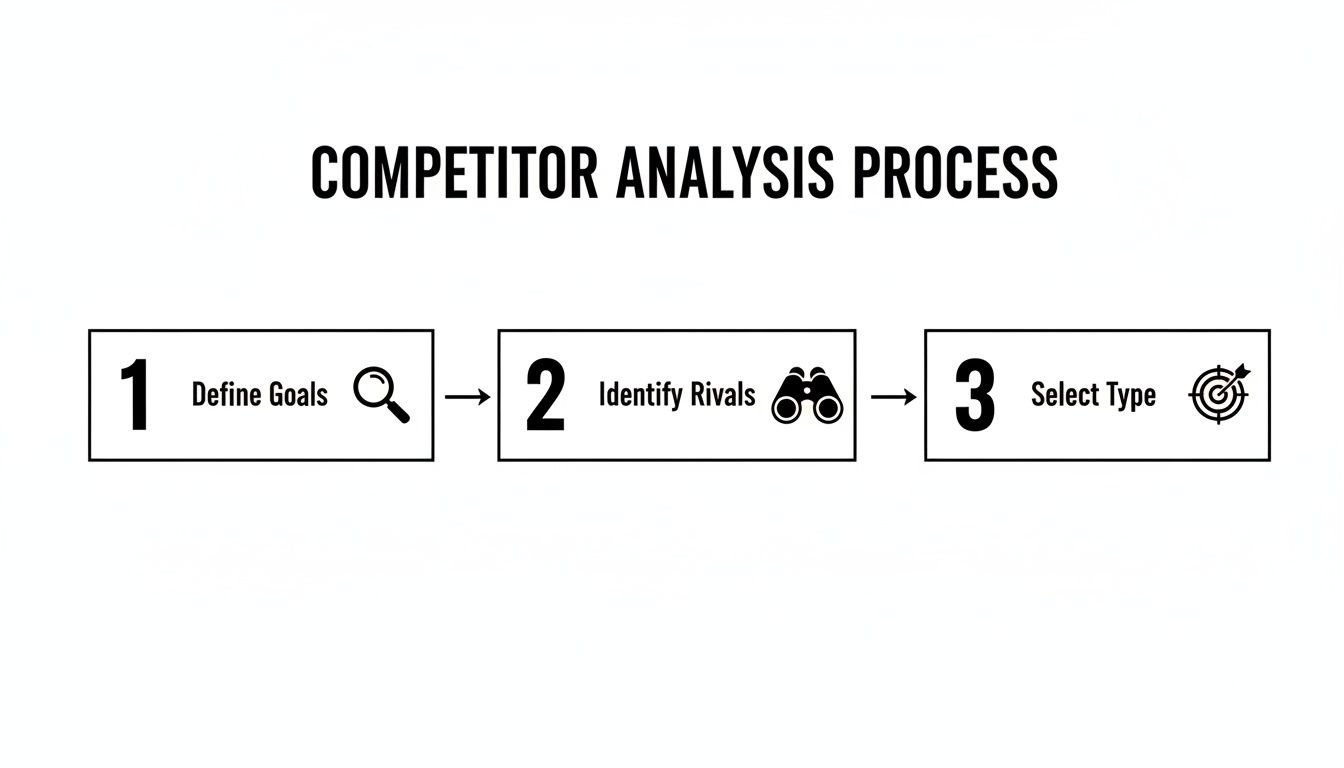
It’s a good reminder that a successful analysis always starts with clear goals and a well-defined scope. Get that right, and the data collection becomes much more effective.
Heuristic Evaluation: Uncovering Usability Flaws
A heuristic evaluation might sound a bit academic, but it's a powerful and straightforward method. At its core, it’s about judging a competitor's interface against a checklist of established usability principles, or "heuristics." Think of it as a professional critique of their design choices.
You and your team will methodically walk through the competitor's app or website, specifically looking for issues related to:
- Clarity and Simplicity: Is the navigation intuitive, or is it a confusing mess?
- Consistency: Do buttons, links, and other elements behave the same way everywhere?
- Feedback: Does the system clearly tell users what’s happening after they take an action?
- Error Prevention: How good is the design at stopping users from making mistakes in the first place?
This process is fantastic for quickly spotting common usability problems—the kind you’ll want to consciously avoid in your own product. For a more structured approach to evaluating user interactions, you can learn more about the formal process of usability testing of a website.
Mapping the Functional Landscape with a Feature Matrix
Next on the list is creating a Feature Comparison Matrix. This is basically a detailed spreadsheet where you list key features down the first column and your competitors across the top row. Then, you simply check off which features each competitor offers.
But the real magic happens when you go beyond a simple checklist. The best matrices add qualitative columns to capture deeper insights:
- Execution Quality: On a scale of 1-5, how well is the feature actually implemented? Is it clunky or seamless?
- User Benefit: What core problem is this feature solving for the user?
- Strategic Gaps: Where are the obvious holes that nobody in the market seems to be filling?
This matrix gives you a clean, at-a-glance view of the competitive landscape. It helps you avoid building just another "me-too" product and instead focus on areas where you can deliver something genuinely better.
Comparing End-to-End User Journeys
A feature list alone never tells the full story. To truly understand a competitor's UX, you have to map out their most critical user journeys. This means literally walking through their entire process for key tasks, step by painstaking step.
Choose 2-3 essential journeys. Good ones to start with are the initial sign-up and onboarding flow, completing a core action (like making a purchase or publishing a post), or trying to get help from customer support. Document every screen, every click, and every moment of potential friction.
This method reveals things a feature list just can't. You might find a competitor has a great feature, but it’s buried so deep in the interface that no one can find it. Or maybe their onboarding is so smooth it creates loyal fans from day one. These are the strategic learnings that shape a winning product.
Digging for Gold in User Reviews and Social Chatter
Finally, remember that some of the most honest feedback on your competitors is already out there, just waiting for you. Dive into App Store ratings, social media mentions, Reddit threads, and third-party review sites.
Look for patterns. Are people constantly raving about a specific feature? Are they complaining about a confusing checkout process? This qualitative data is pure gold. It gives you a direct line into user sentiment and helps you confirm the pain points you've spotted in your own analysis. The stakes are high; an incredible 88% of users say they won't return to an app after a bad experience.
To collect the best data, it helps to be familiar with the different tools in your research toolbox. Brushing up on these 9 essential user research methods will give you a major advantage in uncovering what really matters to users.
To help you decide which research approach to use, here's a quick summary of the methods we've covered and what they're best for.
Core UX Analysis Methods and Their Purpose
| Analysis Method | Primary Goal | Key Insights Gained |
|---|---|---|
| Heuristic Evaluation | To identify common usability issues based on established principles. | Quick identification of friction points, inconsistencies, and design flaws. |
| Feature Comparison Matrix | To map out the functional landscape and identify gaps or opportunities. | At-a-glance view of market standards and areas for differentiation. |
| User Journey Comparison | To understand the end-to-end experience for key user tasks. | Insights into workflow efficiency, emotional highs/lows, and hidden pain points. |
| Review & Social Mining | To gather raw, unfiltered feedback directly from actual users. | Honest user sentiment, common frustrations, and unexpected feature praise. |
Choosing the right combination of these methods will give you a well-rounded, three-dimensional view of the competitive landscape, setting you up to make smarter, more informed design decisions.
Synthesizing Data into a Powerful UX Strategy
Collecting data is only one piece of the puzzle in a UX design competitive analysis. The real magic happens when you take that mountain of raw findings—your feature matrices, journey maps, and heuristic notes—and weave them into a clear, actionable UX strategy. It’s time to connect the dots and tell a story that your whole team can rally behind.
This isn’t just about listing out what your competitors get right or wrong. The goal is to spot the underlying themes and patterns that point to strategic opportunities. You’re shifting from simple observation to deep interpretation, which is where a true competitive edge is found.
From Raw Data to Thematic Insights
First things first: get organized. Start by grouping your research into broad themes. Don't get lost in the weeds of individual features just yet; look for the bigger picture.
Are multiple competitors fumbling with cluttered navigation? That’s a theme. Are users consistently complaining about a clunky checkout process in app store reviews? That’s another powerful theme you can’t ignore.
You'll often find your notes naturally fall into buckets like these:
- Onboarding and First Impressions: How quickly and effectively do competitors show new users the value of their product?
- Core Task Completion: How smooth—or frustrating—is the experience of performing essential functions?
- Visual Design and Branding: Does their interface feel modern and trustworthy, or is it dated and clunky? What kind of feeling does it create?
- Error Handling and Support: What happens when users get stuck? How do they help people recover from mistakes or find answers?
When you cluster your findings this way, the main battlegrounds become obvious. This is how you pinpoint the exact areas where a superior user experience can make the biggest difference.
Constructing a UX-Focused SWOT Analysis
With your themes in hand, a SWOT (Strengths, Weaknesses, Opportunities, Threats) analysis is a fantastic tool for framing everything. But for our purposes, we need to adapt it to focus squarely on design and usability.
You're not creating a generic business SWOT; you're building a visual map of the entire user experience landscape. This framework pushes you beyond a simple pros and cons list and forces you to think strategically about how to position your own product.
A UX SWOT isn't just an academic exercise. It's a strategic document that translates complex research into a simple, powerful format that stakeholders can understand in minutes. It becomes the foundation for your product roadmap.
Let’s walk through a quick example. Imagine you’re analyzing a fictional project management competitor called "TaskMaster."
Sample UX Competitive Analysis SWOT Matrix
This simple matrix instantly visualizes the competitive landscape, showing how to categorize your findings from a user-centric perspective.
| Category | Strengths | Weaknesses | Opportunities | Threats |
|---|---|---|---|---|
| TaskMaster App | Sleek, minimal UI makes core task creation feel fast and modern. | Poor onboarding flow leaves new users confused about advanced features. | Integrate an AI assistant to suggest project templates based on user input, addressing a common market gap. | Newer, niche competitors are emerging with highly specialized features for creative teams. |
| Excellent mobile app performance and responsiveness. | Confusing pricing page with unclear feature tiers. | Simplify the user journey for team collaboration, as competitors' solutions are overly complex. | A major competitor could copy their clean UI, eroding their main differentiator. |
This SWOT tells a clear story. It pinpoints where TaskMaster is winning (clean UI) and where they're vulnerable (onboarding, pricing clarity). Most importantly, it points directly to actionable opportunities you can jump on.
Building a Narrative and Prioritizing Recommendations
With your analysis structured, the final piece is to build a compelling narrative around your findings. Your job is to present this to stakeholders—from designers to product managers—in a way that genuinely inspires action. Don't just show them a spreadsheet; tell them the story of the user you’re fighting for.
Your presentation should clearly walk them through:
- The Current State: "Here’s what the competitive landscape looks like and where the current bar for user experience is set."
- The Core Problem/Opportunity: "Based on our analysis, the biggest opportunity lies in simplifying the team setup process, an area where all our competitors are failing."
- The Proposed Solution: "We recommend prioritizing the design of a streamlined, wizard-based onboarding flow for new teams."
- The Expected Impact: "By doing this, we can reduce user churn in the first seven days and establish ourselves as the easiest-to-use solution on the market."
This clear, prioritized recommendation is the ultimate goal of your UX design competitive analysis. It's more than just data; it’s a strategic roadmap for building a better product that wins.
As companies pour resources into modernizing their apps with AI, the value of this work is skyrocketing. In fact, 42% of companies expect their UX research budgets to jump by over 30% in the next year alone. This surge is driven by the urgent need to benchmark against the competition and uncover their weaknesses. You can read the full research on UX trends to see why this is becoming such a massive priority for business leaders.
Turning Insights into a Competitive Advantage with AI
You’ve done the hard work of gathering data and distilling it into a clear strategy. Now for the exciting part: connecting the dots to build a real, sustainable competitive advantage. A successful UX design competitive analysis doesn't just end up in a slide deck; it becomes the foundation of a smarter product roadmap that lets you actively leapfrog the competition.
This is the moment where you shift from understanding the market to actively shaping it. Your analysis has basically handed you a playbook of your competitors' biggest weaknesses and user frustrations. The next move is to tackle those gaps head-on, and one of the most powerful ways to do that today is by strategically bringing AI into the picture.
Building an AI-Powered Product Roadmap
Maybe your analysis showed a competitor’s search function is painfully slow and inaccurate. Or perhaps their personalization feels generic and misses the mark. These aren't just points to note on a spreadsheet—they are golden opportunities for innovation. Instead of just aiming to build a slightly better search bar, you can build an intelligent one.
Use your competitive insights to prioritize features that solve user problems in entirely new ways:
- Intelligent Personalization: If rivals offer one-size-fits-all content, you can use AI to deliver hyper-personalized experiences that go far beyond basic recommendations. Think about predicting user needs based on subtle behavioral cues.
- Predictive Support: Ditch the static FAQ page. Build an AI-powered support system that anticipates user issues based on their in-app behavior and offers solutions before they even have to ask.
- Smart Onboarding: Did you find that users get lost in a competitor's complex setup process? Create an AI-guided onboarding flow that adapts to each person's skill level and goals, making them feel successful from the very first minute.
When you focus your roadmap on these kinds of AI-driven solutions, you’re no longer just playing a game of feature-matching. You're creating a fundamentally more intuitive and helpful user experience.
Executing Efficiently with the Right Toolkit
A brilliant AI-powered idea is one thing; bringing it to life quickly and effectively is a whole different ball game. This is where modern development toolkits become absolutely essential. For entrepreneurs and developers, having an administrative system designed specifically for AI integration is a game-changer.
By linking your competitive insights directly to your AI development strategy, you create a powerful feedback loop. The market gaps you identify become the direct inputs for the intelligent features you build, ensuring every development hour is spent on what truly matters to users.
Imagine having a central hub to manage this new layer of intelligence within your app. A robust toolkit, like the prompt management system we've developed at Wonderment Apps, empowers your team by providing critical infrastructure right out of the box. For a closer look at how this works in practice, you can learn more about how to leverage artificial intelligence in your software.
Our tool is designed to help you modernize your app by plugging directly into your existing software. It includes several key components that speed up development and ensure you can scale without breaking the bank:
- Prompt Vault with Versioning: Lets your developers create, test, and manage the prompts that fuel your AI features, complete with full version control to track what works and what doesn't.
- Parameter Manager: Securely connects your AI models to your internal databases, allowing them to pull relevant, real-time data for personalized responses without compromising security.
- Centralized Logging: Tracks every interaction across all your integrated AI models. This gives you a single source of truth for monitoring performance and quickly troubleshooting any issues that pop up.
- Cost Management Dashboard: Gives you a crystal-clear view of your cumulative spend on AI services, helping you manage budgets and optimize for efficiency as you scale up.
Ultimately, this approach connects every piece of the puzzle. Your UX design competitive analysis points out the opportunities. Your AI strategy defines how you'll seize them. And a powerful administrative toolkit provides the engine to execute that vision, helping you build a smarter, more scalable application that truly stands out from the crowd.
Common Questions About UX Competitive Analysis
Even with a solid game plan, you're bound to have questions when it's time to put theory into practice. A UX design competitive analysis isn't a static, one-and-done task. Knowing the answers to a few common questions will help your team navigate the process with more confidence and, ultimately, get better results. Let's tackle some of the most frequent ones.
How Often Should We Conduct This Analysis?
This is probably the most common question I get, and the short answer is: not just once.
A full-scale, deep-dive analysis is absolutely essential during the discovery phase of a new product or before a major redesign. This is where you set your strategic foundation.
But the market doesn't stand still, and neither should your research. We strongly recommend lighter, more focused check-ins every 6-12 months. These periodic reviews are perfect for monitoring new competitors, tracking important updates from your key rivals, and staying on top of emerging UX trends. If you're in a fast-moving industry like SaaS or fintech, you might even set up a system for continuous monitoring of your top one or two competitors.
What Are the Most Common Mistakes to Avoid?
It’s surprisingly easy to get this process wrong. The single biggest mistake I see teams make is focusing only on features. They create a simple checklist of what competitors have, but they completely miss the underlying user experience. A feature is just a tool; how a user feels while using it is what truly matters.
Another common pitfall is analysis paralysis. Teams get so buried in data collection that they fail to surface a handful of clear, actionable insights.
Don't just copy your competitors. The goal is to understand the strategic 'why' behind their design choices so you can find opportunities to create a uniquely better and more intuitive experience for your own users.
Can a Small Team with Limited Resources Do This?
Absolutely. You don’t need a huge budget or a suite of expensive tools to pull valuable insights from a competitive analysis. For smaller teams, the key is to be hyper-focused and ruthlessly prioritize.
- Start Small: Forget analyzing the entire market. Begin by digging into just one or two of your most direct competitors.
- Use Free Methods: Lean on techniques that cost nothing but your time. You can perform a heuristic evaluation, meticulously read user reviews on app stores or G2, and manually map out one critical user journey (like the sign-up process).
- Prioritize Impact: Zero in on the part of the user experience that will have the biggest impact on your most immediate business goals.
How Does AI Impact Competitive Analysis?
AI adds a whole new and exciting layer to this process. A modern UX design competitive analysis isn't complete without evaluating how competitors are using AI to enhance their user experience.
You should be actively looking for things like AI-driven personalization, intelligent chatbots, or smart recommendation engines. Your analysis should then assess how effective these AI features actually are from a user’s perspective. On top of that, you can use AI-powered tools yourself to speed up the research—think using AI to summarize thousands of user reviews to quickly spot recurring themes and pain points.
At Wonderment Apps, we believe that turning these insights into intelligent, scalable applications is what separates market leaders from the rest. Our administrative toolkit, featuring a prompt vault, parameter manager, and cost controls, empowers your developers to efficiently implement the very AI features that will give you a decisive edge.
Ready to see how you can transform competitive insights into a modern, AI-powered user experience? Schedule a demo with us today.